ppt-master generate PowerPoint AI agent: the hugohe3/ppt-master repository is a workflow (a “skill”) that runs inside an agent-capable tool such as Claude Code, Cursor or Codex CLI to turn a document or a topic into a native, editable PowerPoint presentation. It showed about 65,600 stars and 5,200 forks in mid-October 2026, under the MIT licence.
For a technical team the interest is not the slide layout but the chain behind it. Internal documents go through an agent, possibly through image-generation or search services, and the bill arrives in tokens. This article reports what the README says, details the installation and explains how to keep control of data and costs.
The information comes from the README, the FAQ and the repository layout. span.observer has not installed or tested ppt-master: the captures below are visuals published in the repository by the project, plus a real README excerpt rendered for readability.
ppt-master generate PowerPoint AI agent: what the repository says
- Author and licence: project of the GitHub user
hugohe3, who says in the README that he builds and maintains it mostly alone. MIT licence, copyright 2025-2026; the README footer says “attribution required” and that only GitHub and the AtomGit mirror are official. - Promise: produce a real PowerPoint file (
.pptx) with native shapes, editable charts and tables, not flattened images. The project itself admits you should not expect a perfect result on the first try: the README calls it a tool, “not a wishing well”. - Prerequisites: Python 3.10 or later; Pandoc only for legacy formats (.doc, .odt, .rtf, .tex…).
- Model: the README states “harness + model = agent”: the project only supplies the workflow, the model sets the quality ceiling. It recommends a model with a large context window (about 1 million tokens).
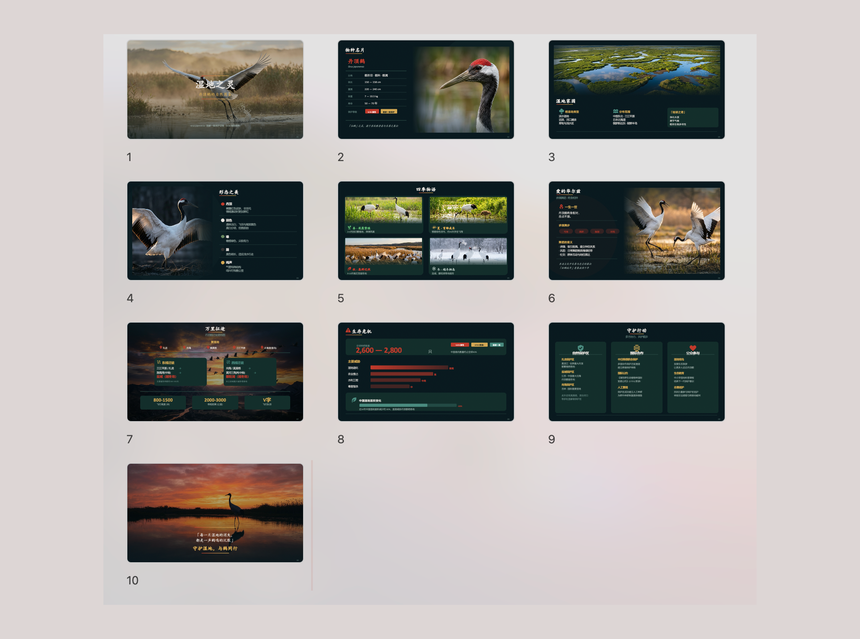
The view above is a sample visual from the repository (folder docs/assets/screenshots/archive): a ten-page deck about a bird species, with photographs, diagrams and charts. The README says the examples are produced in a single pass, with no manual polish.
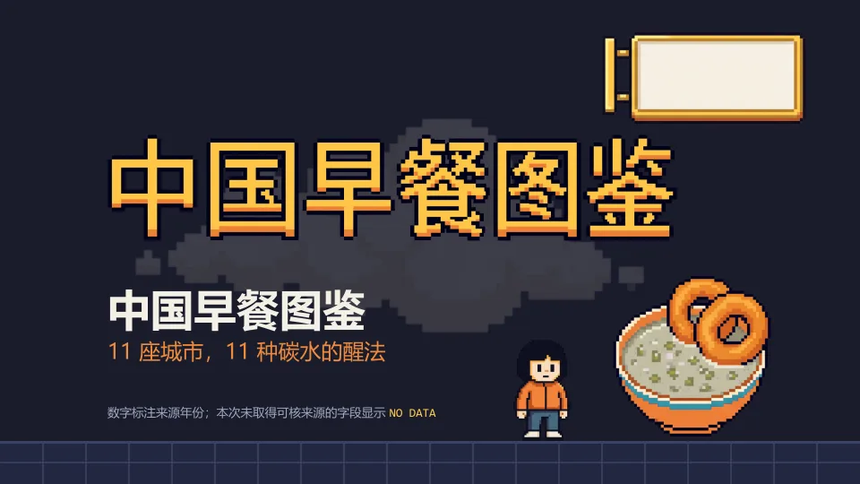
The second image is the title page of a “pixel art” sample, also published by the project. The README links to more examples online (a demo and a separate examples repository) so you can judge quality before installing.
Installing ppt-master as the README describes
Step 1 — Python
Install Python 3.10 or later. On Windows, tick “Add to PATH” during installation and see the repository’s dedicated guide docs/windows-installation.md. On macOS the README gives brew install python; on Ubuntu or Debian, sudo apt install python3 python3-pip.
Step 2 — An agent tool
The README accepts any tool able to read and write files, run commands and hold a conversation: editors with a built-in agent, extensions, or command-line agents. The author says he favours Claude Code, the environment tested most thoroughly in his words.
Step 3 — Get the project
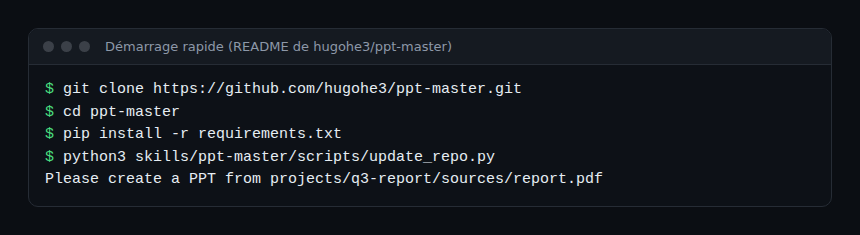
git clone https://github.com/hugohe3/ppt-master.git
cd ppt-master
pip install -r requirements.txt
To update a cloned copy, the README gives python3 skills/ppt-master/scripts/update_repo.py. It also offers a ZIP download and a “marketplace” route: npx skills add hugohe3/ppt-master or, in Claude Code, /plugin marketplace add hugohe3/ppt-master then /plugin install ppt-master@ppt-master. In that case the README notes you must still run pip install -r requirements.txt from the installed folder.
Step 4 — Create a presentation
Open the project folder in the agent, put the source document in projects/, then ask in natural language, for example “Please create a PPT from projects/q3-report/sources/report.pdf”. By default the agent first confirms the design specification (template, format, page count). The README also describes a quick mode, on explicit request.
The final file lands in exports/<name>_<timestamp>.pptx; the default flow also writes page previews to svg_final/. The --native-charts-and-tables option produces, per the README, PowerPoint charts and tables with “Edit Data” in a separate file.
Images, keys and data: what goes where
The README claims that, apart from calls to the model and to the search, image and speech services you enable, everything runs on your machine. That is the project’s statement, which you can cross-check by watching network traffic. Two image routes are described:
- Generation: the agent’s own image tool, or
image_gen.pywith theIMAGE_BACKENDvariable and the provider’s API key. - Image search:
image_search.pyqueries Openverse and Wikimedia Commons without a key, plus Pexels and Pixabay if you supplyPEXELS_API_KEYandPIXABAY_API_KEY. The README says the tool adds a credit on the slide when the licence requires it.
Keys go in an .env file: treat it as a secret (never in Git). The README also lists, among its sponsors, “API relay” services that resell access to models. The repository contains referral links for them; routing your documents through an intermediary is a security decision, not just a pricing tip.
Monitoring costs and data leaks
ppt-master is not a service: it emits no traces. The README and FAQ do not mention OpenTelemetry. The FAQ says you pay according to your AI usage, with no subscription added, and that the repository documents no measured relationship between template reuse and token count. So what you measure is the agent:
- Tokens and cost per presentation, using the methods in tracking the cost of an AI agent; a very large context window gets expensive on a long document.
- Outbound data: which documents go to which model, image or search provider. See the guardrails for AI agents in production.
- Traceability: keep each presentation’s
projects/folder, with its sources and exports, so that a result can be replayed and audited.
For a contrast with a native office suite, see GridCraft, an open-source spreadsheet in Rust, which takes the opposite approach: an application, no agent.
How to check that it works
- The
.pptxfile opens in PowerPoint and each shape can be selected and edited; text is not an image. - With
--native-charts-and-tables, “Edit Data” does open a chart’s data. - The deck’s figures match the source document: check them one by one.
Limits and open points
- Quality depends on the model. The README says it: “the model sets the ceiling”. The weaker the model, the more there is to rework.
- PowerPoint limits. SmartArt is deliberately omitted; the
docs/powerpoint-svg-mapping.mdguide lists feature by feature what is covered. - Dependency licence. The optional PDF converter depends on PyMuPDF, licensed AGPL-3.0 rather than MIT, which the README flags before any redistribution of a bundle that includes it.
- Sponsorship and promotion. The README contains referral links, promo codes and a recommendation of a sponsor’s model. These are commercial elements of the repository, to be told apart from the technical part.
- Content accuracy. A generated deck can contain errors of substance; validation stays human.
- Data. A confidential document sent to a hosted model leaves your perimeter; check the provider’s terms.
Best practices
- Test first on a public document, with a spending cap at the provider.
- Keep the
.envfile out of the repository and use dedicated, revocable keys. - Choose the model provider according to document sensitivity; avoid intermediaries for internal content.
- Check every figure and source before distribution; keep the project folder.
- Turn off external image services if your documents must not leave.
Frequently asked questions
Does ppt-master replace PowerPoint?
No. According to the README it generates a .pptx file you keep editing in PowerPoint; it does not provide an editor.
Is it free?
The code is MIT licensed and the project adds no subscription; you pay for your AI model and any image services you enable.
Do my documents leave my machine?
Per the README, only calls to the model and to the search, image or speech services you enable go out; this is the project’s statement and should be verified on your network. For another approach to local agents, see OpenClaw.
Conclusion
ppt-master answers a concrete need: getting a real, editable PowerPoint file from documents. The project is open about the model limiting the result. On the operations side, remember three things: token costs to cap, keys to protect, and documents whose path you choose deliberately.
span.observer is an independent community blog, not affiliated with Dynatrace LLC or the projects mentioned. Trademarks belong to their owners. Tools change quickly: check commands and options in the official documentation (github.com/hugohe3/ppt-master).