claude-mem persistent agent memory: the thedotmack/claude-mem repository describes itself as a “persistent memory compression system” built for Claude Code. It watches what the agent does during a session, summarises it, then re-injects the essentials when the next session starts. The repository showed about 103,000 stars and 9,100 forks at the end of October 2026, under the Apache 2.0 licence, with version 15.2.1 shown in the README.
For an operations team, it is a small service running next to the agent. It listens to every tool call, calls a language model to summarise it, stores the result and changes the context of every new session. Latency, token cost, the quality of what is recalled and privacy therefore become operational topics. This article follows the repository README and documentation, read on 26 October 2026.
A note on honesty: span.observer has not installed claude-mem. The commands come from the README, the settings from the official documentation, and the interface capture from the project’s own repository. For another approach to agent memory, see Hindsight, AI agent memory: the angle differs, as explained below.
claude-mem persistent agent memory: what the repository says
- Author and licence: the README names Alex Newman (
@thedotmack) as author. The LICENSE file is the standard Apache License 2.0 text, and the README confirms it. The filesdocs/license.mdanddocs/ip-boundary.mddescribe an “open-core” structure: the memory engine, server, CLI, adapters and MCP tools are Apache 2.0, while a hosted cloud, team sync, admin and SSO stay reserved outside the public repository. - Technology: TypeScript, Node.js 20 or later, Bun as process manager, SQLite with FTS5 full-text search, and optionally the Chroma vector database (installed through
uv). - Principle: Claude Code lifecycle hooks (SessionStart, UserPromptSubmit, PreToolUse, PostToolUse, Stop, SessionEnd) pass events to a local worker. The worker asks a model to compress them into structured “observations”.
- Figures read on 26 October 2026: about 103,000 stars and 9,100 forks from the repository page; version 15.2.1 from the README badge and the npm package. The stars were read by a page-summarising tool: re-check them before quoting them elsewhere.
The README also lists installers for environments other than Claude Code (OpenCode, T3 Code, Antigravity, OMP, Pi, OpenClaw). This article sticks to Claude Code, the original case.
Interface tour: the web viewer
The worker serves a web interface, the “viewer”, that shows the stored observations live. The capture below is a frame from the cm-preview.gif animation published in the project repository: a Claude Code session on the left, the viewer on the right.
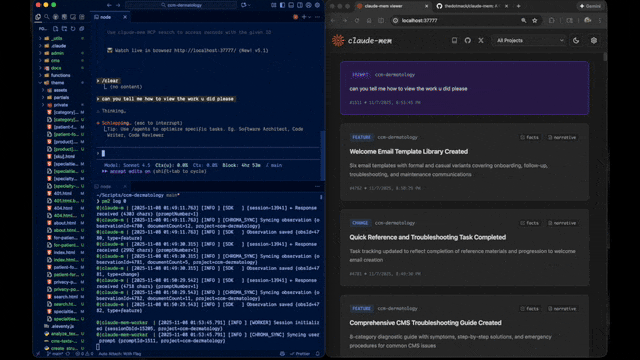
Each card carries a type (for example change or feature), a title, a short narrative and an identifier. According to the documentation, the viewer updates through Server-Sent Events and filters by project. Context settings can also be edited there, with a live preview.
How memory is compressed, then re-injected
The flow described in the architecture documentation fits in one line: a hook writes to the database, the worker reads and processes the entries with the agent SDK, then the next session’s hook reads the summaries back. In practice:
- Capture: after each tool call (PostToolUse), the hook sends the event to the worker. The documentation speaks of “100+ times” per session.
- Compression: the worker hands each event to a model. By default
CLAUDE_MEM_MODELisclaude-haiku-4-5-20251001with theclaudeprovider; other providers are listed:codex,gemini,openrouter,openai-compatible. - Summary: when the agent stops (Stop), a final summary records the request, what was done and what was learned.
- Re-injection: at the next start, the context hook adds the latest observations. The default is 50 (
CLAUDE_MEM_CONTEXT_OBSERVATIONS).
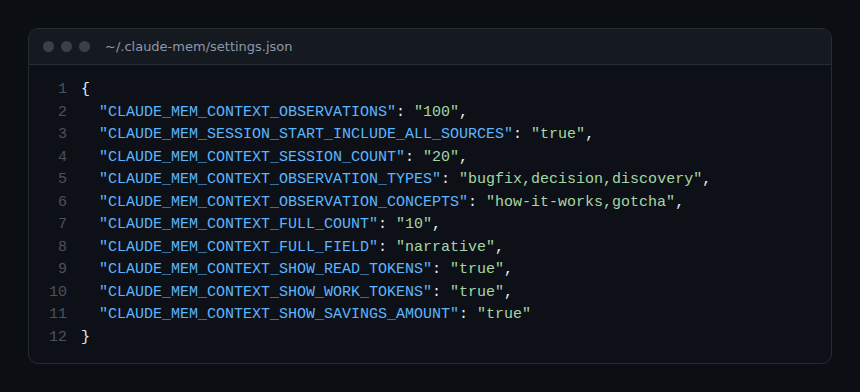
The capture shows the manual configuration example from the documentation: one hundred observations, twenty sessions, filtering by type (bugfix, decision, discovery) and display of the read-token cost. These are not the defaults.
Three-layer search
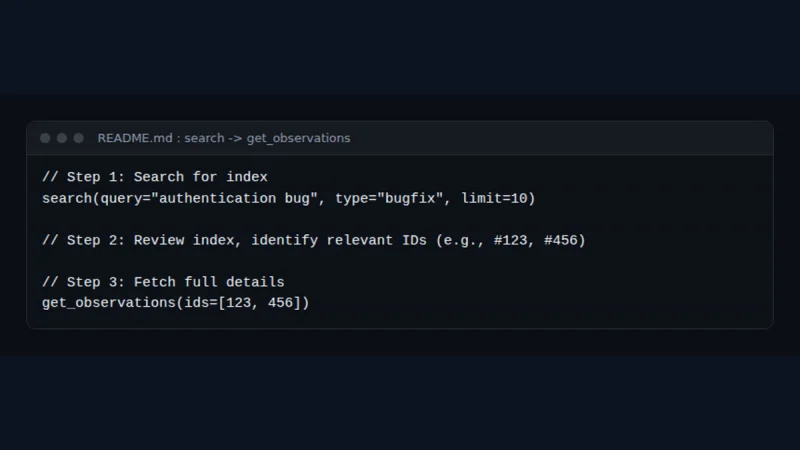
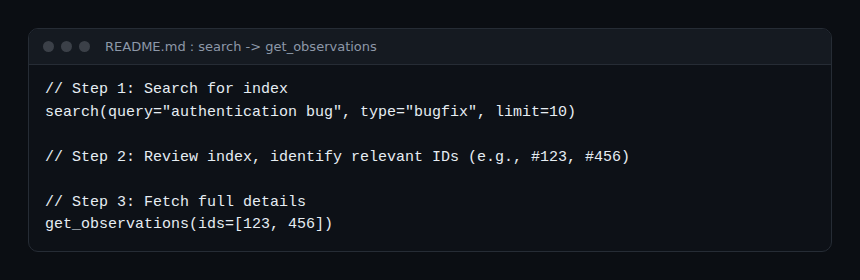
The project defends “progressive disclosure”: show a cheap index first, then fetch detail only when needed. The README describes three MCP tools: search (compact index), timeline (chronological context) and get_observations (details for filtered identifiers). The project claims a saving of about ten times in tokens; that is a README claim, not a measurement reproduced here.
Step-by-step installation
Prerequisites
The README asks for Node.js 20 or later, a recent Claude Code with plugin support, Bun and uv (installed automatically if missing) and SQLite 3 (bundled).
Step 1 — Run the installer
npx claude-mem installThe README states that npm install -g claude-mem installs only the SDK, without registering the hooks or the worker. After installation, the tool offers an e-mail sign-in to a claude-mem account with a 30-day free trial of the hosted “observer”. To avoid it, the README suggests passing an explicit --provider flag, setting CLAUDE_MEM_ONLINE_OPTIN=false or working in a non-interactive shell.
Step 2 — Or use the plugin marketplace
/plugin marketplace add thedotmack/claude-mem

/plugin install claude-mem
Restart Claude Code: the README says context from earlier sessions then appears automatically in new ones.
Step 3 — Windows
The hooks do not need Git Bash. The installer puts a claude-mem.exe launcher in %LOCALAPPDATA%\claude-mem\bin and adds it to the user Path; restart the terminal afterwards. On an “Executable not found in $PATH: “claude-mem”” error, the README points to npx claude-mem doctor.
How to check it works
- Run
npx claude-mem doctor: the documentation says it shows a row for the hook launcher. - Start a Claude Code session, do a few things, then open the viewer at the address the worker prints at start-up. Observation cards should appear.
- Query the worker:
curl -s http://127.0.0.1:$CLAUDE_MEM_WORKER_PORT/api/health, the command given by the configuration documentation to read the active port.
Monitoring claude-mem in operation
The documentation describes neither OpenTelemetry export nor Prometheus metrics. What it does let you follow:
- Worker health: a local HTTP service, default port
37700 + (uid % 100), changeable withCLAUDE_MEM_WORKER_PORT. The “Worker Service” page citesGET /health, the configuration pageGET /api/health: check which one answers on your version. - Queue:
GET /api/pending-queueshows pending, processing, processed and failed messages (three attempts by default) and the number of “stuck” messages (more than five minutes in processing).POST /api/pending-queue/processrestarts processing. It is the right indicator after a crash. - Logs: the
logs/folder of the data directory (~/.claude-memby default,CLAUDE_MEM_DATA_DIR), with the level set byCLAUDE_MEM_LOG_LEVEL(DEBUG, INFO, WARN, ERROR, SILENT). The documentation pages name the files differently (worker-out.logon one,worker-YYYY-MM-DD.logon another). - Stored volume:
GET /api/stats(counts per project) and theclaude-mem.dbfile let you follow growth. - Cost: every observation goes through a model. Token tracking happens on the provider side; the method in the token cost of an AI agent with OpenTelemetry applies, as does observing MCP agents with OpenTelemetry for the search tool calls.
The worker listens on 127.0.0.1 by default (CLAUDE_MEM_WORKER_HOST). The documentation recommends keeping it that way for anyone not using remote access. For the general framework for monitoring a coding agent, see monitoring a coding agent in the enterprise.
How claude-mem differs from Hindsight
The article on Hindsight describes a memory server to deploy with PostgreSQL, called by any agent through an API and retain, recall and reflect operations. claude-mem starts elsewhere: it hooks into Claude Code, needs no agent-side code, stores everything locally in SQLite and re-injects an index at the start of every session. The first is a memory building block for building an agent; the second is an add-on for an existing coding agent.
Limits and open points
- Sensitive data: any tool call may be captured, including paths, commands and file excerpts. The README describes
<private>tags to exclude content, and the documentation covers filters (CLAUDE_MEM_SKIP_TOOLS,CLAUDE_MEM_SKIP_BASH_PATTERNS, excluded projects). They only protect what you thought to exclude. - Commercial offer up front: the README highlights an account sign-in, a 30-day free trial and hosted memory by default for one of the installers. The project claims up to 100% more usage on your plan: that is a commercial argument, not verified here. A local install remains possible.
- Community token: the end of the README mentions CMEM, a token created by a third party but “officially embraced” by the author. span.observer neither recommends nor comments on it; it is a caution signal for anyone evaluating the project.
- Open-core frame: some announced features (team, SSO, cloud) are reserved outside the Apache 2.0 repository, according to
docs/ip-boundary.md. - Uneven documentation: the same information (worker health, log file names) differs from one page to another, and the README describes installation for Grok Bot first, then Claude Code. The “10 times fewer tokens” figure and the skill’s “100% effectiveness” are project claims.
- Very active project: version 15.2.1, more than 3,600 commits according to the repository page; options change quickly.
Best practices
- Try it first on a project without secrets, with
CLAUDE_MEM_CONTEXT_OBSERVATIONSset low. - Add your sensitive patterns to
CLAUDE_MEM_SKIP_BASH_PATTERNSbefore real use and keep the worker on127.0.0.1. - Choose the compression provider explicitly, with the cheapest model that works, and track consumption on its side.
- Back up the data folder before an update, and watch the queue after a restart.
- Review what is stored: a wrong observation is re-injected into every session.
Frequently asked questions
Is claude-mem free and open source?
The repository code is Apache 2.0 according to the LICENSE file. The README also offers a hosted service with a 30-day free trial; by its own account it is optional.
Does my data leave my machine?
Observations are stored in a local SQLite database. But the summary goes through a model: Claude by default, or Gemini, OpenRouter or another provider according to CLAUDE_MEM_PROVIDER. The content of tool calls is therefore sent to that provider. Cloud sync is a separate service described by the project.
How is it different from a CLAUDE.md file?
An instructions file is written by hand and read in full each session. claude-mem generates entries automatically and injects only a bounded index, detailed on request afterwards. The two complement each other.
Conclusion
claude-mem automates a task teams do by hand: telling the agent what happened yesterday. It installs with one command and is tuned through a JSON file. Treat it as a service: watch its queue, count its tokens, limit what it remembers. Sources: thedotmack/claude-mem repository and the official documentation.
span.observer is an independent community blog, not affiliated with Dynatrace LLC or the projects mentioned. Trademarks belong to their owners. Tools change quickly: check commands and options in their official documentation.