Ruflo AI agent swarms: the ruvnet/ruflo repository describes itself as an “agent meta-harness” for Claude Code and Codex, adding specialised agents, coordinated swarms, memory and a monitoring console. It showed about 78,300 stars and 9,200 forks in October 2026, read on the repository page on 22 October, with more than 9,800 commits and an MIT licence. The README says the project was first called Claude Flow.
For an SRE two things matter: what Ruflo adds to a coding agent (coordinating several agents, memory, routing) and what it lets you see (activity, tokens, cost). The repository is also a good example of a project whose README shows many figures, which should be read as claims.
The information comes from the repository README, read on 22 October 2026. span.observer did not install Ruflo: the image and commands below come from the repository.
Ruflo AI agent swarms: what the repository says
- Who: the
ruvnetaccount; the README credits the project to Reuven Cohen (rUv) and says it is powered by the Cognitum.One architecture. According to the README, the first commit dates from 2 June 2025. - Licence: MIT. The repository page shows no release; the package is distributed through npm (
ruflo). - Positioning: “Agent = model + harness”. The model writes; the harness provides tools, memory, loops, sandboxes and controls. Ruflo aims to be that harness around Claude Code and Codex.
- Announced features: more than 100 specialised agents, swarms (hierarchical, mesh and adaptive topologies, with consensus), persistent memory with a vector index, routing across several model providers, “federation” between machines, a visual console and a terminal interface.
- Integrations: Claude Code plugins (requires Claude Code 2.1.287 or later), an MCP server for Codex and other clients.
A reading warning: the README gives several figures that do not agree (98 or more than 100 agents, 35 plugins or 33 plus 21, and so on), and its performance results come from the project’s own measurements, published through an external link. They are the project’s claims, not span.observer measurements.
Installing Ruflo from the README
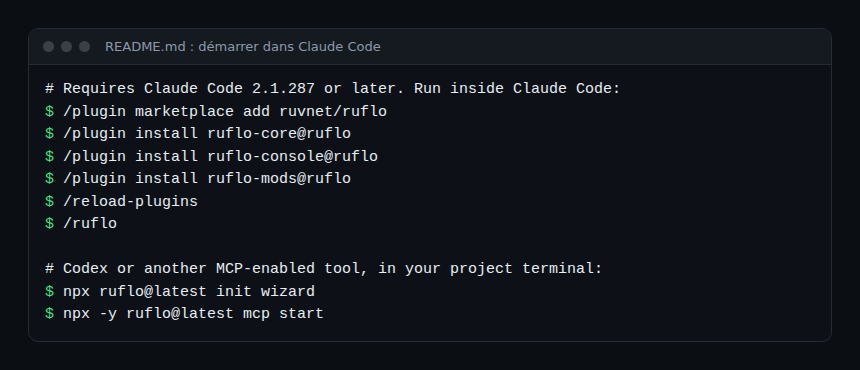
Step 1 — In Claude Code
/plugin marketplace add ruvnet/ruflo
/plugin install ruflo-core@ruflo
/plugin install ruflo-console@ruflo
/plugin install ruflo-mods@ruflo
/reload-plugins
/ruflo
The README describes Core (basic tools), Console (the dashboard) and Mods (routing and policy enforcement inside Claude Code). For how plugin catalogues work, see our article on claude-plugins-official.
Step 2 — With Codex or another MCP client
npx ruflo@latest init wizard
npx -y ruflo@latest mcp start
For a client that accepts local stdio MCP servers, the README gives the command npx with the arguments ["-y", "ruflo@latest", "mcp", "start"]. It states that the console and mods are Claude Code integrations and that hook support depends on the client.
Step 3 — Terminal interface, without Claude Code
npx ruflo tui
npx ruflo tui --plain
The --plain option prints a single frame, useful for scripts. The README notes that the curl | bash script installer needs a POSIX shell: on Windows, use the npx form.
The console: seeing what the agents do
The README describes the console as an “agent cockpit”: workflows, agents, models, tokens and cost. A demonstration shows Claude Code driving the console through MCP tools, with a “Claude control” panel listing the actions taken.
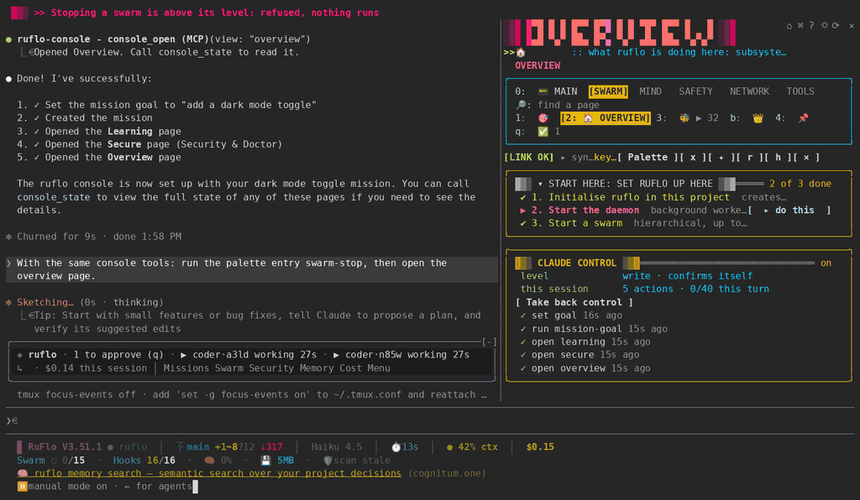
The README warns that this animation uses sample data and does not show finished swarm work or memory recall. It also describes control levels for Claude on the console (read, write, manage, full), with “ask” or “auto” approval, the default being read with confirmation; network, spending and destructive actions require confirmation even in auto mode.
Monitoring a swarm of agents
Several agents working in parallel multiply model calls. Ruflo’s own tools give a first level of reading: the Cost page of the terminal interface and the ruflo-cost-tracker plugin, which the README describes as tracking token usage, budgets and cost alerts.
- Costs. Compare what Ruflo shows with your model provider’s console, as in AI agent cost with OpenTelemetry.
- OpenTelemetry. In the README I read, I found no documented OpenTelemetry export. Before promising traces in your backend, check the project documentation; otherwise instrument the agents themselves, see observing MCP agents.
- Rights. The README warns that mods are not sandboxed: they run with your account’s permissions and their code should be read before installing. See guardrails in production and NVIDIA OpenShell to isolate execution.
How to check that it works
- After
/reload-pluginsand/ruflo, the console opens and the Overview page appears. - A short task given to an agent shows up in the activity and cost pages; the terminal status line shows the session cost.
- The README mentions a
ruflo verifycommand that compares installed files with a signed witness: try it on a test installation.
Limits and open points
- Inconsistent figures. The number of agents, plugins and providers varies in the README; a download counter is labelled “illustrative”. Do not reuse these figures without checking.
- Declared performance. Comparisons with other frameworks come from a document published by the project; no independent measurement here.
- Wide scope. Vector memory, federation between machines, compliance (HIPAA, SOC2 and GDPR audit trails are claimed), trading, IoT: a lot of surface for one repository. Start with one feature.
- Issue tracking. The README’s Support section links to the issues of
ruvnet/claude-flow, notruvnet/ruflo: check where to report a problem. - Double loading. The README notes that enabling the Agentic QE fleet from two marketplaces loads it twice.
Best practices
- Try Core and the console on a test project first, before the mods.
- Keep Claude’s console control on read with confirmation until you need more.
- Set a token budget before launching a swarm.
- Read the mods’ code and pin
rufloversions. - Treat a looping swarm as a reliability incident: stop it, look at the costs, fix the instruction.
Frequently asked questions
Does Ruflo replace Claude Code?
No. According to the README, Ruflo adds a coordination layer to Claude Code or Codex. To compare with another orchestrator, see Paperclip.
Is Ruflo free?
The code is MIT-licensed. Model calls are billed by the provider you choose; the README also mentions a separate hosted desktop, ruOS, reached through an MCP address.
Do I need Claude Code to use it?
Not necessarily: the README describes an npx install and an MCP server for Codex or other clients, plus a standalone terminal interface. The visual console and mods are Claude Code integrations.
Conclusion
Ruflo offers an ambitious harness for coordinating coding agents, with a console to follow cost and activity. Its popularity is no substitute for verification: read the README figures as claims, limit the mods’ rights, and measure costs yourself before automating.
span.observer is an independent community blog, not affiliated with Dynatrace LLC or the projects mentioned. Trademarks belong to their owners. Tools change quickly: check commands in the official README (github.com/ruvnet/ruflo).