The LightCraft non-destructive photo editor, written in Rust, is a photo library and RAW developer. Every adjustment stays a calculation applied on top of the original, which is never modified. The project comes from the ArtCraft team (GitHub organisation storytold) and showed about 13,200 stars in mid-October 2026. The latest release read on the repository page is v0.8.0, published on 14 October.
The README presents LightCraft as a clean-room reimplementation of the workflow of a commercial photo tool. That is the project’s own claim, which span.observer reports without vouching for it; the repository states that it is independent, and neither affiliated with nor endorsed by the original vendor. span.observer has neither installed nor tested the software: this article draws on the README, the licence file and the repository’s screenshots.
LightCraft non-destructive photo editor: what the project says
- Licence: MIT or Apache-2.0, at your option.
- Language: “pure Rust, no C” according to the README, with its own RAW decoders (DNG, CR2, CR3, ARW, NEF, RAF, RW2, PEF, ORF and more).
- Processing: a 32-bit floating-point, scene-referred, wide-gamut pipeline run on the GPU by wgpu kernels (Metal, Vulkan, DirectX 12), with a CPU fallback.
- Local first: the README states no account, no cloud and no telemetry. The catalogue is a human-readable log of operations that you can diff, back up or replay.
- Status: alpha. The project puts its coverage at about 81% of the features of the tool it targets, and about 51% for a working professional photographer, self-assessed figures.
- Agents: an MCP server and a CLI expose the engine’s commands. The broader context is in the Model Context Protocol explained.
A tour of the interface
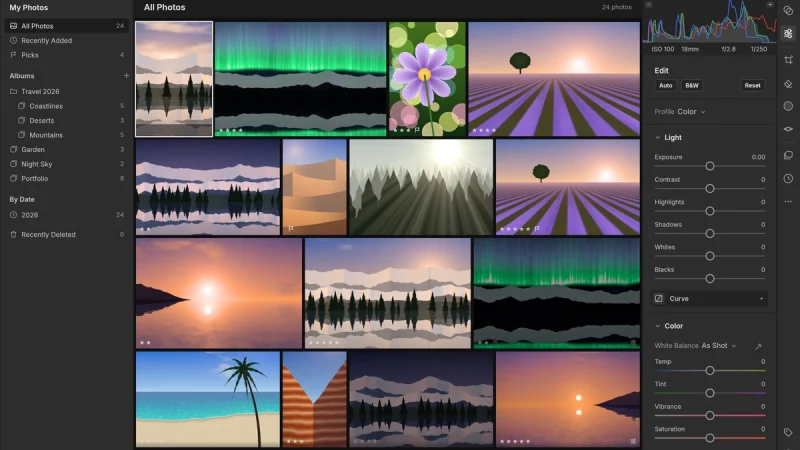
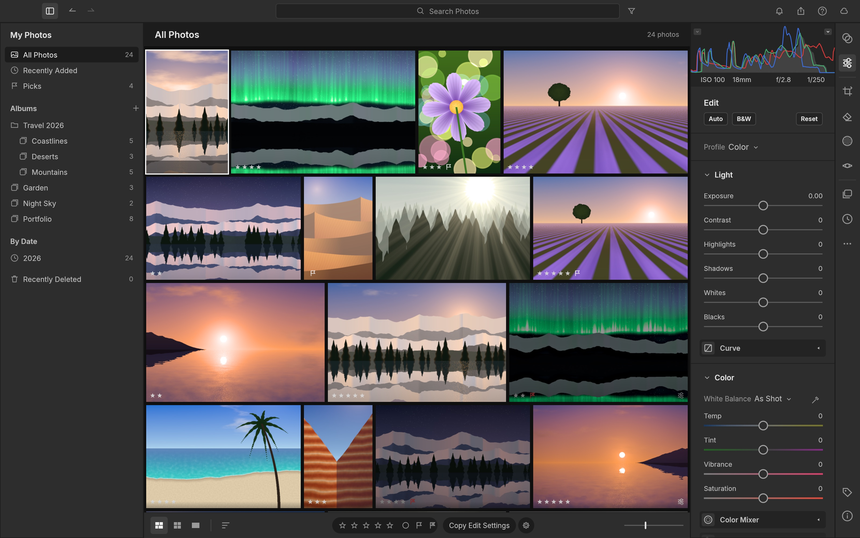
The library grid, with nested albums, ratings, flags and an Edit panel that includes the histogram:
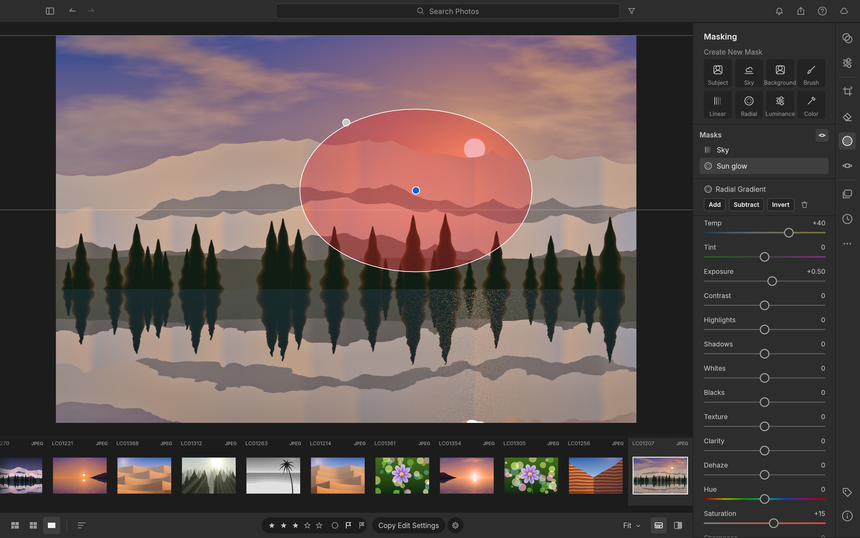
The Masking panel offers the brush, linear and radial gradients, luminance or colour range, sky, subject and background. Components combine by add, subtract or intersect.
Eighteen presets ship in the box, each with an amount slider, next to the eight-band Color Mixer:
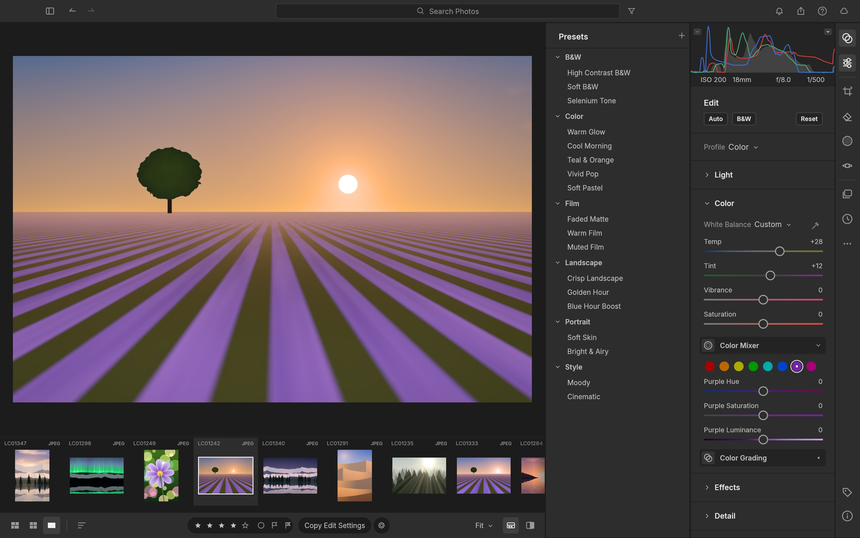
The photos in these screenshots are demo images generated by the project; the README says the screenshots are produced by the scripts in the docs/showcase folder.
Installing LightCraft step by step
The README recommends downloading the app from the LightCraft page on getartcraft.com. Each version’s files are also under “latest release”: MSI and portable archives on Windows (x64, arm64, x86), a universal DMG on macOS, AppImage, Flatpak, .deb, .rpm and tar.gz on Linux, a FreeBSD archive and a web build (static zip). A SHA256SUMS.txt file provides checksums.
From source, the README requires Rust 1.95 or newer:
git clone https://github.com/storytold/lightcraft && cd lightcraft
cargo run --release -p lightcraft                       # opens your library
cargo run --release -p lightcraft -- ~/Pictures/trip    # import a folder of photos
cargo run --release -p lightcraft -- --memory           # throwaway demo session, writes nothing
cargo run --release -p lightcraft -- --control 7980     # with the automation channel
For a build on a memory-constrained machine, the README advises starting with a single build job: CARGO_BUILD_JOBS=1 cargo build --release -p lightcraft -p lightcraft-cli, because out-of-memory failures at link time were reported on a 16 GB machine. A Nix recipe is also provided: nix run github:storytold/lightcraft.
Limits and open questions
- Alpha: the project calls itself “young and moving fast”. It rates itself as great on JPEG, DNG and most Sony, Panasonic, Fujifilm, Nikon and older Canon RAW files, on a single machine; check the RAW parity page for your camera.
- Colour calibration: the profiles for several cameras are estimates; measured calibration is missing, and other RAW files keep a neutral matrix.
- AI: subject and sky masks rely on classical heuristics, and AI denoise is in progress.
- Other gaps: on-screen HDR display, video, and the more advanced print and book modules. Printer colour management is not there.
- Data: work on a test catalogue before pouring your library into it. “Add in place” import does not move your files, but back up your originals anyway.
What you can measure on the workstation
LightCraft is a desktop application with no telemetry according to the README: nothing is sent, and span.observer attributes no monitoring feature to the software. Measurements come from the system, on the same batch of photos and the same version.
- Logs: the README says the app writes
lightcraft.loginto its settings folder (on Linux~/.config/lightcraft/logs/, on Windows%APPDATA%\LightCraft\logs\). Each start archives the previous log, so the log of a crashed run survives. The level is set withLIGHTCRAFT_LOG=infoordebug. - Start-up and opening a RAW: time the launch, then the first preview of a RAW file from your camera. The README gives times measured on an Apple M4 Pro with a 24 MP RAW; those are the project’s figures, to compare with your own.
- Memory: peak resident memory during a batch export (
/usr/bin/time -von Linux). - CPU versus GPU: without a GPU the same pipeline runs on every CPU core; on a workstation, compare the load with and without a graphics card.
- Crashes: panics are also recorded in
lightcraft-panics.login the temp folder, according to the README.
To tie these measurements to a reliability mindset, see the SRE lessons from mainstream MCP: logs, versions and reproducibility matter more than an isolated figure.
Best practices
- Pin the version (v0.8.0 today) and keep your originals untouched and backed up.
- Enable
LIGHTCRAFT_LOG=debugonly for a diagnosis, then go back to the default level. - If you connect the MCP server to an agent, limit its access to a test folder, as in the case of an agent wired to local tools.
- Carry on with PhotoCraft, the pixel editor from the same suite and FilmCraft for video.
Frequently asked questions
What does “non-destructive” mean here?
Adjustments are stored as operations applied to the image at render time; the original file is not rewritten. The README adds that the catalogue is a readable log of operations and that XMP sidecar files are read and written.
Does LightCraft replace a commercial photo tool?
Not yet, by the project’s own admission: about 61% for the whole product and 65% for casual use, self-assessed estimates. Try it on a batch of test photos.
Does the software send data?
The README states there is no account, no cloud and no telemetry. You can check for yourself by watching the process’s network connections during a trial.
Conclusion
LightCraft deserves a trial for its in-house RAW decoders, its GPU pipeline checked against the CPU and its local-first model. But it is alpha, and its colour calibration still depends on your camera. Read the README, install a dated version, measure on your own photos. Sources: LightCraft repository and LightCraft page on getartcraft.com.
span.observer is an independent community blog, not affiliated with Dynatrace LLC or with the projects mentioned. Trademarks belong to their owners. Software changes quickly: check figures, commands and options in the repository and the official documentation.