The DQL in function and the in operator answer the same question: is this value part of a list? The function tests a list written in the query or an array carried by the record; the operator compares a value with the result of a subquery. Choosing the right one avoids unreadable chains of or and hand-copied ID lists during an incident.
This guide covers the documented syntax, arrays, negation, subqueries and the special case of classicEntitySelector, with operations use cases. Every syntax quoted comes from the official DQL documentation, checked in October 2026.
The content applies to Dynatrace SaaS (Grail). Dynatrace Managed has no DQL: filtering there uses the entity selector and the metric selector. For the overview of commands, see DQL commands explained, which shows in() in a few examples; this guide goes further.
DQL in function: syntax and return value
The documented signature is:
in(needle, haystack, …)needle: the element searched for (or elements, if it is an array);haystack: the values to search in. The function supports several haystacks and arrays in every argument;- the result is a boolean, so it can be used directly in
filter,filterOut,fieldsAddorcountIf.
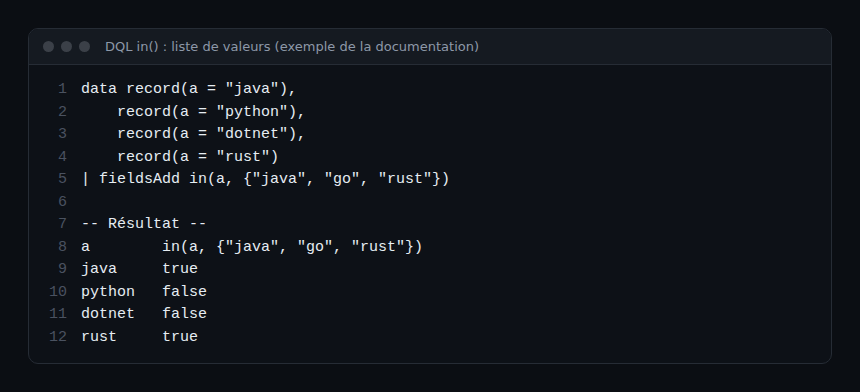
Accepted types cover strings, numbers, durations, IP addresses, timestamps, booleans and records: you can test a list of IP addresses just like a list of service names.
Step by step: filtering on a list
Step 1 — Replace a chain of or
// before
fetch logs
| filter loglevel == "ERROR" or loglevel == "WARN"

// after
fetch logs
| filter in(loglevel, {"ERROR", "WARN"})
The list in braces is the form used by the documentation. A sequence of values works too: in(technologies, "Python", "Hibernate") appears in the official examples.
Step 2 — Exclude a list
Negation is written with not in front of the function, or with the filterOut command:
fetch logs
| filterOut in(k8s.namespace.name, {"kube-system", "monitoring"})
| summarize nb = count(), by:{k8s.namespace.name}
Handy to remove the noise of technical namespaces before looking for the origin of a volume spike.
Step 3 — Test an array field
When the needle is an array, in() returns true if at least one of its elements is in the haystack. The official example:
data record(technologies = array("Java", "Spring", "Jetty")),
     record(technologies = array("Python", "Flask")),
     record(technologies = array("Java", "Hibernate"))
| fieldsAdd in(technologies, "Python", "Hibernate"),
            in(technologies, array("Spring", "Flask"))
The first record gives false then true: none of its elements is Python or Hibernate, but Spring is in the second haystack.
To check that an array is entirely contained in another, the operators documentation suggests a double negation with iAny:
| fieldsAdd not iAny(not in(needle[], haystack))not in(needle[], haystack) is true for each missing element; iAny detects whether one exists; the outer not therefore returns true only when no element is missing. The documentation notes that an array whose elements are all null yields null, so it never passes a filter.
Subqueries: the in operator
When the list is not known in advance, use the in operator with a subquery in square brackets. Documented syntax:
expression in [execution block]Constraint: the subquery must return a single field that provides the list of values.
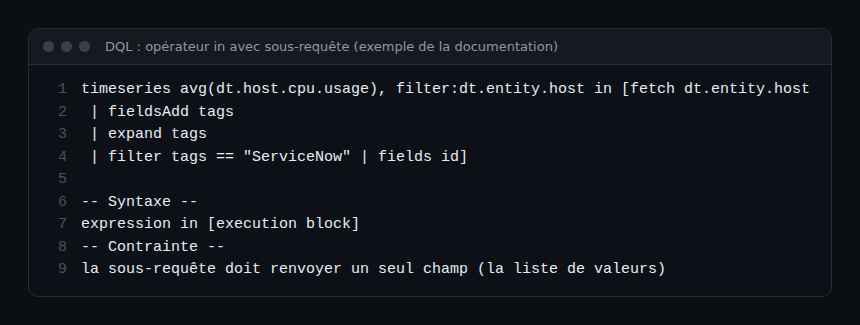
The official example filters the CPU metric of hosts carrying a given tag. The same principle applies to logs:
fetch logs
| filter loglevel == "ERROR"
| filter dt.entity.host in [fetch dt.entity.host
    | fieldsAdd tags
    | expand tags
    | filter tags == "ServiceNow"
    | fields id]
| summarize errors = count(), by:{dt.entity.host}
The subquery returns the id field of host entities; the final fields id guarantees a single field. The result is then grouped with summarize: see DQL group by.
The classicEntitySelector case
The classicEntitySelector() function returns the entity IDs matching a classic entity selector. The documentation states that it is only supported as in(field, classicEntitySelector("..")) and that it requires the storage:entities:read permission. It lets you reuse an existing selector, relationships included:
fetch logs
| filter in(dt.entity.cloud_application_instance,
    classicEntitySelector("type(CLOUD_APPLICATION_INSTANCE),toRelationShip.IS_NAMESPACE_OF_CAI(type(CLOUD_APPLICATION_NAMESPACE), entityId(CLOUD_APPLICATION_NAMESPACE-1B6CFC8C542A2273))"))
Smartscape on Grail does not support classicEntitySelector: the documentation replaces relationship-based selection with the traverse command, which walks the topology directly in DQL. See DQL Smartscape.
Operations use cases
- Incident scope: limit logs to the affected services, listed once in the query.
- Exclusion list: remove monitoring probes or internal IP addresses with
filterOut in(...). - Dynamic filter: a subquery that selects hosts by tag, instead of an ID list that ages badly.
- Conditional counter:
countIf(in(loglevel, {"ERROR", "WARN"}))inside asummarizefor an error indicator.
Every hard-coded list is a source of toil: it must be updated for each new service. A tag-based subquery follows the environment with no intervention, which reduces the risk of a wrong filter at the moment MTTR matters.
How to check that the filter is right
- Show the boolean before filtering:
| fieldsAdd match = in(field, {...}), then| summarize count(), by:{match}. You see how many records pass. - Run the subquery alone: it must return a single column with the expected values.
- List the real values of the field with
| summarize count(), by:{field}: a misspelled value in the list matches nothing and raises no error.
Best practices
- Prefer
in()over more than twooron the same field: the query reads and changes in one line. - End every subquery with
fieldson a single field. - Replace ID lists with a subquery on a tag or a stable property.
- Keep
classicEntitySelectorfor migrating existing selectors; use Smartscape for topology. - Explain in a
//comment why a value is excluded.
Frequently asked questions
What is the difference between the in() function and the in operator?
The in(needle, haystack) function tests a known list or an array. The expression in [subquery] operator tests the result of another DQL query, which must return a single field.
How do I write “not in” in DQL?
With not in(field, {...}) in a filter, or with filterOut in(field, {...}). Both forms exclude the listed values.
Does in() work on Dynatrace Managed?
No: DQL relies on Grail, available on Dynatrace SaaS. On Managed, filter with the entity selector and the metric selector; see the Dynatrace Managed course.
Conclusion
The DQL in function for a list or an array, the in operator for a subquery: these two tools replace long conditions and frozen lists. Combined with summarize, they give short, correct queries that follow the environment as it changes. For more ready-to-use queries, see our DQL operations queries.
span.observer is an independent community blog, not affiliated with Dynatrace LLC. Trademarks belong to their owners. DQL syntax evolves: check it in the official documentation before using it in production.