Cursor plugins specification: the cursor/plugins repository describes both the plugin format of the Cursor editor and a collection of “official” plugins, each in its own folder with its own manifest. Its GitHub description reads “Cursor plugin specification and official plugins”. The repository has about 13,500 stars at the end of October 2026.
For a team that installs plugins in the editor, the specification answers two questions: what can a plugin contain (rules, skills, agents, commands, hooks, MCP servers) and what does it do on your machine. This article follows the repository README and Cursor’s documentation. For the same subject on the Claude Code side, see the official Claude Code plugin directory.
A note on honesty: span.observer is an independent blog with no link to Cursor, and has not installed these plugins. Commands and excerpts come from the repository and Cursor’s documentation; the screenshots are excerpts rendered from repository files.
Cursor plugins specification: what the repository says
- Publisher: the repository belongs to the Cursor organisation; the manifests’ author address is
[email protected]. Some plugins name other authors, in the README’s “Author” column. - Licence: the README’s “License” section says MIT. At the repository root, no LICENSE file appeared on 22 October 2026; the plugins checked (for example
teaching) have their own MIT file reading “Copyright (c) 2026 Cursor”. Check each plugin’s file before reusing it. - Figures checked on 22 October 2026: about 13,500 stars, about 1,300 forks, 642 commits. No published release.
- Content: the README table lists around a hundred plugins: developer tools (PR review, plugin creation, SDK), and, in the
third_party/folder, integrations (Google Drive, GitHub, Playwright, Salesforce, etc.).
Anatomy of a plugin
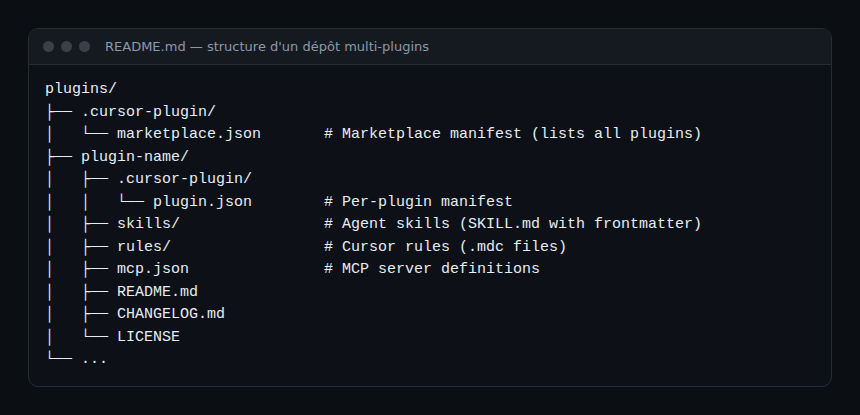
Each plugin is a folder at the root, with a manifest .cursor-plugin/plugin.json. Here is the teaching plugin’s, abridged:
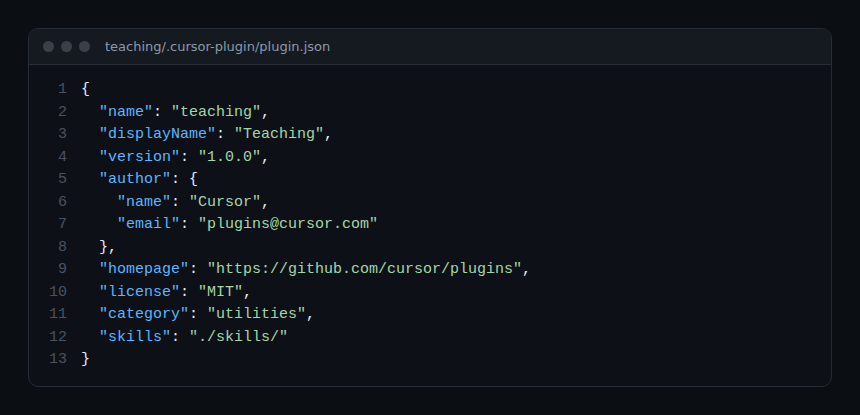
Cursor’s documentation states that only the name field is required in plugin.json. Components live in default folders or in paths declared in the manifest:
- rules/: rules in
.mdcformat; - skills/<name>/SKILL.md: skills for the agent;
- agents and commands: agent configurations and command files (Cursor Plugins format only, according to the documentation);
- hooks: scripts triggered by events;
- mcp.json: MCP server definitions. The documentation asks for
${CURSOR_PLUGIN_ROOT}for the plugin root.
A multi-plugin repository adds .cursor-plugin/marketplace.json, which lists each plugin (name, source, description).
Step-by-step installation
Step 1 — From the editor
The plugins README gives the command /add-plugin teaching (the plugin name follows). Cursor’s documentation also describes the graphical path: open “Customize”, find the plugin, choose “Install”, then project or user scope.
Step 2 — Develop locally
According to the documentation, you place the plugin in ~/.cursor/plugins/local/<plugin-name>, then restart Cursor or run “Developer: Reload Window”. The repository’s create-plugin plugin offers a scaffold and a pre-submission review (skills create-plugin-scaffold and review-plugin-submission).
Step 3 — Publish
The documentation points to a submission at cursor.com/marketplace/publish, a manual review of each plugin and each update before listing, and the requirement that marketplace plugins be open source. It also mentions private marketplaces for Teams and Enterprise plans.
What a plugin can do on your machine
A plugin is not just text. Examples read in the repository:
- the
ralph-loopplugin declares inhooks/hooks.jsonafterAgentResponseandstophooks that run the plugin’s shell scripts; - the
githubplugin (third_party/githubfolder) declares inmcp.jsona remote MCP server,https://api.githubcopilot.com/mcp/, with an authorisation header read from theGITHUB_PERSONAL_ACCESS_TOKENvariable; - several
third_party/plugins describe themselves as access to services: messaging, CRM, finance, payments. The README descriptions mention, for instance, placing trades or sending messages: these are rights to review before enabling.
For the GitHub server, see the GitHub MCP server guide; for hidden-instruction risks, MCP tool poisoning; for an observability plugin on the Dynatrace side, the Dynatrace plugin for Cursor.
Observing and supervising
The specification describes no OpenTelemetry export for the plugins themselves. What you can measure on the operations side:
- Inventory: list the plugins installed per machine, their version and scope (project or user), as for packages.
- Hooks: read each
hooks.jsonand the scripts it calls; log their executions if you own them. - MCP servers: note the URLs, the token environment variables and each token’s rights (see securing an MCP server).
- Costs and calls: tool activity is read in the agent’s telemetry, not in the plugin.
Limits and open points
- Licence: MIT according to the README, but no root file at the time of checking; the
third_party/plugins were not all reviewed here. - The format is changing: Cursor’s documentation already distinguishes the “Cursor Plugins” format (
.cursor-plugin/plugin.json) from an “Agent Plugins” format (plugin.jsonat the root). - Several plugins require third-party accounts; those services’ terms do not depend on the repository.
Best practices
- Install at project scope rather than user scope while you evaluate.
- Read
plugin.json,hooks.jsonandmcp.jsonbefore enabling a plugin. - Give MCP servers minimal-rights tokens, read-only whenever possible.
- Keep a written inventory of approved plugins, with an owner and a review date.
Frequently asked questions
Are Cursor plugins the same as Claude Code plugins?
Do not assume they are interchangeable. Cursor’s manifest is .cursor-plugin/plugin.json; Cursor’s documentation also describes an “Agent Plugins” format. Check compatibility in the other tool’s documentation before reusing a plugin.
Do I have to pay to use this repository?
The repository is public, under MIT according to its README. The Cursor editor and the third-party services the plugins call have their own terms.
How do I know what a plugin sends outside?
Read its mcp.json (server URLs) and its hooks (scripts run). Then watch the machine’s outbound connections.
Conclusion
The cursor/plugins repository is both a living specification and a catalogue. For an SRE team the essentials are to treat a plugin as code: manifest read, hooks reviewed, tokens limited, inventory kept. Sources: cursor/plugins repository and Cursor plugin documentation.
span.observer is an independent community blog, not affiliated with Dynatrace LLC, Cursor or the projects cited. Trademarks belong to their owners. Tools change quickly: check commands and options in their official documentation.