With ILM delete searchable snapshot, a trap waits for teams that keep logs on searchable snapshots: by default, the delete action of an ILM policy removes the index and also the snapshot behind it. If that snapshot was your only copy of the data, it is gone with it.
This guide covers what the Elastic documentation for the delete action says, why the behaviour surprises people, and how to switch it off or work around it. The goal is a policy whose effect on storage you understand, and a check that it does what you think. Searchable snapshot availability depends on your licence: check with Elastic.
In short
- The
delete_searchable_snapshotparameter of thedeleteaction is a boolean, true by default, according to the Elastic documentation. - It applies when the
searchable_snapshotaction was used in an earlier phase of the same policy. - With
false, ILM keeps the snapshot; you delete it yourself later with the Delete snapshots API. - A mounted snapshot is not an independent backup: Elastic describes it as the only full copy of the data.
ILM delete searchable snapshot: what the action does by default
An ILM policy splits an index’s life into phases. The searchable_snapshot action takes a snapshot of the managed index and mounts it as a searchable snapshot. Its reference page allows it in the hot, cold and frozen phases. It needs a snapshot repository, through the required snapshot_repository parameter.
Later, the delete phase runs the delete action. That action’s page says delete_searchable_snapshot deletes “the searchable snapshot created in a previous phase”. The default is true. The searchable_snapshot page confirms it: by default the delete action in the delete phase removes the snapshot, and to keep it you set delete_searchable_snapshot to false.
In practice, the shortest possible policy, a delete phase with "delete": { }, also deletes the snapshot. Nothing shows up as an error: this is the documented behaviour.
Why this behaviour catches SRE teams out
The trap comes from vocabulary. A “snapshot” sounds like a backup. For an index mounted as a searchable snapshot, the Elastic documentation says otherwise: the snapshot is the only full copy of the data, and if you delete it, the data is permanently lost.
Take a 365-day retention with a cold phase at 30 days that mounts a snapshot. A team that reads “snapshot” as “backup” may believe a copy survives the delete phase. With default values, it does not. For an SRE the risk is compliance: an obligation to keep logs longer than the index lives is not covered.
Note the retention nuance too: according to the searchable_snapshot page, snapshot retention follows ILM policies and is not affected by SLM policies. A scheduled snapshot policy therefore does not protect this snapshot on its own. This topic is separate from cost and latency, covered in https://span.observer/en/elasticsearch-frozen-tier-searchable-snapshots-cost/.
Write a policy that keeps the snapshot
Here are the steps to keep the snapshot after the index is deleted.
- Prerequisites: a registered snapshot repository (here
backing_repo) and configured data tiers, which the action requires. - Create the policy with
PUT /_ilm/policy/{policy}, settingdelete_searchable_snapshottofalsein the delete phase. - Attach the policy to the relevant index template or data stream.
- Decide who deletes the snapshot, and when: with
false, that job is yours.
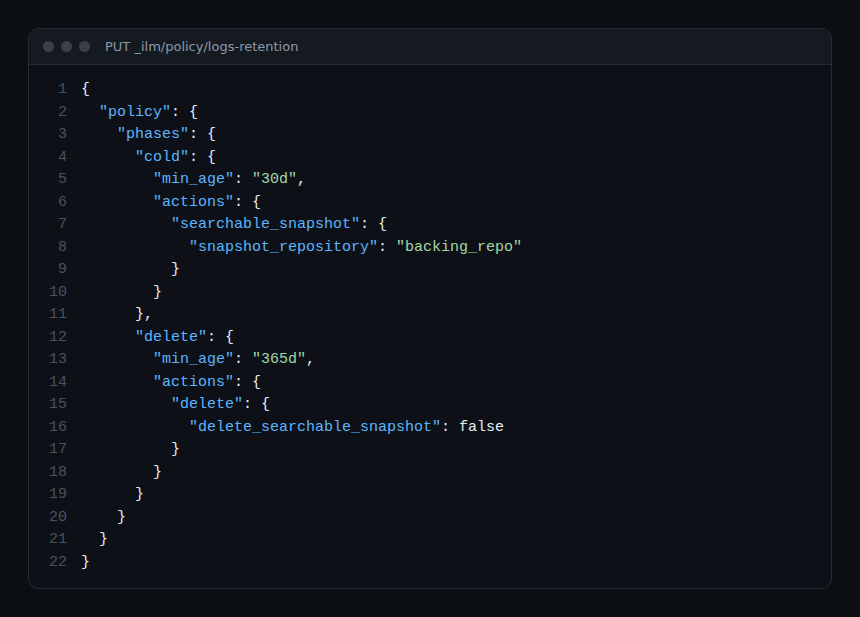
PUT _ilm/policy/logs-retention
{
  "policy": {
    "phases": {
      "cold": {
        "min_age": "30d",
        "actions": {
          "searchable_snapshot": { "snapshot_repository": "backing_repo" }
        }
      },
      "delete": {
        "min_age": "365d",
        "actions": {
          "delete": { "delete_searchable_snapshot": false }
        }
      }
    }
  }
}
This example adapts the documentation’s examples: the durations and the repository name are illustrative, so replace them. The API reference page does not define min_age: read the “About index lifecycle management” page before choosing your durations.
Delete the snapshot cleanly, or clone it
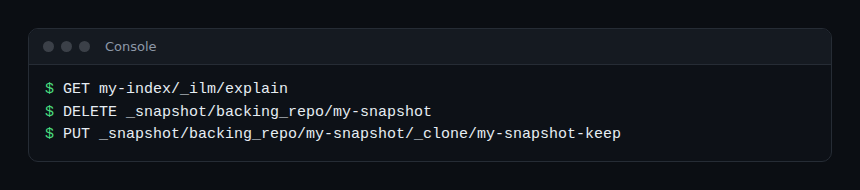
When delete_searchable_snapshot is false, the action page points to the Delete snapshots API. According to the API reference, the request is DELETE /_snapshot/{repository}/{snapshot}; the snapshot name accepts a list or wildcards (*), and wait_for_completion defaults to true.
Beware of a case the documentation flags: while an index is mounted from that snapshot, Elastic says not to delete it. The searchable snapshots page states you must not delete a snapshot if any of its indices are mounted. The local cache can hide the problem for a while, but it is incomplete: Elasticsearch keeps operating normally until the first cache miss, and restores fail for indices whose original snapshot is gone.
To separate the index’s lifetime from the backup’s, the same page suggests cloning the snapshot. The Clone snapshot API is PUT /_snapshot/{repository}/{snapshot}/_clone/{target_snapshot}, with a body listing the indices to include.
PUT _snapshot/backing_repo/my-snapshot/_clone/my-snapshot-keep
{
  "indices": "my-index"
}
Two more points. If you delete an index by hand before the delete phase, ILM will not delete the snapshot: remove it with the API. And if you apply a policy to an index that is already a searchable snapshot, the underlying snapshot will not be deleted, because that policy did not create it.
How to check that it works
Before the delete phase, query the Explain API: GET /{index}/_ilm/explain returns, per index, the managed, policy, phase, action and step fields. Check that the index is managed by the right policy and sits in the expected phase.
Then test on a throwaway index with very short durations. Check, before and after the delete phase, whether the snapshot is still in the repository. Do this before touching production, because the operation is destructive. Once the policy is live, schedule a check of the space used in the repository: a snapshot kept on purpose needs an owner and an expiry date.
Best practices
- State in the policy review whether the snapshot must outlive the index.
- Never treat a mounted snapshot as your only backup: clone it if the data must be kept.
- Test on a disposable index before applying a policy to a production data stream.
- Plan a scheduled clean-up of retained snapshots, with a named owner.
OpenTelemetry and Dynatrace angle
This trap is a configuration effect, not a failure: no alert fires, because the action succeeds. The defence lies in policy review, not monitoring. To monitor the cluster itself, see https://span.observer/en/opentelemetry-collector-kubernetes-dynatrace/ on the OpenTelemetry Collector; the choice between platforms is covered in https://span.observer/en/dynatrace-vs-datadog-comparison-sre/. I present no Dynatrace integration specific to Elasticsearch snapshots: I found none in the pages I read. On the difference between watching and understanding, see https://span.observer/en/observability-vs-monitoring-difference/.
Frequently asked questions
What is the default value of delete_searchable_snapshot?
It is true, according to the delete action page. The snapshot created in an earlier phase is deleted with the index unless you explicitly set false.
Does the parameter apply to every policy?
It applies when the searchable_snapshot action was used in an earlier phase of the policy. For an index that was already a searchable snapshot before the policy was applied, the snapshot is not deleted, because the policy did not create it.
Does an SLM policy protect this snapshot?
According to the searchable_snapshot action page, retention of these snapshots follows ILM policies and is not affected by SLM policies. Do not rely on SLM to keep it.
Conclusion
Remember one rule: in a policy with searchable_snapshot, the delete phase is not neutral. Decide explicitly what happens to the snapshot, clone it if the data must survive, and test on a throwaway index. For the cost and latency side of the frozen tier, read https://span.observer/en/elasticsearch-frozen-tier-searchable-snapshots-cost/ too.
Independent blog, not affiliated with Dynatrace LLC or Elastic N.V. The behaviours described come from the Elastic documentation read on 30 October 2026; check them against your cluster’s version.