ECC agent harness optimization is the theme of the affaan-m/ECC repository, an open-source system that describes itself as an “agent harness operating system”. It adds specialised agents, skills, hooks, rules, memory and a security scanner to your coding agent (Claude Code first), with a cycle it states as “plan, test, implement, review, verify, remember, improve”. The repository shows about 286,000 stars in mid-October 2026, making it one of the most followed on GitHub.
A harness this rich has an operating cost: context injected at start-up, hooks that run on every tool use, memory that accumulates, scripts installed on your machine. This article follows the README for installation, then details what to tune, measure and audit before adopting it in a team.
span.observer did not install or run ECC for this article. The commands come from the README and the screenshots are excerpts rendered from its passages.
ECC agent harness optimization: what the repository says
- Author and licence: a personal repository of the user affaan-m; MIT licence “forever” according to the README, which also presents a paid hosted offer (ECC Pro, a GitHub App for private repositories) and sponsorship.
- Figures read on 22 October 2026 on the repository page: about 286,000 stars, about 42,400 forks, 3,957 commits on the main branch. The README gives 2.2.3 (1 October 2026) as the current version; the repository page shows no GitHub release.
- Content announced by the README: 71 agents, 311 skills and 97 compatibility “command shims”, plus hooks, rules, memory, continuous learning and the AgentShield scanner. These numbers change between versions: the repository’s cover image showed different ones when last made.
- Targets: best with Claude Code; native paths for Codex and Qoder; “capability-limited” adapters for Cursor, OpenCode, Gemini, Zed, GitHub Copilot and others. The README asks you to read the support matrix before assuming feature parity.
- Languages: the README shows Shell, TypeScript, Python, Go, Java, Perl and Markdown.
ECC is not a Dynatrace product. Its effects on context and cost can be measured through OpenTelemetry, whether you use Dynatrace SaaS or Dynatrace Managed.
Step-by-step installation
The README insists on one point: install ECC only from its official channels (the repository, the npm packages ecc-universal and ecc-agentshield, the ecc@ecc plugin, the ecc.tools site), because third-party copies may contain malware.
Prerequisites
Node.js 18 or newer for the universal package; for the Claude plugin, Git and Claude Code 2.1 or newer on the PATH.
Guided wizard (recommended by the README)
npx [email protected] setupThe README adds a Windows (PowerShell) walkthrough: check node --version, git --version and claude --version, run the command, choose “Global user” and “Standard” hooks, then check with /plugin list that ecc@ecc is enabled. The wizard inventories existing Claude scopes before writing anything.
Claude Code native commands
The commands below install the same plugin. The README asks you to choose one method per harness and not to stack a full manual install.
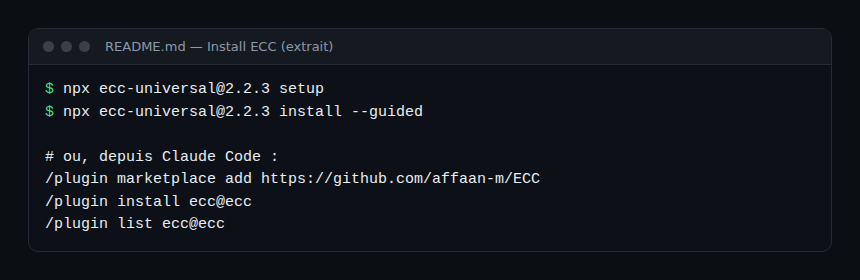
The README notes that the pinned version (@2.2.3) is neither a security audit nor an integrity check: review the source and package integrity before running its code. Rules do not travel through the plugin: the README explains copying rules/common and a language pack by hand into ~/.claude/rules/ecc.
Uninstalling
If you stacked several installs, the README points to its “Reset / Uninstall” section, and advises node scripts/ecc.js doctor then repair before reinstalling.
Usage: start with a workflow, not the catalogue
The README suggests starting from the need: /ecc:plan then the tdd-workflow skill for a feature, /code-review for a fresh-context review, /build-fix to repair a build, /context-budget to watch context pressure, /save-session and /resume-session for memory, and /security-scan to audit the agent configuration. Skills are the main surface; commands remain compatibility shortcuts.
Tuning cost: context, hooks and memory
The most concrete operations item in the README is the list of environment variables that bound what ECC injects into the context. They are direct levers on token consumption, which we cover in the token cost of an AI agent.
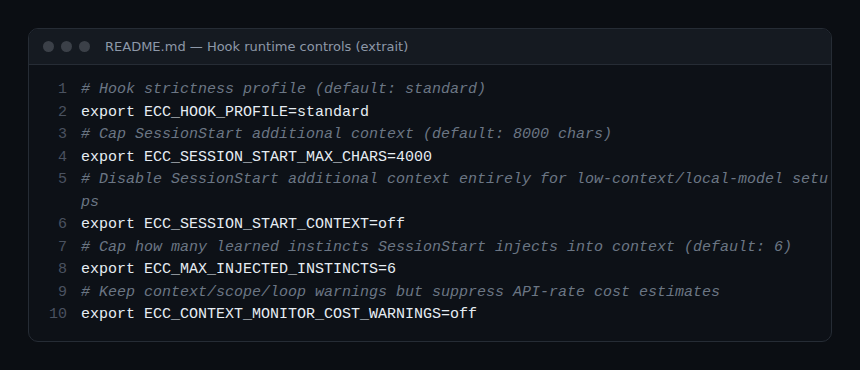
ECC_HOOK_PROFILE: hook intensity, “standard” by default.ECC_SESSION_START_MAX_CHARS: cap on context added at session start, 8,000 characters by default according to the README.ECC_SESSION_START_CONTEXT=off: turns that context off, intended for low-context or local-model setups.ECC_MAX_INJECTED_INSTINCTS: number of learned “instincts” injected at start, 6 by default.ECC_CONTEXT_MONITOR_COST_WARNINGS=off: keeps context warnings but removes API-rate cost estimates.
The README also states a retention period for temporary sessions, 30 days by default (ECC_SESSION_RETENTION_DAYS). For memory and context, two other projects in the series make similar choices: context-mode and Hindsight.
Security: the harness is an attack surface
ECC makes security an argument: the README says agent configuration should not be trusted by default. It ships AgentShield, a scanner whose documented commands are agentshield scan --path ., --fix and agentshield init. The README applies it to CLAUDE.md, settings.json, MCP configurations, hooks, agent definitions and skills. It requires an already installed, reviewed binary and states that publication on a registry is not an audit.
The README also describes a guard (GateGuard) that checks destructive shell commands before they run. These are the project’s claims; we have not tested them. For the general frame, see guardrails for AI agents in production.
Limits and open points
- Very wide surface: hundreds of skill, agent and hook files. Each addition is text or code that drives your agent: review before enabling.
- Parity across harnesses: only some targets have native paths; the others are limited.
- Changing numbers: agents, skills and commands vary between versions; do not quote them without a date.
- Business model: an MIT project with an associated paid offer. Nothing unusual, but worth knowing.
- Single stated maintainer: the README speaks of one maintainer shipping weekly; plan for a change of pace.
Observing ECC with OpenTelemetry
The README describes no OpenTelemetry export specific to ECC. The signals come from the client:
- the
claude_code.tool_resultevent (tool name, status, duration) and tokens per session, see supervising a coding agent in the enterprise; - comparing tokens per session with and without ECC, or with a capped start-up context, to quantify the real effect on your repositories;
- ECC’s hook logs and context warnings, kept as evidence of what the agent was prevented from doing.
How to check that it works
/plugin list ecc@eccshows the plugin enabled, only once.- A new session start injects context bounded by the variables above.
- Your traces show tool calls with duration and status, and the session’s token consumption.
Best practices
- Install from the official channels and pin the version.
- Enable few skills and a standard hook profile, then widen.
- Measure tokens before and after installation.
- Run AgentShield (or another audit) on your configuration, not only on code.
- Avoid stacking the plugin and a full manual install.
Frequently asked questions
Does ECC only work with Claude Code?
No: the README describes native paths for Codex and Qoder and more limited adapters for other tools, but says Claude Code is best supported.
Does ECC increase token consumption?
It injects context at start-up and loads skills; the README provides variables to cap it. The net effect on your repositories is something to measure, not assume.
Do I need the paid offer?
The README states the repository stays free under the MIT licence; the hosted offer covers private repositories through a GitHub App.
Conclusion
ECC is less a tool than a packaged stack of practices for coding agents. Its value to a team lies in its levers (hook profiles, context cap, memory, configuration audit); its risk, in its size. Adopt it in small steps, measure tokens, audit the configuration. Source: affaan-m/ECC repository.
span.observer is an independent community blog, not affiliated with Dynatrace LLC, with the projects cited or with Anthropic. Trademarks belong to their owners. Tools change quickly: check commands and options in their official documentation.