The wshobson agents plugin marketplace is the wshobson/agents repository: a collection of plugins, agents, skills and commands for AI coding tools, installable in Claude Code, Codex CLI, Cursor, OpenCode, Antigravity CLI, GitHub Copilot and Pi. It showed about 41,500 stars and 4,400 forks in mid-October 2026, under the MIT licence.
For an SRE team the interesting question is this: what happens when dozens of Markdown instructions written by a third party steer an agent that reads your code and runs commands? This article covers the repository’s content as described in its README and documentation, the installation steps, and how to stay in control: costs, permissions, and measuring what is actually loaded.
The information comes from the README, the documentation and the directory layout of the repository. span.observer has not installed or tested these plugins: the images below are real excerpts of repository files, rendered for readability.
The wshobson agents plugin marketplace: what the repository says
- Maintainer and licence: maintained by the GitHub user
wshobson; the LICENSE file is MIT, copyright 2024. According to the README, referenced external plugins carry their own licences. - Catalogue size (per the README): 94 plugins (92 local and 2 external entries), 202 agents, 185 skills and 105 commands in the local sources.
- Principle: one Markdown source in the Claude Code plugin format; adapters generate the formats of the other tools. The README calls the tool that loads and runs the components a “harness”.
- README definitions: an agent is an instruction set for a specialist subagent; a skill is guidance the agent loads when relevant; a command is a named workflow you invoke yourself.
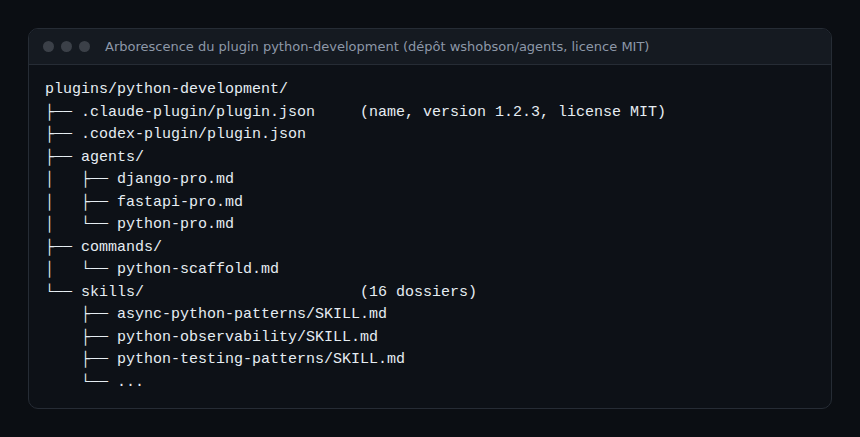
The layout above, read from the repository, shows the basic unit: the python-development plugin groups three agents (Django, FastAPI, Python), a project-scaffolding command and sixteen skills. The .claude-plugin and .codex-plugin manifests let two tools read the same source.
Installing the marketplace as the README describes
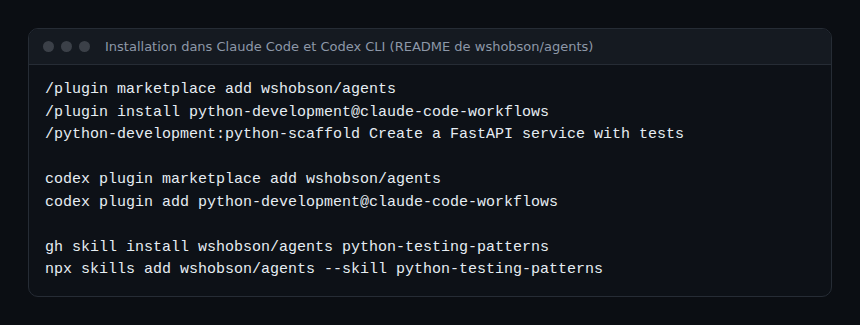
The README lists one route per tool. The commands below come from its “Quick start” section.
Step 1 — Claude Code
Type these commands inside Claude Code to register the marketplace and install a plugin:
/plugin marketplace add wshobson/agents
/plugin install python-development@claude-code-workflows
The README then suggests the plugin’s scaffolding command:
/python-development:python-scaffold Create a FastAPI service with testsStep 2 — Codex CLI
codex plugin marketplace add wshobson/agents
codex plugin add python-development@claude-code-workflows
The README states that the native Codex manifests expose the source skills, while the generated TOML agents go through a separate adapter path.
Step 3 — A single skill, nothing else
gh skill install wshobson/agents python-testing-patterns
npx skills add wshobson/agents --skill python-testing-patterns
Both installers fetch the skill without cloning the repository and without the plugin’s agents, commands or hooks. gh skill needs GitHub CLI 2.90 or later; npx needs Node.js. This is the most cautious route for a first try.
Step 4 — OpenCode, Antigravity, Copilot, Pi
These four tools go through a clone: install uv, Python 3.12 or later and the target tool, clone the repository (gh repo clone wshobson/agents ~/agents), then run make install-opencode, make install-antigravity, make install-copilot or make install-pi. According to the README, each target generates the artefacts and links all local plugins into the tool’s user configuration, which is much broader than a single plugin.
Under the hood: agents, skills and commands
An agent file is a Markdown document with a YAML header: name, description, model alias. The README says the possible aliases are opus, sonnet, haiku, fable or inherit, and that each adapter maps them to the target tool’s settings.
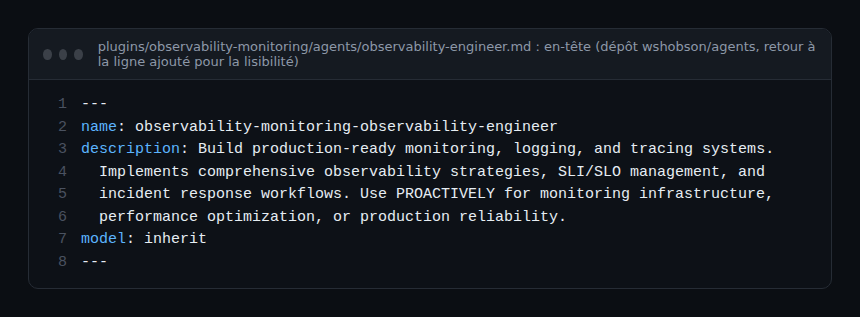
The example above comes from the observability-monitoring plugin. Its agent declares itself usable “PROACTIVELY”, meaning the tool may suggest it on its own based on the description. That is handy, and also a reason to read these descriptions before installing in bulk.
The repository also holds plugins close to our field: observability-monitoring (database, network, observability and performance agents; monitor-setup and slo-implement commands; distributed-tracing, grafana-dashboards, prometheus-configuration and slo-implementation skills), plus incident-response and distributed-debugging. These are instructions for the agent, not collection tools: they do not replace an observability backend.
Monitoring and constraining a plugin marketplace
The repository is not a service: it emits no traces or metrics. What you monitor is the agent that loads it. Three angles, as for the token cost of an AI agent.
- Costs. The README warns that
plugin-evalruns with the LLM judge useANTHROPIC_API_KEYwhen it is set and bill that account, otherwise your Claude Code login. Measure consumption before and after adding plugins to your tool. - Permissions. Plugins can carry hooks and MCP configuration (the README mentions “plugin-specific hooks and MCP configuration” for Claude Code). The capability matrix in
docs/harnesses.mdshows no lifecycle hooks for Codex and Cursor. Apply the guardrails for AI agents in production: per-agent tool allowlists, a sandbox, command review. - Observation. If your tool exports OpenTelemetry traces, the tool produces them; check its documentation. For agents calling MCP tools, see observing MCP agents.
How to check that it works
- After
/plugin install, the/python-development:python-scaffoldcommand appears in the tool and runs on a throwaway directory. - The number of loaded components matches what you installed: one plugin, not all 94.
- For clones (
make install-*), the README offersmake validate STRICT=1to check the structure of the generated artefacts.
Limits and open points
- Volume. 94 plugins and nearly 500 components (agents, skills, commands): quality is uneven by nature, and the README itself says the LLM judge and Monte Carlo scores are experimental and “do not prove that a task succeeds in a project”.
- Parity between tools. Capabilities differ (subagents, hooks, an 8 KB cap on a skill body for Codex). A “multi-harness” plugin does not behave identically everywhere; read the matrix in
docs/harnesses.md. - Trust. Installing a plugin means giving instructions to an agent that holds your permissions. External plugins have their own licences and maintainers.
- Disclosed interest. The README states that the repository’s maintainer founded Major7 Apps, which maintains the external Pensyve (memory) entry, and that Pensyve Cloud closed on 1 October 2026 according to the README; only local or self-hosted use remains.
- Figures. Stars, forks and component counts are those read in mid-October 2026; they change quickly.
Best practices
- Start with a single skill (
gh skill install) rather than a clone that links every plugin. - Read the
agents/*.md,commands/*.mdfiles and hooks before enabling a plugin. - Limit each agent’s tools and work in a throwaway directory or container, for example with an isolated runtime such as NVIDIA OpenShell.
- Pin a version (the README points to its documentation on pinning) and review changes before updating.
- Keep few plugins: every loaded description takes up context and can trigger an unexpected agent.
Frequently asked questions
Does the wshobson marketplace work outside Claude Code?
Yes, according to the README: Codex CLI, Cursor, OpenCode, Antigravity CLI, GitHub Copilot and Pi are supported, with different capabilities per tool.
Can I install just one skill?
Yes. The README describes gh skill install and npx skills add, which install the skill without the plugin’s agents, commands or hooks.
Is it free?
The repository is MIT licensed. Model calls are billed by your provider, and external plugins have their own licences. For another widely followed agent project, see OpenClaw.
Conclusion
The wshobson/agents repository is a very full catalogue of reusable building blocks for coding agents. Its value depends on what you take from it: one reviewed skill beats a hundred plugins loaded at once. Treat it as third-party code: read it, isolate it, budget it and measure it.
span.observer is an independent community blog, not affiliated with Dynatrace LLC or the projects mentioned. Trademarks belong to their owners. Tools change quickly: check commands and options in the project’s official documentation (github.com/wshobson/agents).