agentgateway MCP gateway: the agentgateway/agentgateway repository describes itself as a next-generation “agentic” proxy for AI agents and MCP servers. Written in Rust, it sits between an agent (Claude Code, Cursor, an in-house service) and the tools it calls, to federate them, authenticate callers, filter what is exposed and trace every tool call with OpenTelemetry. The repository page showed about 5,800 stars and 1,000 forks on 30 October 2026, under the Apache 2.0 licence.
For an SRE or a platform team, the question is not “do we need yet another proxy?” but “where do we put the control point when ten agents call thirty MCP servers?”. An agent that receives a server’s full tool list can call any of them; a gateway that filters that list by identity, logs the arguments and exports one span per tools/call brings those calls back into the usual scope of observability and security.
Honesty note: span.observer has not deployed agentgateway. Commands, excerpts and screenshots come from the README, the repository’s examples/ folder and the agentgateway.dev documentation.
agentgateway MCP gateway: what the repository says
- Project and governance: the README states that agentgateway is a Linux Foundation project. The project blog dates the donation by Solo.io to the Linux Foundation to 25 August 2025, and the documentation landing page says the project was accepted as an Agentic AI Foundation (AAIF) project in 2026. We found no mention of the CNCF: do not present it as a CNCF project.
- Licence and language: Apache 2.0, checked in the LICENSE file on 30 October 2026. The repository is a Cargo workspace (Rust, 2024 edition); the documented
agentgateway --versionoutput for 1.7.0 reportsrust_version1.89.0 and anx86_64-unknown-linux-musltarget. - Version: the releases page lists v1.7.0 as the latest version, published on 27 October 2026, after v1.6.0 on 2 October. The project blog places 1.0.0 in March 2026: the cadence is monthly, with breaking changes documented in every minor release.
- Scope: the README describes three roles: an LLM gateway (OpenAI-compatible API, budgets, guardrails), an MCP gateway (tool federation, stdio, HTTP, SSE and Streamable HTTP transports, OpenAPI exposed as tools, OAuth) and an A2A gateway. This article sticks to the MCP role, with authentication, CEL authorisation and telemetry.
- Deployment modes: a standalone binary driven by a YAML file, or a Kubernetes controller implementing the Gateway API. Release 1.7.0 publishes the
cr.agentgateway.dev/agentgateway:v1.7.0image, the controller image and three Helm charts.
A tour of the configuration
An agentgateway configuration file is short. The repository’s mcp-authorization example fits in thirty lines and shows the whole chain: a listening port, a jwtAuth policy that validates client tokens, mcpAuthorization rules written in CEL, and an MCP target over HTTP.
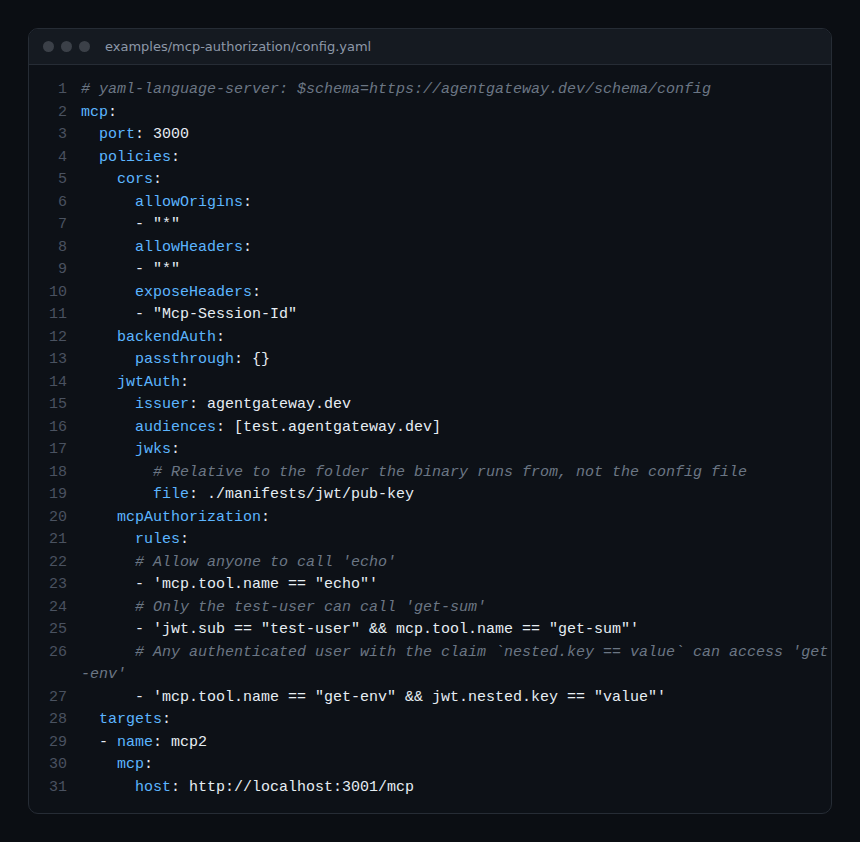
Three things to read in this file:
jwtAuthdeclares the issuer, the audiences and the location of the public keys; the README warns that the keys and tokens shipped inmanifests/jwt/are for demonstration only.mcpAuthorization.rulesholds CEL expressions evaluated against the MCP call, not the HTTP request:mcp.tool.name == "echo"allows everyone,jwt.sub == "test-user" && mcp.tool.name == "get-sum"reserves a tool for one user, and a third rule relies on a nested claim. According to the documentation, a tool that is not allowed disappears from thetools/listresponse and a direct call to it is denied.- Targets accept
stdio(the gateway launches the command) ormcpwith an HTTPhost. Both forms mix in the same list.
With several targets, the gateway aggregates the servers into a single MCP endpoint and prefixes each tool with its target name to avoid collisions. The mcp-multiplex example exposes the time and everything servers this way:
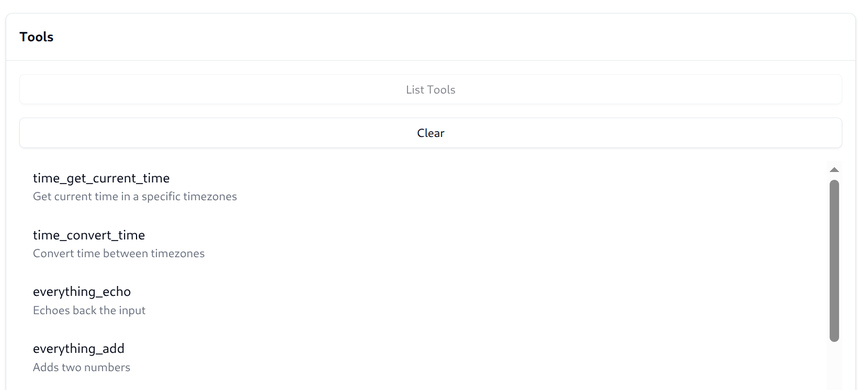
The same README points out a concrete trap: if one target fails to start, initialize fails for the whole multiplexed backend. A broken MCP server therefore cuts access to all the others, which argues for an alert on the availability of each target.
Step-by-step installation (standalone mode)
Step 1 — Install the binary
The documentation offers an install script, with a pinned-version option that we recommend for anything beyond a trial:
curl -sL https://agentgateway.dev/install | bash -s -- --version v1.7.0
agentgateway --version
The binary lands in /usr/local/bin/agentgateway. Nightly builds exist for Linux (x86 and ARM), macOS and Windows, versioned 0.0.0-alpha.<commit>: keep them for testing.
Step 2 — Start a test MCP server
PORT=3005 npx -y @modelcontextprotocol/server-everything streamableHttpStep 3 — Write the configuration
The MCP quickstart in the documentation also serves the web UI on the same port:
# yaml-language-server: $schema=https://agentgateway.dev/schema/config
gateways:
  default:
    port: 4000
mcp:
  targets:
  - name: server-everything
    mcp:
      host: http://localhost:3005/mcp
ui: {}
agentgateway -f config.yaml
# info app serving UI at http://localhost:4000/uiStep 4 — Check with an MCP client
The UI offers a “Tool Playground”. On the command line, the quickstart chains initialize, tools/list and then tools/call as JSON-RPC against http://localhost:4000/mcp, with the mcp-session-id header returned at initialisation. The expected answer to an echo is Echo: <your message>.
Observing tool calls: metrics, logs, traces
This is the core of the interest for an SRE: according to the “MCP observability” documentation, the gateway produces all three signals with no instrumentation on the agent or the MCP server side.
Metrics. The Prometheus endpoint listens on localhost:15020/metrics. The reference lists agentgateway_mcp_requests_total, a counter labelled by server, method (tools/call, tools/list), resource and resource_type. Counters only appear after the first request. The README of the mcp-telemetry example shows an older output with tool_calls_total: check the names on your version before writing an alert.
Logs. Every request produces a structured line with mcp.method.name, mcp.target, mcp.session.id, gen_ai.tool.name, trace.id and span.id. An accessLog policy can add the arguments and result of a call:
frontendPolicies:
  accessLog:
    filter: 'mcp.methodName == "tools/call"'
    add:
      tool_args: 'mcp.tool.arguments'
      tool_result: 'mcp.tool.result'
      tool_error: 'mcp.tool.error'
Tool lists are written in full into each matching line: filter on the method to limit volume, as the documentation advises.
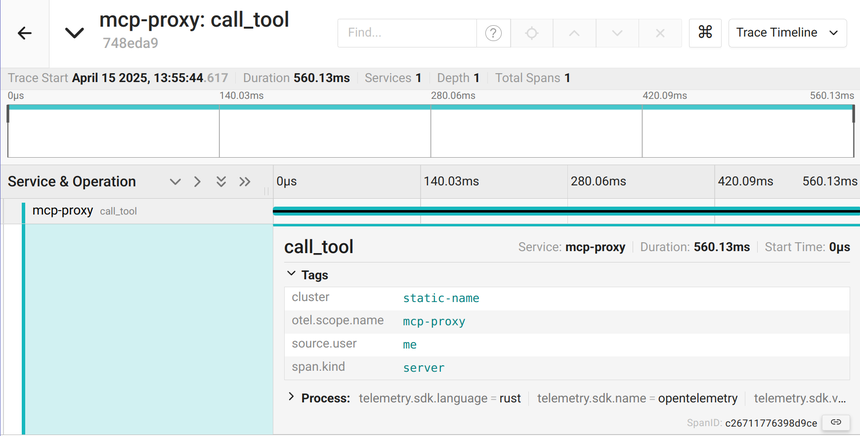
Traces. OTLP export is enabled with frontendPolicies.tracing, with a host (OTLP gRPC by default, protocol: http available) and randomSampling (true, or a fraction such as 0.1). The resources field sets service.name, which defaults to agentgateway; attributes adds attributes computed in CEL, remove drops some, and filter exports only the spans matching an expression. Spans carry mcp.method.name, mcp.target, mcp.session.id, gen_ai.tool.name, and mcp.error.code on failure; the span name follows the form <method> <target>_<tool>, for example tools/call everything_echo.
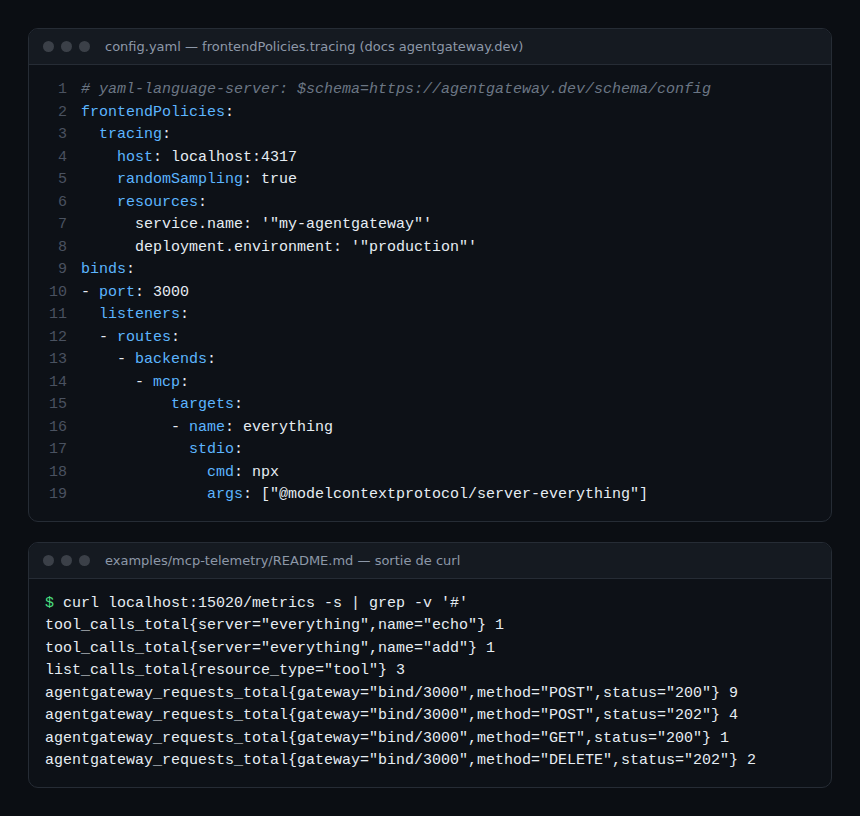
The repository’s mcp-telemetry example ships a docker-compose.yaml with an OpenTelemetry Collector (OTLP gRPC receiver on 4317) and a Jaeger; its screenshot shows a 560 ms server-side call_tool span.
What about Dynatrace?
The project documents no Dynatrace integration; we claim nothing beyond what OTLP allows. On the agentgateway side, export is OTLP gRPC by default, with headers customisable through policies.requestHeaderModifier.set. On the Dynatrace side, the OTLP export documentation states that gRPC is not accepted: the API expects OTLP/HTTP on /api/v2/otlp (SaaS: https://{id}.live.dynatrace.com/api/v2/otlp; Managed: through an Environment ActiveGate on port 9999) and recommends a Collector to convert gRPC to HTTP. The safest path is therefore agentgateway → Collector (OTLP gRPC receiver, otlphttp exporter) → Dynatrace; see the Collector Contrib components. On SaaS, the gen_ai.tool.name and mcp.target attributes can be queried in DQL on spans; on Managed, traces land in Distributed traces without DQL or Grail. For the next step of the analysis, measuring the cost of an AI agent with OpenTelemetry and detecting MCP tool poisoning start from the same attributes.
Limits and open points
- 1.7.0 introduces a breaking change: standalone mode now always encrypts MCP session IDs; sessions opened before the upgrade are rejected unless you set
config.session.key: disabled. Plan the upgrade off-peak. - Authorisation rules and CEL guardrails (
mcpGuardrails,kind: expressionprocessors withrejectortransform) are powerful but live in a YAML file: without review and testing (the project ships a “CEL playground” in the UI), a faulty expression denies or lets through more than intended. - Operational detail is spread across the documentation, the example READMEs and the release notes, which do not always name metrics the same way.
- The quickstart leaves the web UI unauthenticated on the gateway port: do not reproduce this on a shared network. The documentation has a dedicated section for securing the UI.
- Like any gateway, agentgateway becomes a single point of passage: its unavailability cuts off every tool for every agent.
Good practices
- Pin the binary or image version and read the “breaking changes” section of every release before upgrading.
- Write
mcpAuthorizationrules as an allow-list per tool and per identity; a tool missing fromtools/listis your first line of defence. - Export traces to a Collector: you gain the gRPC → HTTP conversion, batching and a redaction point for
mcp.tool.argumentsif you log them. - Alert on
agentgateway_mcp_requests_totalperserver: astdiotarget that no longer starts shows up there first. - Pair the gateway with an isolated runtime for the agent itself: agent-sandbox fences the agent’s pod, agentgateway fences its outbound calls; the guardrails for AI agents in production cover content. To expose a Dynatrace environment to an agent, the Dynatrace MCP server is a natural candidate to place behind the gateway.
Frequently asked questions
Does agentgateway replace authentication on MCP servers?
It centralises it on the client side: jwtAuth, API keys or OIDC authenticate the agent, and backendAuth describes how the gateway authenticates to each target (passthrough, token, token exchange).
Which OpenTelemetry signals does the gateway emit for a tool call?
One span per MCP request with mcp.method.name, mcp.target, mcp.session.id and gen_ai.tool.name, a structured log line carrying the same fields plus trace.id, and the agentgateway_mcp_requests_total counter on :15020/metrics.
Can these traces be sent to Dynatrace?
Yes, over OTLP, but not directly in gRPC: the Dynatrace API only accepts OTLP/HTTP on /api/v2/otlp. Go through an OpenTelemetry Collector, or set protocol: http and the required authorisation header; we have not tested that second route.
Conclusion
agentgateway brings to teams running AI agents what an API gateway brought to microservices: a single point where you decide who calls what, and where every call leaves a span, a log line and a counter. The project is young, its release cadence is brisk and its breaking changes are real, but the telemetry documentation is at the level expected of an infrastructure component. Sources: agentgateway/agentgateway repository, MCP observability documentation and OTLP export to Dynatrace.
span.observer is an independent community blog, not affiliated with Dynatrace LLC or the projects mentioned. Trademarks belong to their owners. Tools change quickly: check commands and options in their official documentation.