WordCraft, open source word processor written in Rust, is developed by the ArtCraft team (GitHub organisation “storytold”). The project describes itself as a clean-room reimplementation of Microsoft Word: the ribbon, styles, tables, track changes, references and mail merge. It reads and writes .docx and runs on macOS, Windows, Linux, BSD and in the browser through WebAssembly.
Figures read on the repository page in mid-October 2026: about 13,600 stars and 3,500 forks, dual-licensed MIT or Apache-2.0 (your choice), latest release v0.7.0 published on 14 October, Rust code according to the README. The project says it is not affiliated with or endorsed by Microsoft. span.observer reports these claims without vouching for them, has not installed the software, and uses screenshots from the repository.
If free office software interests you on the operations side, also read ONLYOFFICE with local AI: it is a different model, a web server, where WordCraft is a native application. For the spreadsheet of the same family, see GridCraft.
WordCraft open source word processor: a tour
The built-in sample document, “The Open Studio Handbook”, serves as the demonstration. It shows the tabbed ribbon, the style gallery with live preview, the rulers and the Navigation pane.
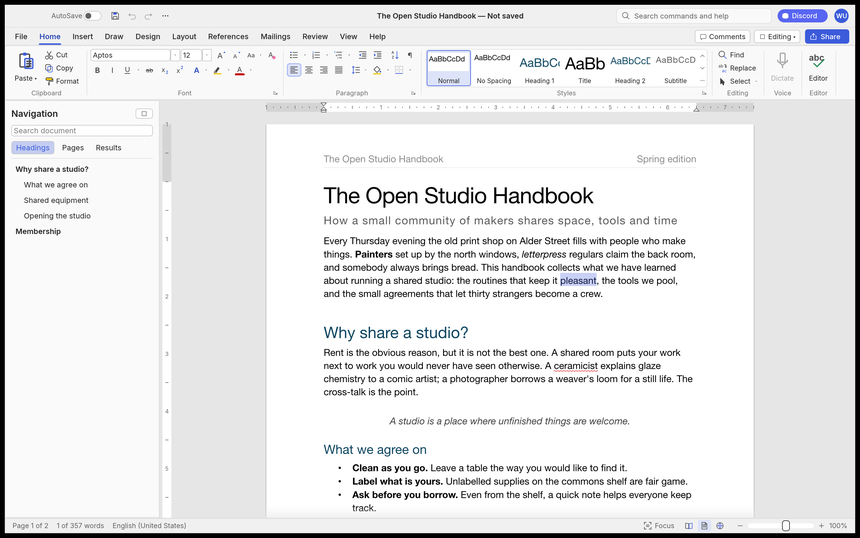
The README states that the same 422 commands drive the ribbon, keyboard shortcuts, command search, a command-line tool, a JSON control channel and an MCP server. In other words, every mouse gesture has a scriptable equivalent.
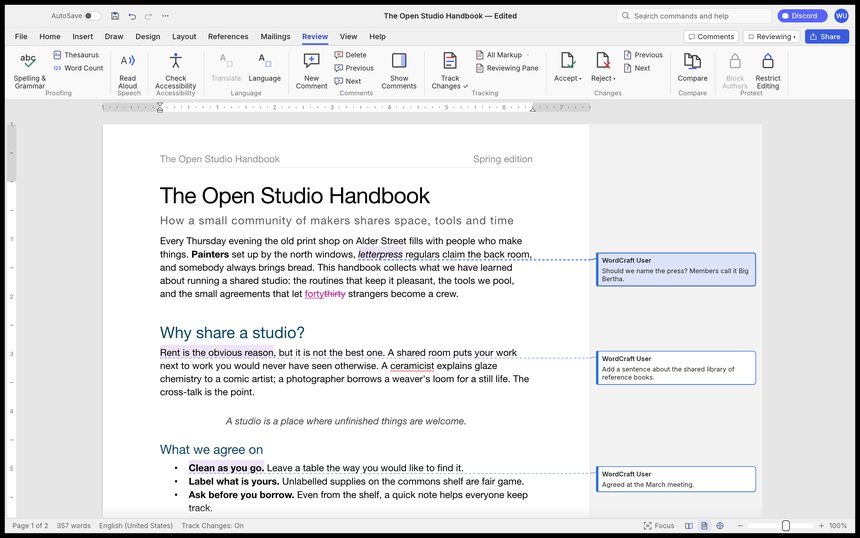
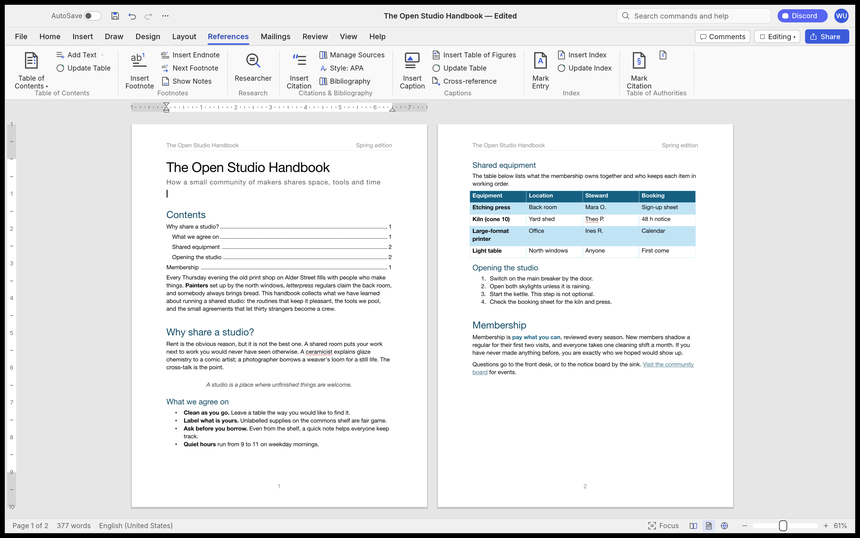
The Review tab illustrates track changes and margin comments. References cover the table of contents, footnotes, citations (APA, MLA, Chicago, IEEE) and the index.
Installing WordCraft from the README
From source, with a Rust toolchain:
git clone https://github.com/storytold/wordcraft
cd wordcraft
cargo run --release -p wordcraft -- --sample        # the app with the sample document
cargo run --release -p wordcraft -- report.docx     # open a document
The command line converts without an interface:
wordcraft-cli convert report.docx report.pdf
wordcraft-cli text report.docx
wordcraft-cli inspect report.docx
The web version starts with cd apps/wordcraft-web && trunk serve, then you open the address given in the README. Ready-made packages are on the GitHub releases: MSI or portable archive (Windows x64, arm64, x86), macOS DMG, AppImage, Flatpak, .deb, .rpm or Linux tarball, FreeBSD tarball, web zip. The AUR packages and the Gentoo overlay are community-maintained, according to the README.
Limits and open questions
- Alpha: the project estimates it is about 60% of the way to replacing Word “for real work”. It lists as steps before beta: tests on real-world .docx files, keeping charts and SmartArt through a round trip, pagination closer to Word’s, stability and native printing.
- File fidelity: never overwrite an important .docx; save a copy and compare.
- Proofing: spelling and grammar in English and Polish only, per the README’s feature list; French is not listed.
- Clean-room claim: it comes from the project and is not verified here.
Measuring WordCraft on a workstation
As a desktop application WordCraft has nothing to monitor server-side, and we do not invent any telemetry feature. The README does document a wordcraft.log file (Linux ~/.config/wordcraft/logs/, macOS ~/Library/Application Support/WordCraft/logs/, Windows %APPDATA%\WordCraft\logs\): older files are kept (wordcraft.1.log, .2.log) so a crash leaves a trace, the size is capped at 16 MiB, and document text is never logged. The level is set with RUST_LOG.
On Windows the README describes a useful case to watch: if the app opens then closes at once, WGPU_BACKEND (for example vulkan) forces another graphics backend, as shown here in PowerShell:
$env:WGPU_BACKEND = "vulkan"
& .\wordcraft.exe
For measurements, stay with operating-system tools: start-up time, resident memory (/usr/bin/time -v on Linux), and the number of sessions that end without a panic in the log. The README quotes about 1.4 ms to re-lay out a 188-page document after a keystroke: that is the project’s own measurement, to be reproduced on your machine before you cite it.
Good practice
- Test on copies of documents while the project is in alpha.
- Keep the installer of a specific version with its SHA256 checksum.
- Attach
wordcraft.logto bug reports. - If you connect an agent through MCP, confine it with the README’s folder options (
--automation-read-root,--automation-write-root); see securing an MCP server and guardrails for AI agents in production.
Frequently asked questions
Does WordCraft read .docx files?
Yes according to the README: .docx read and write, Word 97-2003 .doc import, plus .odt, .rtf, .html, .md, .tex and .txt, and PDF export.
Is WordCraft under a free licence?
The repository contains LICENSE-MIT and LICENSE-APACHE: a dual licence, your choice. ArtCraft trademarks are not included.
Can it be used in a browser?
A WebAssembly version exists according to the README: it is built with trunk and served from any static server. Plan to host it yourself.
Conclusion
WordCraft is an open source word processor in Rust that is already widely followed but still alpha. Try it on copies, with the logs within reach. Sources: the storytold/wordcraft repository and getartcraft.com. The screenshots come from the repository, under MIT or Apache-2.0.
span.observer is an independent community blog, not affiliated with Dynatrace LLC or ArtCraft. Trademarks belong to their owners. Figures date from mid-October 2026 and change quickly: check them on the repository.