PhotoCraft, open source photo editor written in Rust, is published by the ArtCraft team in the “storytold” GitHub organisation. The project describes itself as a clean-room reimplementation of Adobe Photoshop: layers, masks, adjustment layers, layer styles, type, vectors, brushes and PSD files. This guide is for anyone following what climbs on GitHub who wants to know whether the tool deserves an evening of testing.
Figures read on the repository page in mid-October 2026: about 64,900 stars and 11,300 forks, dual-licensed MIT or Apache-2.0 (your choice), latest release v0.9.0 published on 14 October. The code is Rust, according to the README. The project states that it is not affiliated with or endorsed by Adobe. These are the project’s own claims, and span.observer does not vouch for them. This is not a test: span.observer has not installed the software, and the screenshots come from the project’s repository.
If you also follow tools that agents can drive, see Ghidra and MCP for driving local tools: PhotoCraft also exposes an MCP server (see the Model Context Protocol explained). The rest of the family is covered in the ArtCraft Craft suite.
PhotoCraft open source photo editor: a tour
The interface follows the layout of a classic raster editor: toolbar on the left, Properties and Layers panels on the right, and a status bar with zoom, colour mode and document size. According to the README it is built on egui, with a GPU compositor on wgpu (Metal, Vulkan, DX12, WebGPU) and a CPU compositor that serves as the reference.
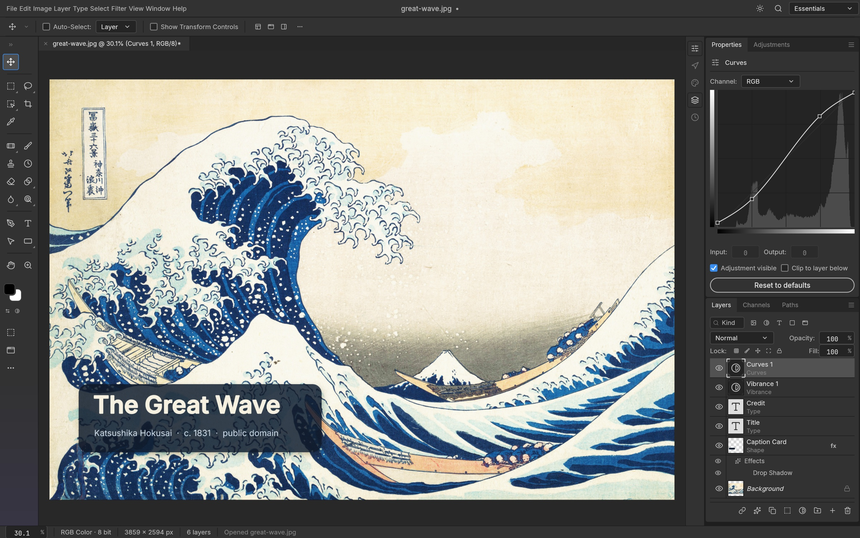
The screenshot above shows the point of adjustment layers: the Curves adjustment stays editable and the original pixels never change. The README lists 16 adjustment layers, 67 tools and a brush engine.
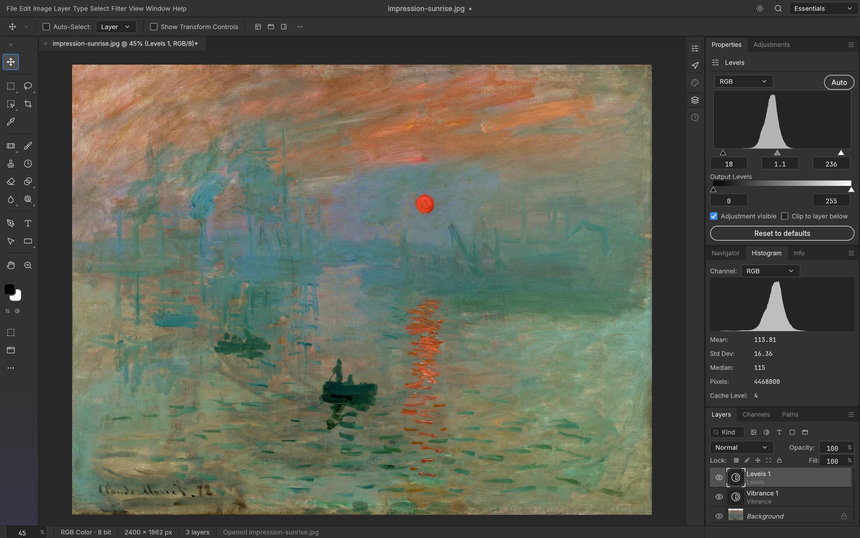
Here the Histogram panel shows the mean, standard deviation and median live while the Levels adjustment is edited: the kind of visual feedback you expect from a retouching tool.
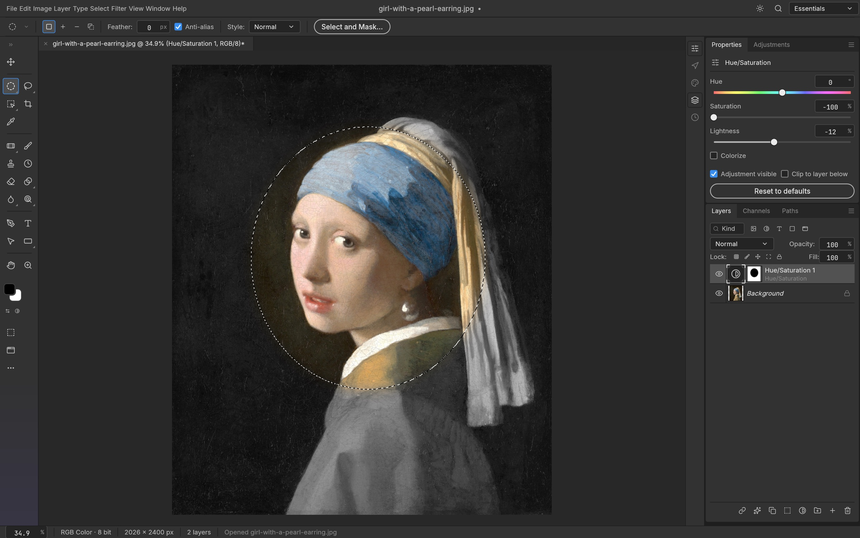
Third example: an elliptical selection becomes the mask of a Hue/Saturation layer, so only the face keeps its colour. The project says smart selection (Quick Selection, Object Selection, Select Subject) runs on your machine, with no cloud and no account.
Installing PhotoCraft: from source or from binaries
There are two routes, according to the README. The first builds from source with a Rust toolchain:
git clone https://github.com/storytold/photocraft
cd photocraft
cargo run --release -p photocraft -- image.psd   # the desktop app
cargo test --workspace                           # the test suite
The second installs a package from the GitHub releases: MSI or portable archive on Windows (x64, arm64, x86), a signed and notarised universal DMG on macOS, AppImage, Flatpak, .deb, .rpm or tarball on Linux, a FreeBSD tarball, and a static WebAssembly site. For Flatpak the README gives:
flatpak install --user photocraft-<version>-linux-x86_64.flatpak   # or -linux-aarch64
flatpak run ai.storyteller.photocraft
Japanese fonts are an optional build input (the craft-fonts repository); the published desktop builds include them. On a Wayland session the README says dropping files on the window does not work yet: use File › Open, or start the app under XWayland.
Limits and open questions
- Maturity: the README says “early alpha” and states that PhotoCraft is not yet a Photoshop replacement for daily professional work. Gaps it lists: generative AI features, 15 missing tools, depth in typography, and plug-in compatibility.
- Clean-room claim: the project says it was written from public specifications and observed behaviour, with no proprietary code. That is the project’s claim, which we have not verified.
- PSD files: according to the README, a reopened and re-saved document renders the same for 307 of the 309 files in the psd-tools test set. Work on copies.
- Branding: the ArtCraft names and logos are trademarks and not under the open licence; only the code is.
Measuring PhotoCraft on a workstation
PhotoCraft is a desktop application: there is no server to monitor, and we do not invent any telemetry feature. What you can measure is behaviour on your own machine. The README describes a photocraft.log file (Linux ~/.config/photocraft/logs/, macOS ~/Library/Application Support/Photocraft/logs/, Windows %APPDATA%\Photocraft\logs\). Each launch moves the previous log to photocraft.1.log, so the trace of a run that crashed survives; the file stops growing at 16 MiB. GPU start-up fallbacks, a lost device and the crash guard’s panic reports land there.
The level is set with RUST_LOG, for example RUST_LOG=debug or RUST_LOG=warn,photocraft_gpu=trace. For everything else use the operating system’s tools: start-up time with a stopwatch or a script, resident memory (Task Manager, Activity Monitor, or /usr/bin/time -v on Linux, which prints “Maximum resident set size”), and a count of crashes from the log. Reliability you can measure on a desktop is a simple SLI: how many sessions end without a panic.
Good practice
- Work on copies of your files while the project is in alpha.
- Keep the archive of a specific version (and its SHA256SUMS.txt) so you can roll back.
- Attach
photocraft.logto any bug report. - For automation, the README describes
photocraft-cliand an MCP server: open it only to agents you control, as explained in guardrails for AI agents in production.
Frequently asked questions
Is PhotoCraft free and open source?
The repository is dual-licensed MIT or Apache-2.0, your choice; the LICENSE-MIT and LICENSE-APACHE files are present. The README adds that the ArtCraft names and logos are not under the open licence.
Does PhotoCraft open PSD files?
Yes according to the README, including PSB, along with other formats such as layered TIFF, OpenRaster and Krita .kra. The project still acknowledges fidelity gaps: test with your own files.
Does PhotoCraft replace Photoshop?
Not yet, by the project’s own account: it calls itself early alpha and not ready for daily professional work. To follow the same family, see LightCraft.
Conclusion
PhotoCraft is an ambitious and already widely followed project, to be tried on copies and watched closely. Sources: the storytold/photocraft repository and the PhotoCraft page on getartcraft.com. The screenshots come from the repository, under MIT or Apache-2.0.
span.observer is an independent community blog, not affiliated with Dynatrace LLC or ArtCraft. Trademarks belong to their owners. Figures date from mid-October 2026 and change quickly: check them on the repository.