Android skills Android development agents: the android/skills repository is the official collection of “AI-optimised” instructions published by Google’s Android team, to help a coding agent follow Android development best practices. It showed about 9,200 stars and 592 forks in October 2026, read on the repository page on 22 October, under the Apache-2.0 licence. These are SKILL.md files in the open “Agent Skills” format, which agents such as Claude Code, Codex or those in the Gemini ecosystem can load.
For a mobile or platform team the appeal is concrete: migrating to Android Gradle Plugin 9, moving from XML to Compose, auditing R8 configuration. But handing such operations to an agent means controlling what instructions it gets and what it changes.
The information comes from the repository README and the official documentation on developer.android.com, read on 22 October 2026. span.observer is not affiliated with Google and did not install these skills: the images below come from the official documentation and the repository.
Android skills Android development agents: what the repository says
- Who: Android (the
androidorganisation on GitHub). The plugin file names “Google / Android” as owner. - Licence: Apache-2.0 (
LICENSE.txtfile). - Size: 86 commits, 33 open issues; no release is displayed.
- Goal: according to the README, skill development focuses on cases where evaluations show language models underperform; well-established areas, such as basic Jetpack Compose best practices, are not prioritised.
- Topics (top-level folders): build system (AGP 9), CameraX, cars, on-device AI, tooling (Android CLI), identity, Jetpack Compose, media, navigation, performance, Play, profilers, security, testing, TV, Wear, XR.
- Contributions: the README asks you to open an issue for feedback or skill requests and states that public contributions are not accepted at this time.
How a skill is laid out in a project
The Android documentation says the agent looks for skills starting from the .skills/ or .agent/skills/ directories at the project root, with one folder per skill containing a SKILL.md and any extra resources. Only skills located inside the project’s codebase are supported.
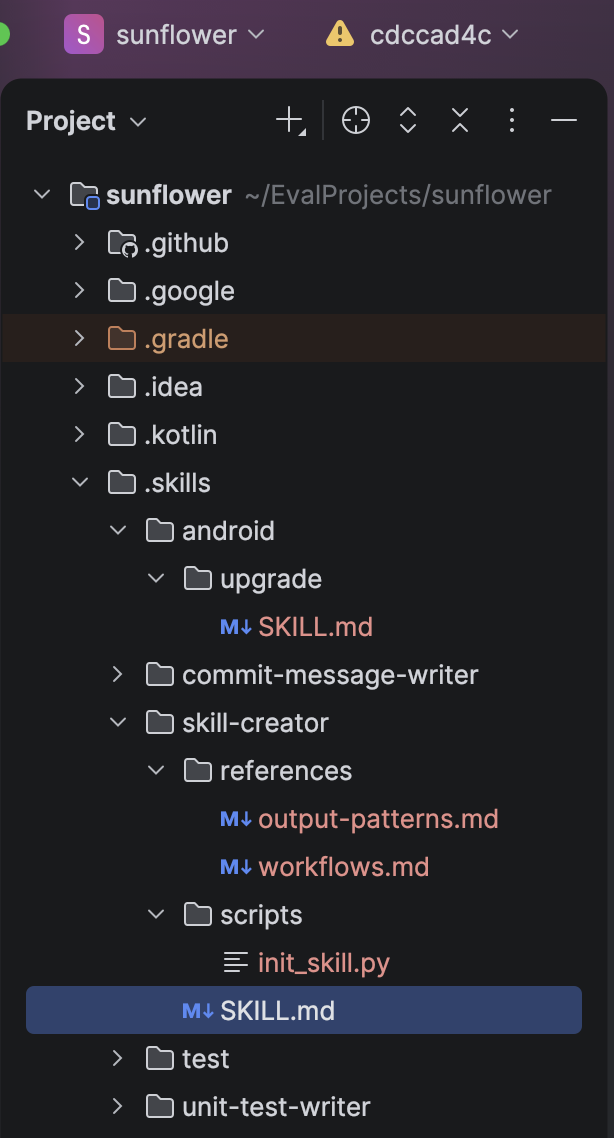
The SKILL.md format described by the documentation: a YAML header with at least name (up to 64 characters, lowercase letters, digits and hyphens) and description (up to 1,024 characters), then the content. scripts/, references/ and assets/ folders are optional. Here is the start of a real skill from the repository:
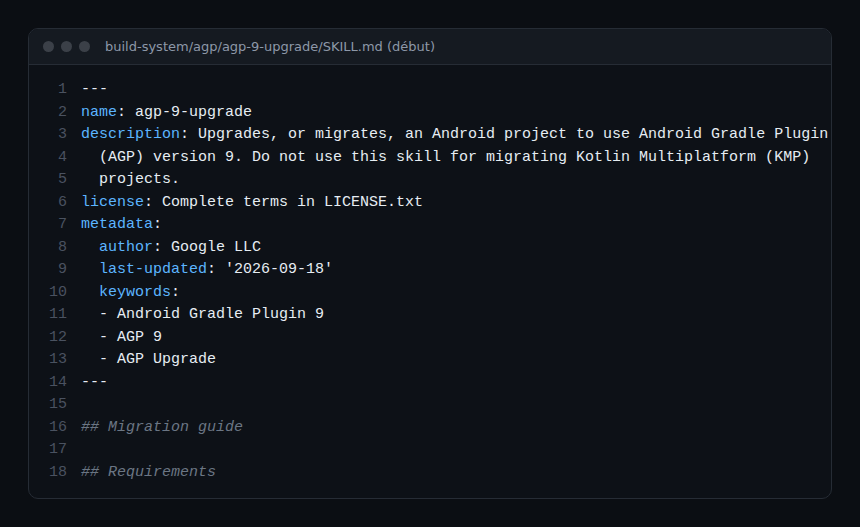
This skill states when not to use it (Kotlin Multiplatform migration) and, in its body, tells the agent to check the AGP version before acting. That is the kind of guardrail a good skill contains.
Installing Android skills from the README
Step 1 — With the Android CLI
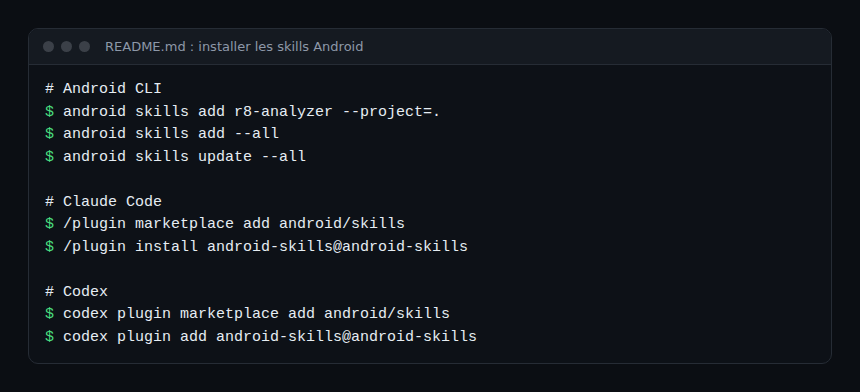
android skills add r8-analyzer --project=.
android skills add --all
The first command installs one skill in the current project; the second installs all skills for the detected agents. Without --all, only the android-cli skill is installed. The --agent option takes a list of agents. If no agent directory exists, the README says skills are installed for Gemini and Antigravity in ~/.gemini/antigravity/skills. The documentation recommends the Android CLI and adds android skills list to see available skills.
Step 2 — Or as an agent plugin
/plugin marketplace add android/skills
/plugin install android-skills@android-skills
These are the Claude Code commands. For Codex, the README gives codex plugin marketplace add android/skills then codex plugin add android-skills@android-skills. On how plugin marketplaces work, see claude-plugins-official.
Step 3 — Update
android skills update --all
android skills update wear-compose-m3
The documentation warns: if you customise a skill, rename it, or skills add will overwrite it on update.
Step 4 — Use a skill
According to the README, the agent activates relevant skills on its own; the example given is the request “Make my app UI edge-to-edge”. In Android Studio, the documentation says you can also invoke a skill by typing @skill-name in the chat.
Monitoring an agent that changes an Android project
A skill is text, not a service: it emits no traces or metrics. What you monitor is the agent and what it changes in the repository.
- Review the diffs. An AGP or Compose migration touches many build files. Use a branch and a code review, as for a human contribution.
- Lean on continuous integration. Build, unit tests and static analysis are the safety net for an agent’s change. See guardrails for AI agents in production.
- Measure the cost. Long migrations consume tokens: see AI agent cost measured with OpenTelemetry.
- Version the skills. If you copy skills into
.skills/, they enter your repository: review them like code and keep track of the original version, especially beforeandroid skills update.
How to check that it works
- After installation, the skill folder (for example
.skills/…/SKILL.md) exists in the project or in the agent’s directory. - A request tied to the skill (“Make my app UI edge-to-edge”) should lead the agent to find and use the skill, according to the README; look in its output to see whether it mentions it.
- After the run, the project builds and its tests pass before anything is merged.
Limits and open points
- Repository disclaimer. “AI can make mistakes, so always double-check the results.”
- Closed contributions. No public contributions for now: content moves at the Android team’s pace.
- No release. The repository shows no version; for reproducibility, note the installed commit.
- Deliberately narrow coverage. The skills target cases where models get things wrong; they replace neither the Android documentation nor your team’s training.
- Varied agents. The documentation says skill structure and use may differ slightly between agents: check your tool’s documentation.
Best practices
- Install only the skills you need rather than
--all, and read each one. - Have the agent work on a dedicated branch and require a green CI.
- Keep a team file listing installed skills and their origin.
- Rename any skill you customise.
- Complement public skills with your own architecture rules, in internal skills.
Frequently asked questions
Does Android skills work with Claude Code?
Yes, according to the README: it offers a Claude Code plugin install, as well as one for Codex. The Android documentation says the skills follow the open standard and are compatible with any tool that supports skills.
Do I need Android Studio?
Not for the Android CLI. The documentation also describes importing a skill into an Android Studio project, where you can invoke it with @skill-name.
How does it differ from other skill collections?
This one is published by Android and focused on Android development; Scientific Agent Skills covers scientific research. The SKILL.md format is the same.
Conclusion
The android/skills repository provides official instructions for specific Android tasks, in a format several agents understand. It helps an agent do better; it does not remove the need to review. Install few, pin the commit, and keep code review and CI as guardrails.
span.observer is an independent community blog, not affiliated with Dynatrace LLC or Google. Android is a trademark of Google LLC; other trademarks belong to their owners. Tools change quickly: check commands in the official documentation (developer.android.com).