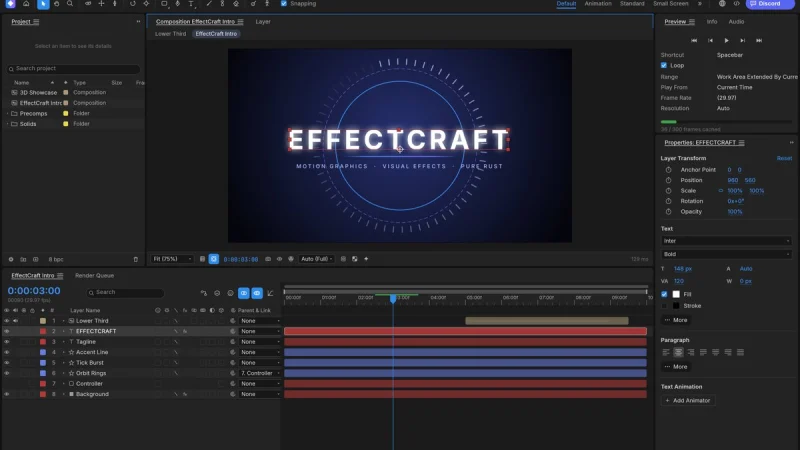
The EffectCraft open source motion graphics tool is written in Rust: a compositor for animated titles, visual effects and compositing, where you stack layers, animate their properties with keyframes, add effects and render the result. It comes from the ArtCraft team (GitHub organisation storytold) and showed about 7,000 stars in mid-October 2026. The latest release read on the repository page is v0.10.0, published on 14 October.
The project is very young: its README says the first commit was on 1 October 2026. It describes itself as a clean-room reimplementation of a commercial animation tool, with the same panels and the same keyframe behaviour. That is the project’s own claim, which span.observer reports without vouching for it; the repository states that it is independent, and neither affiliated with nor endorsed by the original vendor. span.observer has neither installed nor tested the software: this article draws on the README, the licence and the repository’s screenshots.
EffectCraft open source motion graphics: the essentials
- Licence: MIT or Apache-2.0, at your option.
- Language and platforms: “pure Rust” according to the README; macOS, Windows, Linux, FreeBSD and the browser.
- Announced content: compositions, layers of every kind, keyframes with a curve editor, 306 effects, layer styles, JavaScript expressions, 3D cameras and lights, a render queue.
- Files: projects are versioned JSON (
.ecproj), readable and diffable in version control. Lottie import and export are built in. - No FFmpeg: encoding and decoding are in Rust, including the project’s own VP9, AV1, HEVC and Opus encoders, according to the README.
- Status: alpha. About 91% of the target tool’s features exist according to the project, which estimates it is about 45% of the way to professional use. These figures are self-assessed.
- Agents: an MCP server, a CLI and a JSON control channel expose every command. See the Model Context Protocol explained.
A tour of the interface
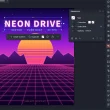
The main window brings together the Project panel, the demo composition, a timeline with text, shape and solid layers, and the Properties panel for the selected layer:
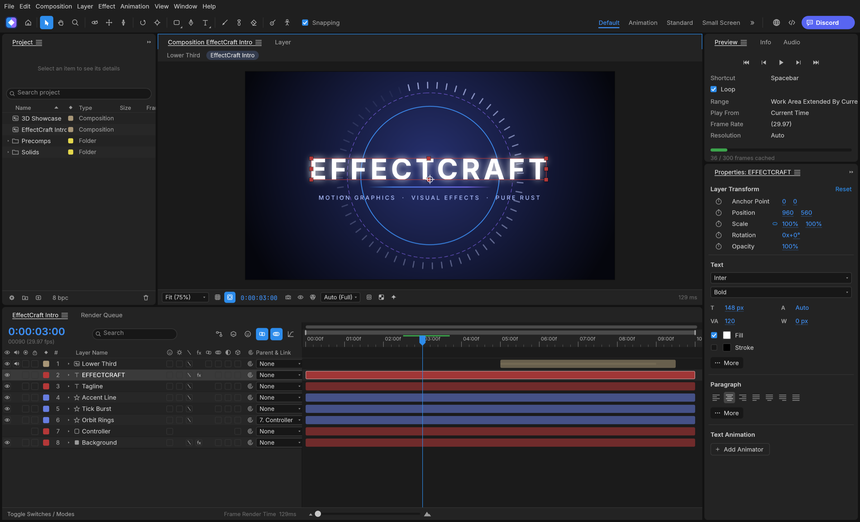
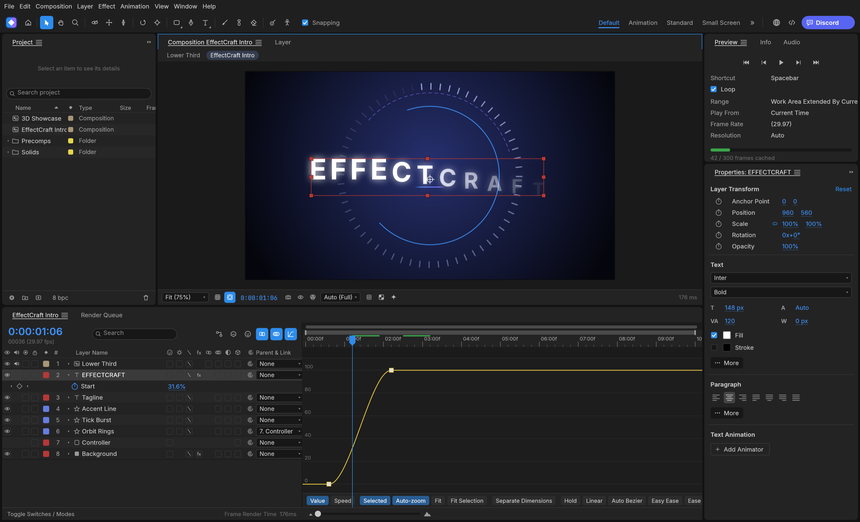
The Graph Editor shows the eased curve of an animated property, here the start of a text animator, with the Hold, Linear, Auto Bezier and Easy Ease buttons.
The render queue lists the compositions to export. The README announces H.264 and ProRes, HEVC and AV1, WebM, PNG, JPEG, TIFF and 32-bit EXR sequences, animated GIF and WAV or AIFF audio.
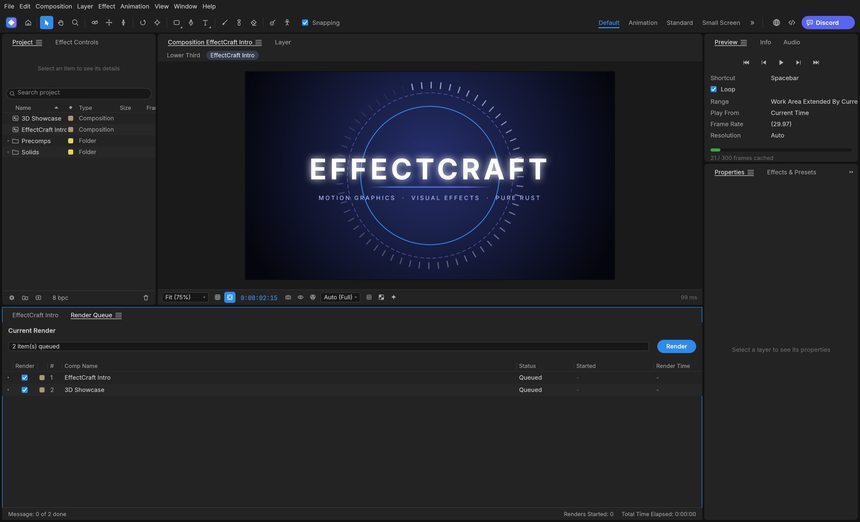
The repository’s attribution file says these screenshots show only procedurally generated demo content.
Installing EffectCraft step by step
The README points to the repository’s Releases page: a universal macOS app, MSI and portable archives for Windows (x64, x86, ARM64), AppImage, Flatpak, .deb, .rpm and tar.gz for Linux (x86_64 and aarch64, plus riscv64 as tar.gz), a FreeBSD archive and a web build. The Windows installers are signed, and the ARM64 build runs natively.
From source, a Rust toolchain 1.95 or newer is required:
git clone https://github.com/storytold/effectcraft
cd effectcraft
cargo run --release -p effectcraft          # the app (add -- --demo to open the demo project)
cargo run --release -p effectcraft-cli -- render --out intro.mp4    # render the demo headless
cargo xtask web --serve 8765                # the browser build on http://127.0.0.1:8765/
On Linux with native Wayland, the README says file drag-and-drop does not work: use File > Import > File…, or start the app through XWayland with env -u WAYLAND_DISPLAY effectcraft. For agent control, effectcraft-cli mcp starts the MCP server over stdio, with the --bridge 9877 option to connect to the running app.
Limits and open questions
- Existing projects: .aep and .aepx files cannot be opened, and third-party plug-ins do not run.
- Fidelity: behaviour still differs from the target tool in places, and nothing automatically compares renders. The project asks for reports of differences.
- Platforms: macOS is the most tested; basic interaction bugs have been seen on Linux and Windows and are being fixed first. The Windows ARM64 build is installed and its command-line tool run in continuous integration, but the app’s window is not yet opened automatically there.
- Trained models: Roto Brush can use MobileSAM (an optional download of about 40 MB) and face tracking MediaPipe (about 3.8 MB). These downloads need a network connection, to allow knowingly.
- Age: a two-week-old repository has no track record yet. The project itself calls it a good place to try things, not a replacement for client work.
What you can measure on the workstation
EffectCraft is a desktop application: span.observer attributes no monitoring feature to it. In the screenshots the software itself shows a per-frame render time at the bottom of the timeline and the number of cached frames in the Preview panel. For the rest, you measure from the system, on the same composition.
- Rendering: time
effectcraft-cli renderon the demo composition, withtimeon Linux or macOS orMeasure-Commandin PowerShell, for one version and one output format. - Memory: peak resident memory during a render (
/usr/bin/time -von Linux), especially with 3D compositions or many effects. - Start-up: the delay to a usable window, noted for each version.
- Crashes and logs: the README mentions render logs in the render queue; collect them, count abnormal exits per version and keep a test
.ecprojfile to replay cases.
The logic is version against version, as in the SRE lessons from mainstream MCP: a reproducible measurement beats an impression.
Best practices
- Start with the demo composition, then a throwaway project, before trusting real work to an alpha version.
- Keep
.ecprojprojects in a Git repository: the versioned JSON format diffs line by line. - Pin the version (v0.10.0 today): the project ships fast.
- If you give an agent access to the MCP server, read the example of an agent wired to local tools and limit the folders it can reach.
- Carry on with FilmCraft for editing and VectorCraft for vector assets.
Frequently asked questions
Does EffectCraft open my old animation projects?
No, according to the README: .aep and .aepx files cannot be opened. Projects are saved as .ecproj. Lottie import does exist, through File > Import > Lottie.
Does EffectCraft use FFmpeg?
No, according to the README: decoding and encoding are written in Rust, with FilmCraft’s codecs and EffectCraft’s own encoders.
Is it ready for production?
The project rules that out for client work itself, and estimates it is about 45% of the way to professional use. Use it to experiment and to report differences.
Conclusion
EffectCraft is interesting for its scope (306 announced effects, expressions, 3D, Lottie) and its readable project format. It is less than three weeks old and still alpha. Install a dated version, measure rendering and memory on a composition of your own, then judge on the evidence. Sources: EffectCraft repository and EffectCraft page on getartcraft.com.
span.observer is an independent community blog, not affiliated with Dynatrace LLC or with the projects mentioned. Trademarks belong to their owners. Software changes quickly: check figures, commands and options in the repository and the official documentation.