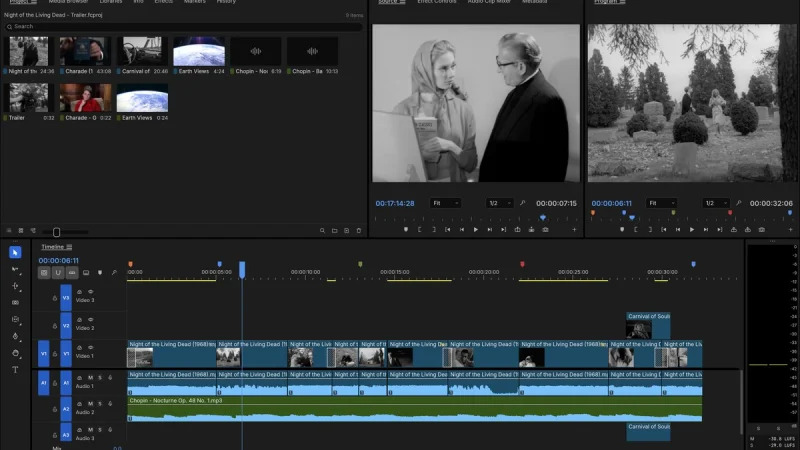
The FilmCraft open source video editor is written in Rust: a non-linear editor with Source and Program monitors, a multitrack timeline, colour grading, effects, titles and export. It is one of the “Crafting Apps” from the ArtCraft team (GitHub organisation storytold) and it is climbing fast, with about 14,200 stars on the repository page in mid-October 2026. The latest release read that day is v0.8.0, published on 14 October.
The project describes itself as a clean-room reimplementation of the workflow of a commercial video editor, with the same panels and shortcuts. That is a claim made in the README, which span.observer reports without vouching for it: the repository also states that FilmCraft is independent and is neither affiliated with nor endorsed by the original vendor. This article covers the project, its installation according to the README and its limits, then what you can measure on a workstation. span.observer has not installed or tested the software: the screenshots come from the project’s repository.
FilmCraft open source video editor in Rust: the essentials
- Licence: dual-licensed MIT or Apache-2.0, at your option (LICENSE-MIT and LICENSE-APACHE files in the repository).
- Language: “pure Rust” according to the README, with an egui interface on top of an engine that knows nothing about the UI.
- Platforms: macOS, Windows, Linux, FreeBSD, and the browser through WebAssembly.
- Codecs: the project says its H.264, HEVC, ProRes and AAC codecs are written in Rust from the public specifications, with no FFmpeg inside. FFmpeg is used only as an external test oracle.
- Status: alpha. The project puts its feature breadth at about 86% and its readiness for real work at about 56%, self-assessed figures (re-measured on 10 October 2026 according to the README).
- Agent-driven: every action is a command (more than 650 according to the README), callable from the UI, a CLI, a JSON channel or an MCP server. For the wider context, see the Model Context Protocol explained.
A tour of the interface
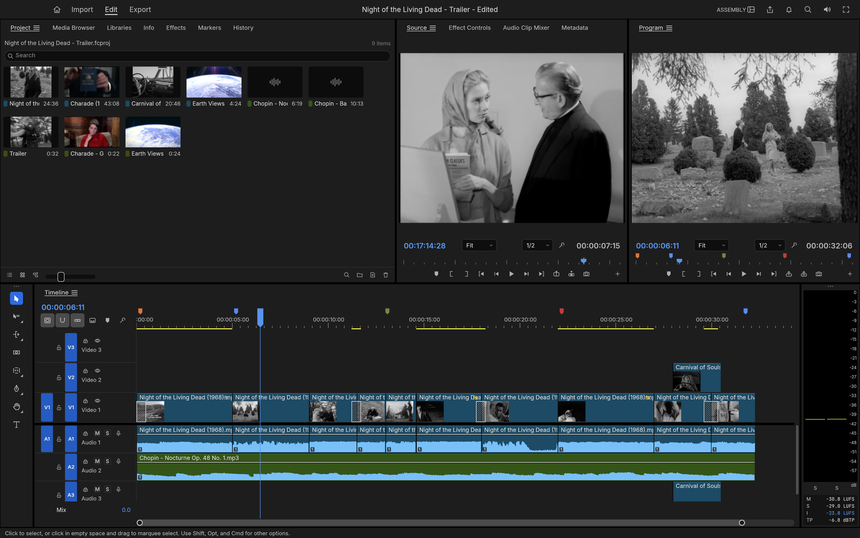
The Assembly workspace brings together the media bins, the Source and Program monitors, a multitrack timeline and the loudness meters. The README says the demo footage comes from public-domain films and NASA material.
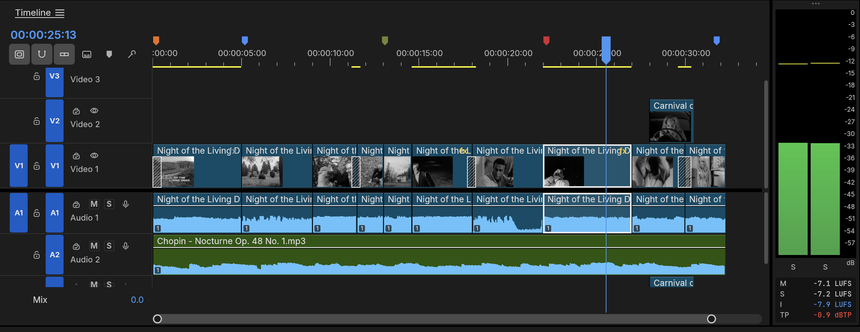
A close-up of the timeline shows dissolves on V1, an inserted shot on V2, the music waveform on A2, coloured markers on the ruler and the loudness readings (M, S, I and TP in LUFS and dBTP).
Beyond these two screens, the README describes a colour grading panel, curves, scopes, 93 video effects and around 30 transitions, keyframes with value and velocity graphs, caption tracks (SRT, WebVTT, SCC) and an export mode. The interchange formats it lists are FCP7 XML, FCPXML, OpenTimelineIO, EDL, AAF and OMF.
Installing FilmCraft step by step
The README points to the FilmCraft page on getartcraft.com as the easiest route. For a specific build, the repository’s “latest release” page lists the files (a SHA256SUMS.txt file provides checksums).
- Windows: MSI installer or portable archive, for x64, arm64 and x86. The README says the installers are code-signed.
- macOS: a universal DMG (Apple silicon and Intel), signed and notarised, plus a command-line tool.
- Linux: AppImage, Flatpak, .deb and .rpm packages, or a tar.gz archive. With the archive,
./install.shinstalls into~/.localwithout administrator rights;sudo ./install.sh --prefix /usr/localinstalls for all users. - From source: a Rust toolchain is required. The README commands:
cargo run --release -p filmcraft                           # the desktop app, with a demo project
cargo run --release -p filmcraft -- --control 9876         # plus the JSON-lines control server
cargo run --release -p filmcraft-cli -- commands           # list every engine command
cargo run --release -p filmcraft-cli -- mcp                # MCP server (headless)
If the app closes straight away on Windows, the README explains that by default it initialises only Vulkan and DirectX 12, and that the WGPU_BACKEND variable lets you force a graphics backend for troubleshooting:
$env:WGPU_BACKEND = "vulkan"
& .\filmcraft.exe
Remove-Item Env:WGPU_BACKEND
The same README mentions an AMD driver crash with OpenGL and duplicated GPUs when several driver packages coexist. The log lives in %APPDATA%\FilmCraft\Logs\filmcraft.log: attach it to any bug report.
Limits and open questions
The project is open about its state: “young and moving fast”, in alpha. The main gaps listed in the README:
- Speed on big footage: hardware decoding exists on macOS, Windows and, for H.264 and HEVC, on Linux (VA-API); Lumetri, keys and export rendering still run on the CPU.
- Existing projects: .prproj files cannot be opened; you have to go through FCP7 XML, AAF or OTIO.
- No plugins: no VST3 or Audio Units, no OpenFX.
- Export: H.264 is the only software delivery codec; H.265 goes through a hardware encoder; no AV1 export.
- Real-world media: the decoders are bit-exact on conformance streams, but camera and phone files are less tested. Windows and Linux get far less testing than macOS.
Also keep in mind the age of the repository, the performance figures quoted by the project (not reproduced here) and the fact that star counts say nothing about reliability. Do not send your only masters through alpha software: keep the original sources.
What you can measure on the workstation
FilmCraft is a desktop application: do not expect OpenTelemetry traces from the software itself, and span.observer invents no monitoring feature. You measure from the operating system instead, on the same sequence and the same export, noting the version (v0.8.0 at the time of writing) and the graphics driver.
- Start-up: the delay between launch and a usable window, and the content of
filmcraft.logafter each launch. - Memory: peak resident memory during an export. On Linux,
/usr/bin/time -vprints it for the compiled binary; on Windows,Get-Process filmcraft | Select-Object CPU, WorkingSet64. - CPU and GPU: the README says Lumetri, keys and export run on the CPU, so compare CPU and GPU load (
nvidia-smi dmonon an NVIDIA card) with hardware decoding on and off. - Crashes: count abnormal exits and check that the recovery journal restores unsaved work, which the README says is written about a second after each edit.
To frame these measurements as reliability indicators, monitoring a coding agent follows the same logic: one measure per behaviour, compared from one version to the next.
Best practices
- Test on a copy of the project and keep the stable tool you already use for client work.
- Pin the version (v0.8.0 today) and verify the SHA256 sums of downloaded files.
- If you expose the MCP server to an agent, keep it to the strict minimum: isolate stdio MCP servers and read how to secure an MCP server.
- Follow the series: EffectCraft for motion graphics and the Craft suite as a whole.
Frequently asked questions
Is FilmCraft really free and open?
The repository is dual-licensed MIT or Apache-2.0. The ArtCraft name and logos are trademarks and are not covered by that licence, as the README points out.
Can FilmCraft open an existing editing project?
Not .prproj files, according to the README. It imports FCP7 XML, FCPXML, OpenTimelineIO, EDL, AAF and OMF exchanges.
Can you use it in production today?
The project rates itself at about 56% readiness for real work and calls itself alpha. For client deliverables, keep your current tool and use FilmCraft for trials.
Conclusion
FilmCraft is interesting for its ambition (in-house codecs, an engine without FFmpeg, agent control) and its permissive licence. It remains a young piece of software whose parity figures are self-assessed. Read the README, install a dated version, measure start-up, memory and load on your own media, then decide. Sources: FilmCraft repository and FilmCraft page on getartcraft.com.
span.observer is an independent community blog, not affiliated with Dynatrace LLC or with the projects mentioned. Trademarks belong to their owners. Software changes quickly: check figures, commands and options in the repository and the official documentation.