
Module 3 of the Monaco Managed course: the Monaco Managed export with monaco download turns your environment’s existing configuration into version-controlled files.
Course: Monaco Managed · Module 3/5 · Duration: ~40 min · Level: Intermediate
Objectives:
- Run
monaco downloadwith a manifest or with a URL - Limit the export to Settings 2.0 or to the classic configuration APIs
- Read the generated structure: manifest, project,
config.yamland JSON templates - Know what the export does not include
Prerequisites: module 2 completed (Monaco installed, manifest, API token); a Dynatrace Managed test or staging environment.
Your Managed environment already holds dozens of settings entered by hand: alerting profiles, management zones, automatic tags. Rewriting them in YAML would be slow and error-prone. Monaco does the reverse: it reads the environment and writes the files for you. The export serves as a backup, as the starting point for the next module and as a basis for comparing two environments. This module covers Dynatrace Managed only.
What the monaco download command does
The official documentation describes the download command as the way to download configurations from a Dynatrace environment as Monaco files. Three uses stand out: backup, sharing between environments, and building templates from what was set up in the UI.
Two modes exist, and they are mutually exclusive:
| Mode | Command | Note |
|---|---|---|
| With a manifest | monaco download --manifest manifest.yaml --environment dev |
--environment is required; without --manifest, Monaco looks for manifest.yaml in the current folder |
| Without a manifest | monaco download --url URL --token VARIABLE_NAME |
Cannot be combined with --manifest or --environment; a manifest is generated |
An essential security point: --token never receives the token itself, but the name of the environment variable that holds it. The documentation puts it this way: authentication secrets are always loaded from environment variables. Your shell history therefore never contains the token.
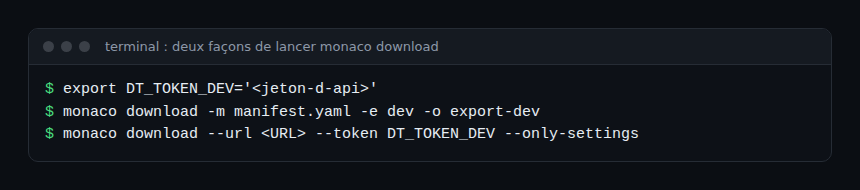
Options that matter for a Monaco Managed export
The following options appear in the official documentation and in the command help, read from the Monaco repository source code.
--output-folder(-o): output folder. By default Monaco creates a folder nameddownloadfollowed by a timestamp.--project(-p): name of the generated project,projectby default.--only-settings: Settings 2.0 objects only.--settings-schema(-s) targets one or more specific schemas.--only-apis: classic configuration APIs only, excluding deprecated APIs.--api(-a) targets one or more APIs, deprecated ones included.--force(-f): overwrites an existingmanifest.yamlinstead of creatingmanifest_{timestamp}.yaml.
The export options specific to next-generation platform resources (automations, buckets, documents) do not apply to Managed and are not covered here. The --api and --only-apis options are mutually exclusive, as are --settings-schema and --only-settings.
Token and scopes
The Monaco configuration page of the Managed documentation lists the permissions required “in most cases”: DataExport, ReadConfig, WriteConfig, settings.read and settings.write. It does not say which ones the export alone needs. Which subset is enough for a read-only download is therefore not verified here: on a test environment, use the module 2 token and narrow it down carefully afterwards.
Reading the generated structure
After the export, the output folder contains a manifest and a project folder. With a manifest, the environment name is appended to the project name (for example project_dev), unless you use --force. Inside the project, each configuration type has its own subfolder: the name of a classic API, or the ID of a Settings schema. Characters other than letters, digits, hyphen, underscore and dot are stripped from the folder name, so builtin:management-zones becomes builtinmanagement-zones.
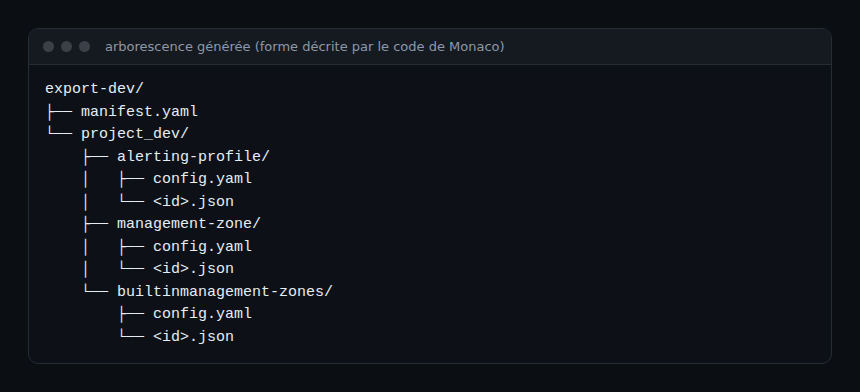
Each subfolder holds a config.yaml and one JSON template per configuration. The config.yaml declares the ID, the template, the skip field and the type: api for a classic API, settings with schema, schemaVersion and scope for a Settings 2.0 object. The two excerpts below come from the Monaco repository’s test files (Apache 2.0 licence), not from a real export of your environment.
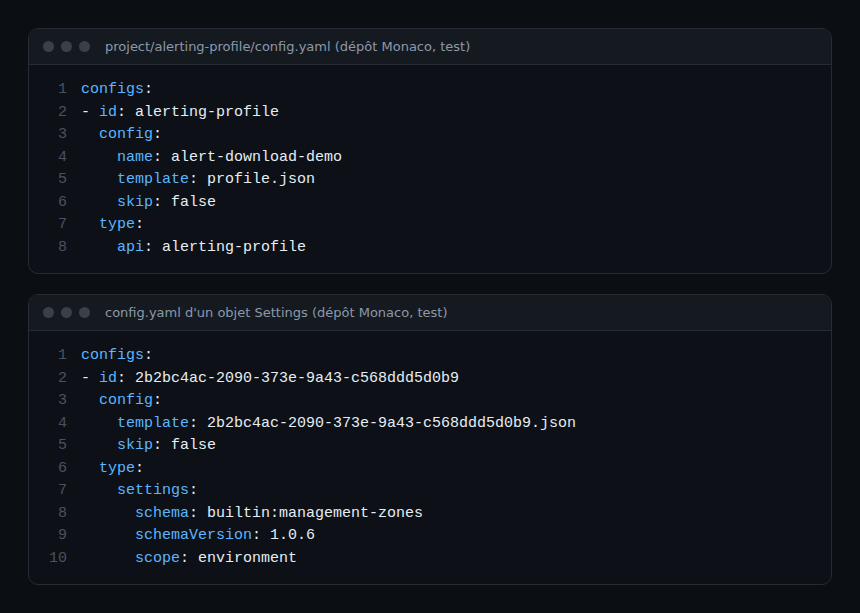
References, IDs and templates
During the export, Monaco analyses the JSON templates to find references between configurations (a rule that points to a management zone, for example) and replaces them with YAML references, so that redeployment happens in the right order. It also extracts some identifiers into YAML parameters. For Settings objects, it escapes double curly braces in the content so they are not read as template variables; if that fails, a warning says the template needs manual adaptation. At the end of the export, the command looks for circular dependencies and reports them. Templates are the subject of module 4.
Limits of the export
- Types excluded by default:
aws-credentials,azure-credentials,kubernetes-credentials,credential-vaultandextension. The API does not return their full content, and their secrets cannot be exported after creation. - Read-only objects: configurations that cannot be modified are filtered out.
- Filters can be disabled (Monaco 2.2.0 and later):
MONACO_FEAT_DOWNLOAD_FILTER=falseturns off all filters;MONACO_FEAT_DOWNLOAD_FILTER_SETTINGS,MONACO_FEAT_DOWNLOAD_FILTER_SETTINGS_UNMODIFIABLEandMONACO_FEAT_DOWNLOAD_FILTER_CLASSIC_CONFIGSact per family. An unfiltered export cannot be deployed as it is: it needs manual rework. - Performance:
MONACO_CONCURRENT_REQUESTSsets the number of simultaneous calls (5 by default). Dependency resolution is CPU-intensive and can be slow on modest hardware.
For an SRE, these limits have a practical consequence: an export is not a complete backup. Note what stays outside the repository (credentials, extensions) and handle it separately.
Hands-on exercise
Run this on a Managed test or staging environment, never on production first. The commands below are not executed in this article: the exact output depends on your environment and Monaco version, so no output is made up.
Step 1 — Prepare the token
Put the module 2 token in an environment variable, for example DT_TOKEN_DEV. Check that the module 2 manifest references this variable in auth.token.name. Expected result: no plain-text secret in the manifest.
Step 2 — Export Settings objects only
Run monaco download -m manifest.yaml -e dev --only-settings -o export-settings. Expected result: the logs show the download, the dependency resolution, the search for circular dependencies, then the write to the output folder.
Step 3 — Export the classic APIs
Run the same command with --only-apis and a different output folder. Expected result: subfolders named after the classic APIs (alerting profiles, management zones…).
Step 4 — Read and compare
Open a config.yaml and its JSON template, then note the type, the ID and the skip field. Note the types you expected but did not get. Expected result: a list of at least one excluded type, to compare with the limits section.
Step 5 — Put it under Git
Create a repository and commit the exported folder, with no token in it. Expected result: a first commit “initial state of the dev environment”.
Quiz
- What does the
--tokenoption ofmonaco downloadreceive? a) The API token b) The name of an environment variable c) A file path d) The environment URL - With a manifest, which option is mandatory? a)
--environmentb)--urlc)--forced)--project - Which configuration type is excluded from the export by default? a)
alerting-profileb)management-zonec)credential-vaultd)builtin:management-zones - What does
--only-settingsdo? a) It exports the classic APIs b) It exports Settings 2.0 objects only c) It overwrites the manifest d) It deploys the objects
Answers
- b) The secret stays in the shell environment; only its name is passed to the command.
- a) Once the manifest is chosen, you must name the environment to read.
- c) Credential vaults hold secrets that cannot be exported after creation.
- b) The classic APIs are then left out.
Going further
- Monaco: Dynatrace configuration as code
- Monaco or Terraform: which tool to configure Dynatrace?
- Reusing your Monaco configuration from Managed to SaaS
- Terraform and Dynatrace: alerting and dashboards
- Monaco command reference (Managed documentation)
- Dynatrace Configuration as Code repository on GitHub
← Module 2: Monaco Managed installation · Course overview · Module 4: Monaco Managed deployment →
Frequently asked questions
Can you export without a manifest?
Yes, with --url and --token. Monaco then generates a manifest so the export can be redeployed. This option cannot be combined with --manifest or --environment.
Why are some configurations missing from the export?
By default, Monaco filters out the types whose API does not return full content (credentials, extensions) and read-only objects. The MONACO_FEAT_DOWNLOAD_FILTER* variables turn these filters off, at the cost of an export that needs rework before deployment.
What happens if the folder already holds a manifest?
Without --force, Monaco creates manifest_{timestamp}.yaml next to the existing one. With --force, it overwrites manifest.yaml.
You now have an initial snapshot of the environment as files. The next module shows how to edit these projects, parameterise them with templates and deploy them with a dry-run.
span.observer is an independent community blog, not affiliated with Dynatrace LLC. This course does not replace the official training and certifications from Dynatrace University. Check features against the official documentation for your version.