
This module of the Monaco Managed path covers Monaco Managed installation: downloading the binary, writing a manifest that points to your Managed environment, and supplying an API token with the right scopes.
Path: Monaco Managed · Module 2/5 · Duration: ~40 min · Level: Beginner
Objectives:
- Download, verify and install the Monaco binary
- Write a manifest that targets a Managed environment
- Create an API token with suitable scopes and pass it through an environment variable
- Check the result with a
deployrun in--dry-runmode
Prerequisites: a Managed test environment, module 1, a terminal and access to GitHub.
Monaco (Dynatrace Configuration as Code) is a command-line tool. It reads YAML and JSON files, then sends them to your environment’s APIs. Before any deployment, three things must be in place: the program, a manifest and a token.
This module applies to Dynatrace Managed only. The platform token and OAuth authentication sections found in the SaaS documentation are outside this path.
Monaco Managed installation: download and verify the binary
The installation page of the Managed documentation offers one binary per system: Linux (64-bit AMD, 64-bit ARM, 32-bit), macOS (Apple Silicon, Intel) and Windows (64-bit and 32-bit). The binaries are published on the releases page of the tool’s GitHub repository.
On Linux 64-bit (AMD), the documentation gives this sequence: download, checksum verification, rename, execute permission, then copy into the PATH.
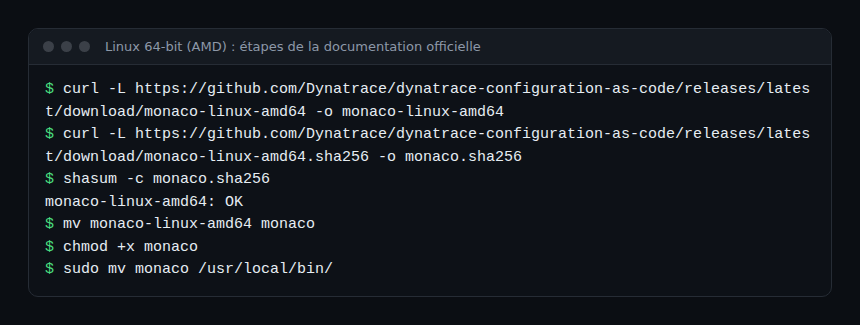
The documentation marks verification as optional, but it costs a single command. The expected result is the line monaco-linux-amd64: OK. Both files must sit in the same folder.
On Windows, the documentation uses PowerShell with Invoke-WebRequest to fetch monaco.exe, then asks you to add its folder to the PATH variable (entries separated by a semicolon) and to open a new console. The page states that this executable is signed by Dynatrace.
A container image, dynatrace/dynatrace-configuration-as-code:[VERSION], also exists; the same page describes how to verify it with cosign.
Check that Monaco responds
Run monaco with no argument: the help lists the available commands. The monaco version command prints the installed version; note it, because behaviour and features depend on the version.
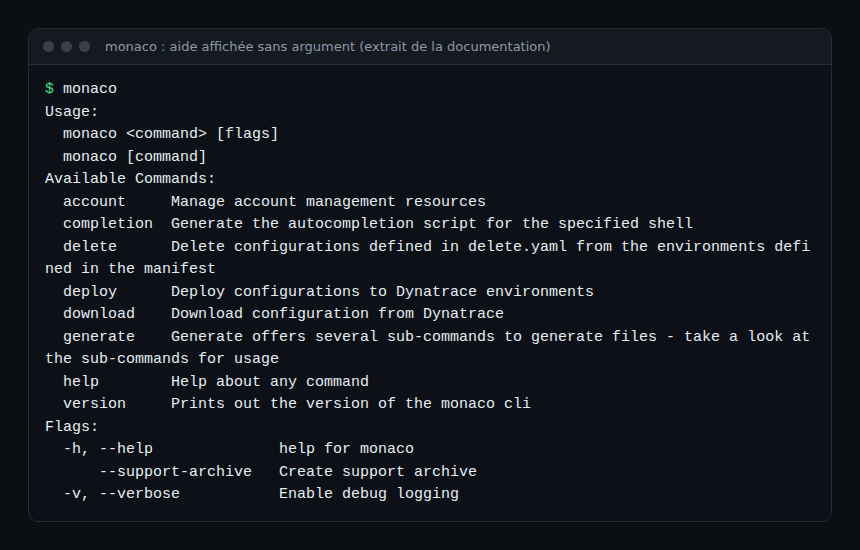
The -v flag enables debug logging, which helps in understanding a failure.
The manifest: where to deploy
The manifest is a YAML file that describes the projects to deploy and the target environments. It has three top-level keys: manifestVersion, projects and environmentGroups. According to the documentation, the only supported manifest version is 1.0.
projects: each project has aname(without a slash) and an optionalpath. Withoutpath, the name is used as the path. Thegroupingtype loads each subfolder as a separate project, namedname.subfolder.environmentGroups: each environment belongs to one group, and only one. Groups let you target or override several environments at once, for example to separate staging from production.- Each environment has a
name(free text, but unique), aurland anauthsection.
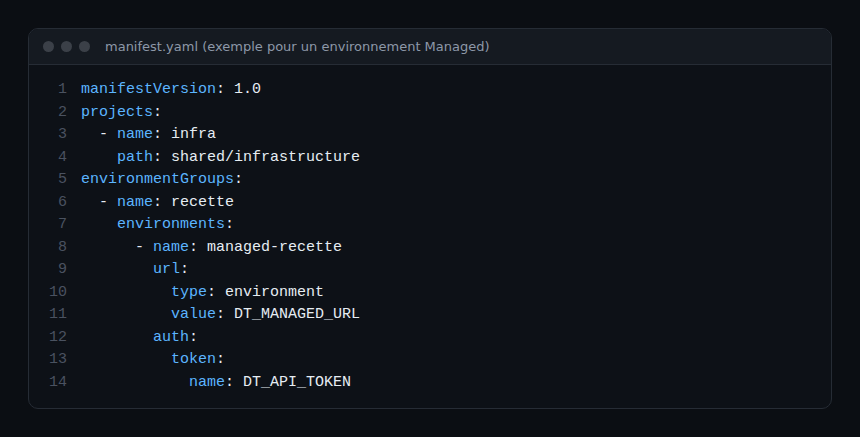
The URL of a Managed environment
The url field has a type and a value. With type: value, the address is written in the file; with type: environment, the value is the name of an environment variable. The example above uses the second form, because the address changes from one environment to another.
For Managed, the environment address follows the pattern https://{your-domain}/e/{your-environment-id}, the one the Managed environment API documentation uses for its API Explorer. The apps.dynatrace.com addresses in the Monaco documentation examples illustrate the file structure; they do not correspond to Managed.
The API token and its scopes
The manifest never contains a secret: the tool does not let you define it in clear text and always loads the token from an environment variable. The name key of auth.token designates that variable. In Monaco’s code, a missing or empty variable raises an explicit error when the manifest is loaded.
The Managed documentation states that an access token requires at least the following scope, to query general information about the environment:
DataExport: access to problems, the event feed, metrics and topology (API v1).
In most cases, at least the following five scopes are needed:
| Scope | Role |
|---|---|
DataExport |
General environment information |
ReadConfig |
Read through the Configuration API |
WriteConfig |
Write through the Configuration API |
settings.read |
Read through the Settings API |
settings.write |
Write through the Settings API |
Each configuration type needs its own scopes: check the page “Monaco API support and access permission handling” before widening the scope. Least privilege applies: a read token is enough for the export in module 3, and the write token is created only for deployment. A Managed access token is generated from the environment’s access tokens page, with “Generate new token”.
Hands-on exercise
This exercise runs on a Managed staging environment. The commands below were not executed while writing this module, so no output is reproduced beyond what the documentation shows.
Step 1 — Install Monaco
Follow the commands for your system, then run monaco version. Expected result: a version number, and the help displayed by monaco alone.
Step 2 — Create the token
In the staging environment, generate a token named “monaco-staging” with the five scopes from the table. Keep it in your secrets manager. Expected result: a token visible once, never pasted into a repository file.
Step 3 — Export the variables
export DT_MANAGED_URL="https://{your-domain}/e/{your-environment-id}"
export DT_API_TOKEN="<your-token>"
Expected result: two variables defined in the current terminal, outside any file tracked by Git.
Step 4 — Write the manifest and the project
Create manifest.yaml as in the screenshot, plus the shared/infrastructure folder. Expected result: a tree with one manifest and one project folder.
Step 5 — Validate with a dry run
monaco deploy manifest.yaml --dry-runAccording to the command help, --dry-run (or -d) validates the structure of the manifest, projects and configurations, resolves parameters and renders the JSON templates, but cannot validate the content of the payloads. Expected result: no environment variable error. If you unset DT_API_TOKEN, an error should report the missing variable. The exact behaviour with an empty project was not verified here; module 4 fills the project.
Best practices
- One token per environment and per use (read, write); never a secret in the manifest or in Git.
- Start with staging: production joins the manifest only after validation.
Quiz
- Which command prints the Monaco version? a)
monaco --aboutb)monaco versionc)monaco statusd)monaco info - Where does the manifest store the API token? a) In clear text in
auth.tokenb) Inprojectsc) As the name of an environment variable d) In the environment name - How many groups can one environment belong to? a) One b) Two c) As many as needed d) None
- What does
--dry-rundo fordeploy? a) Deploys without logs b) Validates the structure and resolves parameters, without validating payload content c) Deletes configurations d) Creates the token
Answers
- b)
versionappears in the help’s command list. - c) The documentation specifies that
nameis the variable name, not the secret. - a) Each environment belongs to one group, and only one.
- b) According to the command help, validation does not inspect the JSON content.
Going further
- Dynatrace Monaco: configuration as code
- Monaco or Terraform to configure Dynatrace
- Monaco: from Managed to SaaS, to prepare what comes next
- Monaco installation (Managed documentation) and Monaco repository
← Module 1: configuration as code Managed · Path overview · Module 3: Monaco Managed export →
Frequently asked questions
Must Monaco be installed on the Managed server?
No. Monaco runs on a workstation or a CI agent and calls the environment’s APIs over the network. The environment address only needs to be reachable from that machine.
Can the token be written directly in the manifest?
No. The documentation states that the tool does not let you define this sensitive information in the file and always loads it from environment variables.
Do the platformToken and oAuth sections apply to Managed?
They serve the platform APIs and appear in the SaaS documentation. The Managed Monaco documentation only describes the access token; this path sticks to it.
Monaco is installed, the manifest points to the environment and the token arrives through an environment variable. The next module uses monaco download to export the existing configuration and read the generated structure.
span.observer is an independent community blog, not affiliated with Dynatrace LLC. This learning path does not replace the official training and certifications from Dynatrace University. Check features against the official documentation for your version.