
Module 1 of the Monaco Managed path: configuration as code Managed explained before you install any tool, so that you can choose your tool with confidence (Monaco or the Terraform provider).
Path: Monaco Managed · Module 1/5 · Duration: ~35 min · Level: Intermediate
Objectives:
- Explain why Dynatrace configuration belongs in versioned files
- Tell Settings 2.0 apart from the classic configuration APIs
- Compare Monaco and the Terraform provider on concrete criteria
Prerequisites: basics of Dynatrace Managed (the Managed path is recommended), some Git and YAML.
A Managed cluster is quick to configure by hand: alerting profiles, tagging rules, management zones, notifications. Then environments multiply, teams too, and nobody knows who changed what. Configuration as code Managed answers this: the configuration lives in files, in Git, and a tool applies it to the environment. This module sets the scene. Installation and commands come in the next modules.
This path covers Dynatrace Managed only. The API paths and tokens described here are those of Managed environments; the SaaS platform has its own path.
Why configuration as code Managed?
The official Managed documentation presents Configuration as Code as a way to automate Dynatrace configuration from files rather than from the UI. It lists uses such as self-service onboarding, consistency across environments and Git-based reviews. From an SRE point of view, the gains are concrete:
- Traceability: every change is a commit, reviewed before merge;
- Reproducibility: a staging environment gets the same configuration as production;
- Less toil: no more repeated clicks in the console for each new team;
- Rollback: going back to a known state means replaying an earlier commit.
The contract is simple: the Git repository becomes the source of truth. Any manual change in the UI drifts away from that source, which raises the question of drift, covered in the separate Terraform course.
Settings 2.0 and classic configuration APIs
Before choosing a tool, you need to know what it configures. Dynatrace Managed exposes two families of configuration, and the Monaco documentation names them explicitly: “Settings 2.0” and “Configuration APIs”.
Settings 2.0
According to the Managed documentation, the Settings 2.0 framework is a unified instrument for controlling configurations. Each configuration is a settings object described by a schema. Schemas are created and maintained by Dynatrace: you cannot create your own. Objects are under your control. Each object targets exactly one scope, for example the whole environment. The documentation also states that the web UI and the Settings API set the same configurations with the same effect.
Classic configuration APIs
The configuration APIs (/api/config/v1/… paths) are the older generation: one endpoint per configuration type. The “Configuration types and access permissions” page of the Monaco documentation says that most of these APIs are deprecated in favour of Settings 2.0. The coverage table in the Monaco repository gives the mapping: for instance, classic alerting profiles (/api/config/v1/alertingProfiles) are replaced by the builtin:alerting.profile schema. That table describes itself as a working document that may be outdated: the official page prevails.
| Criterion | Settings 2.0 | Classic configuration APIs |
|---|---|---|
| Model | Schemas, objects, scopes | One endpoint per type |
| Token permission (Monaco) | Read settings (settings.read), Write settings (settings.write) |
Mostly Read configuration and Write configuration; some types require other permissions |
| Status | Current target | Mostly deprecated |
The practical rule: prefer Settings 2.0 whenever a schema exists for what you configure, and keep the classic APIs for what has no equivalent.
Monaco or the Terraform provider?
Two tools cover this need. Both target Settings 2.0 and the classic APIs; they differ in philosophy. The table summarises what the official documentation and repositories say. The article Monaco or Terraform to configure Dynatrace goes deeper.
This path teaches Monaco (modules 1 to 5); Terraform is covered by a separate course: the Terraform Dynatrace Managed path.
| Criterion | Monaco | Terraform provider |
|---|---|---|
| Nature | Standalone Dynatrace command-line tool | dynatrace-oss/dynatrace provider for Terraform |
| Description | YAML for configurations, native JSON for templates | HCL |
| State | Not verified here | Terraform state, possibly remote |
| Recommended when | Terraform cannot be used in the team | Terraform is already in place, several providers in one workspace, external state, dynamic configurations in HCL |
The last two rows repeat the criteria of the official Managed page. The Monaco repository is published under the Apache 2.0 licence; so is the Terraform provider, which lives under the dynatrace-oss organisation.
What Monaco looks like
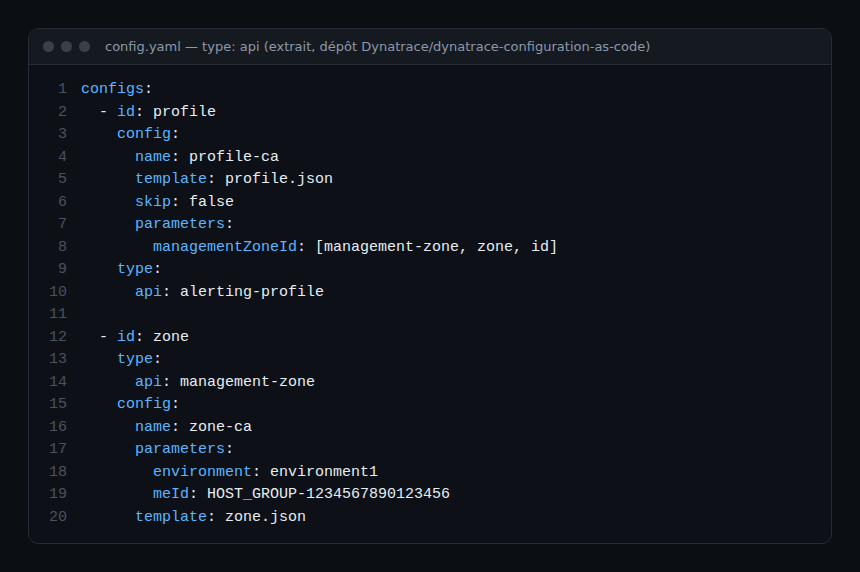
Monaco describes each configuration in a config.yaml file. The type block says whether it is a Settings 2.0 object (settings key, with schema and scope) or a classic API (api key). The following images are real excerpts from the Monaco repository’s test data.
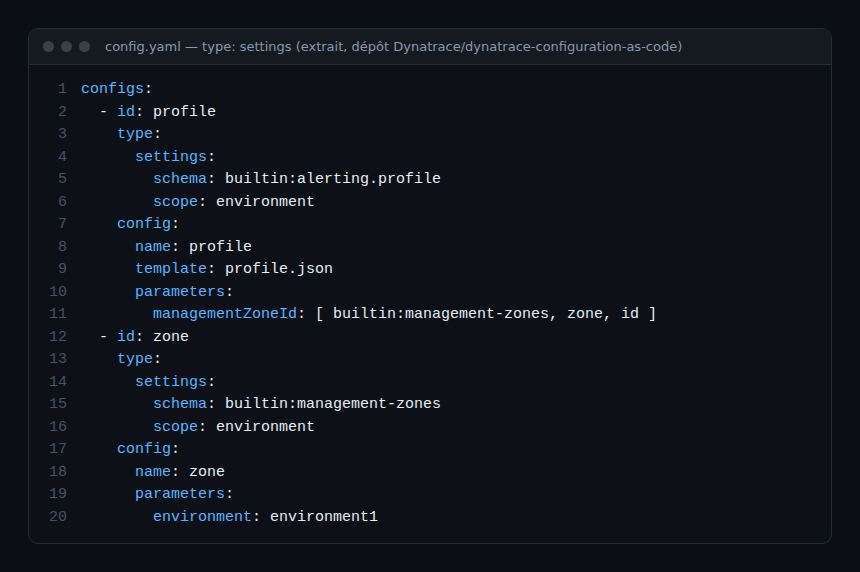
The same idea with classic APIs: the api key replaces settings, and the type is named by an identifier such as alerting-profile.
What the Terraform provider looks like
The provider documents each resource with its underlying API. The supported-resources.md file in its repository shows it for each one: the dynatrace_alerting resource relies on Settings 2.0, while dynatrace_application_detection_rule relies on a classic API. The same subject can even exist in both versions, as with dynatrace_application_detection_rule_v2.
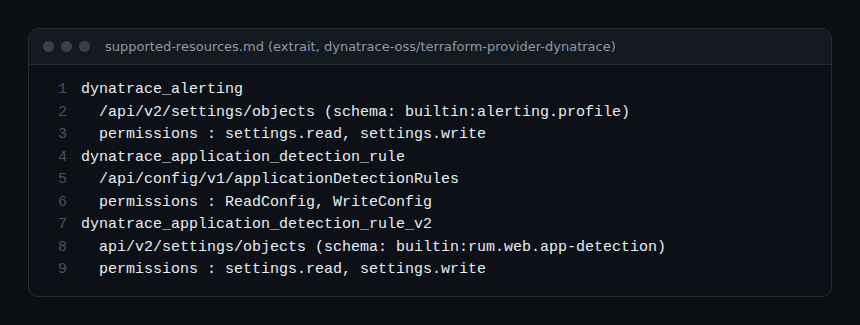
For connecting to Managed, the provider’s docs/index.md says the environment URL has the form https://<dynatrace-host>/e/<identifier>, and that an API token is supplied through the DYNATRACE_API_TOKEN variable and the URL through DYNATRACE_ENV_URL. The separate Terraform course walks through the full procedure.
Best practices
- Start with a small scope (alerting profiles, tagging rules) before growing the repository.
- One API token per tool and per environment, with only the permissions needed.
- Always go through code review before applying to production.
- Do not mix tools on the same objects: two tools driving the same configuration contradict each other.
Hands-on exercise
This exercise only needs read access to a Managed test environment and a browser. No command is run; no output is to be reproduced.
Step 1 — Inventory the configuration
List ten configuration items your team changes regularly (alerting profiles, automatic tags, notifications, management zones…). Expected result: a table of at least ten rows.
Step 2 — Classify by model
Open the coverage table in the Monaco repository (api_coverage.md) and look up each item. Note whether it maps to a builtin:… schema (Settings 2.0) or only to an /api/config/v1/… API. Expected result: a completed “family” column, with “not found” for items missing from the table.
Step 3 — Note the token permissions
In the “Configuration types and access permissions” page of the Managed documentation, note the permissions required for each item. Expected result: the list of permissions a token must carry.
Step 4 — Pick a tool
Apply the comparison table criteria to your context and justify your choice in three sentences. Expected result: a written decision, reviewed by a colleague.
Quiz
- Who creates Settings 2.0 schemas? a) Each user b) Dynatrace c) Monaco d) Terraform
- In a Monaco
config.yaml, which key designates a Settings 2.0 object? a) api b) settings c) schema alone d) classic - Which token permissions does the Monaco documentation associate with Settings 2.0? a) ReadConfig and WriteConfig b) settings.read and settings.write c) apiTokens.read d) none
- When does the documentation recommend Terraform instead? a) When Terraform is impossible b) When the team already knows it or wants external state c) Never d) Only on SaaS
Answers
- b) Schemas are created and managed by Dynatrace; only objects are under the user’s control.
- b) The
settingskey, withschemaandscope, as opposed toapifor classic APIs. - b) Read settings (
settings.read) and Write settings (settings.write). - b) Team already familiar, several providers, external state or dynamic configurations in HCL.
Going further
- Dynatrace Monaco: configuration as code
- Terraform and Dynatrace: alerting and dashboards
- Managing SLOs with Terraform
- Migrating Monaco configuration from Managed to SaaS
- Configuration as Code in the Managed documentation
- Dynatrace Terraform provider repository
← Path overview · Module 2: Installing Monaco and the Managed environment →
Frequently asked questions
Does Settings 2.0 replace all configuration APIs?
No. The documentation says most configuration APIs are deprecated in favour of Settings 2.0, not all of them. Some types have no equivalent: check the official page for your version.
Do I also need to learn Terraform?
Not to follow this path, which focuses on Monaco. Terraform is covered by a separate course, the Terraform Dynatrace Managed path, to follow or not depending on the tool your team picks.
Can two tools be used together?
Technically yes, but on separate scopes. Two tools managing the same object conflict.
Do you need a different token per tool?
It is a least-privilege best practice: one token per tool and per environment, limited to the permissions listed in module 2.
You now know what configuration as code brings, what Settings 2.0 and the classic APIs cover, and how to choose your tool. The next module installs Monaco and connects it to a Managed environment.
span.observer is an independent community blog, not affiliated with Dynatrace LLC. This path does not replace the official training and certifications of Dynatrace University. Check features in the official documentation for your version.