
This first module of the Monaco SaaS course lays the foundations of configuration as code SaaS: describing the configuration of a Dynatrace SaaS environment in versioned files instead of entering it by hand in the interface, then understanding where each tool fits (Monaco or the Terraform provider).
Learning path: Monaco SaaS · Module 1 · Duration: ~35 min · Level: Beginner
Objectives:
- Explain why configuration is described in files
- Place Monaco and the Terraform provider, and know how to choose
- Read a Monaco manifest and a Monaco configuration
- Identify the authentication methods of a SaaS environment
Prerequisites: a Dynatrace SaaS environment (the free trial is enough), basic Git and YAML. This course covers Dynatrace SaaS only.
Why configuration as code SaaS?
The official documentation presents configuration as code as a declarative approach: you configure Dynatrace “without the need to set up everything in the UI”. The files can be versioned, reused, shared and synchronised between environments.
For an SRE team, three benefits follow:
- Reproducibility: the test and production environments receive the same definition, hence the same alerts.
- Traceability: every change goes through a commit and a review. An alert changed by mistake can be found and reverted in minutes, which lowers MTTR.
- Less toil: a rule written once is deployed to ten environments without copying screens.
The principle is simple: the Git repository becomes the source of truth, and the tool applies that description to the environment.
Two tools: Monaco and the Terraform provider
The Dynatrace documentation names two tools. Monaco is a command-line tool published by Dynatrace. It is standalone and works with native JSON. The Terraform provider (dynatrace-oss/dynatrace) is used with Terraform, which the page describes as the industry-standard configuration as code tool.
| Criterion | Monaco | Terraform provider |
|---|---|---|
| Nature | Standalone Dynatrace CLI | Provider for Terraform |
| Format | YAML (manifest, configurations) and JSON templates | HCL |
| Recommended when | Terraform cannot or should not be used | Terraform is already in place, several providers in one workspace, external state, HCL expressions |
According to the documentation, Terraform is recommended when the team already knows it; Monaco is the alternative otherwise. The article Monaco or Terraform for Dynatrace configuration goes deeper into this choice. This course teaches Monaco (modules 1 to 5); Terraform is covered in a separate course.
Anatomy of a Monaco configuration
The documentation describes three building blocks: a deployment manifest, projects and configurations. The manifest states which projects (folders of files) go to which target environments. Each configuration pairs a YAML file (name, parameters, dependencies) with a JSON template that holds the API payload, with placeholders for the parameters.
Here is a manifest built from the documented keys, with example values:
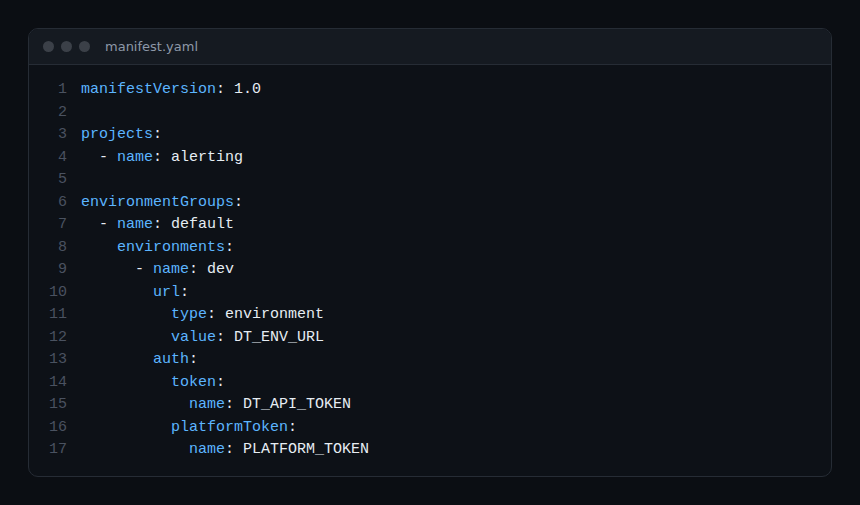
Three points deserve attention:
manifestVersionis1.0, the manifest version supported by the project repository;- the URL and tokens never appear in clear text:
nameis the name of the environment variable that holds the secret, not the secret itself; - if a referenced variable is missing or empty, Monaco refuses to load the manifest (repository source code,
manifest_loader.go).
A configuration lives in a config.yaml file. This excerpt comes from the test data of the official repository (Apache 2.0 licence):
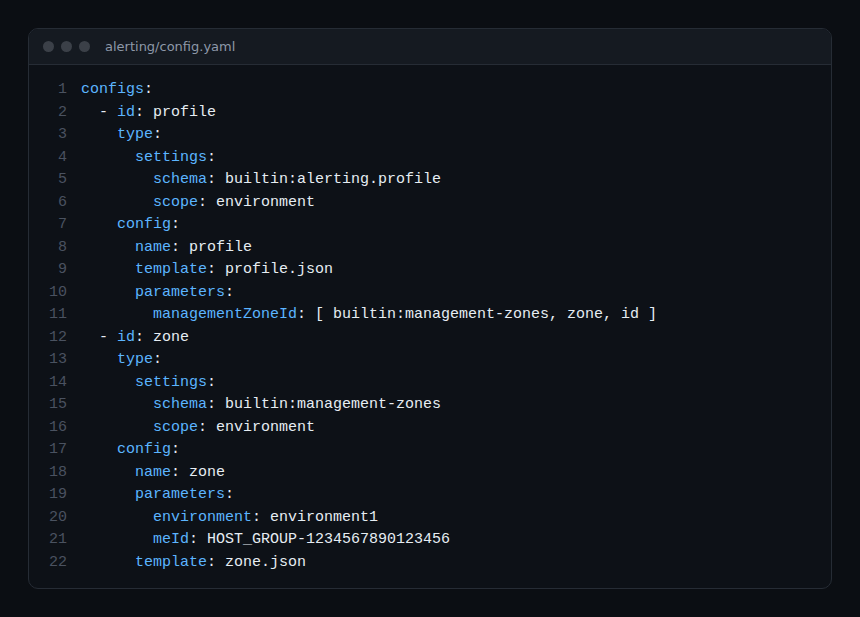
The reference [ builtin:management-zones, zone, id ] creates a dependency: Monaco deploys the zone first, then the profile that uses its identifier. Module 4 comes back to this.
Authenticating against a SaaS environment
The choice of authentication depends on the APIs you target. According to the Monaco documentation:
token: classic API token, for the configuration APIs;platformTokenoroAuth: for the platform APIs (workflows, documents, Grail buckets);- a
tokencan be combined with aplatformTokenor with an OAuth client, butplatformTokenandoAuthcannot both be defined for the same environment; - the
platformTokensyntax is supported from Monaco 2.24.0 onwards, according to the documentation.
The required scopes depend on the resource types you manage. In the official SLO example, the platform token needs slo:slos:read, slo:slos:write and slo:objective-templates:read. Module 2 covers creating the token and the list of scopes.
The Terraform provider reads its configuration from environment variables. Its documentation gives DYNATRACE_ENV_URL (for SaaS: https://########.live.dynatrace.com), DYNATRACE_PLATFORM_TOKEN for a platform token, and DT_CLIENT_ID, DT_CLIENT_SECRET, DT_ACCOUNT_ID for OAuth:
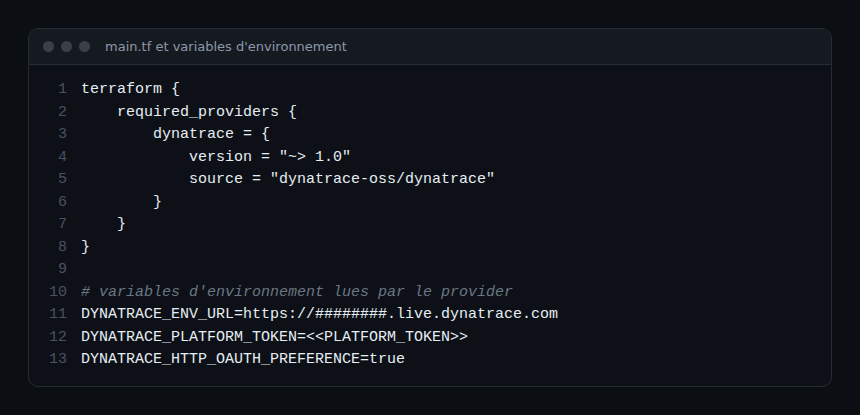
That documentation states two limits: not every resource supports OAuth, and a platform token cannot be used for the account management (IAM) API or for classic resources.
The commands to know
Monaco exposes four main commands (official command reference):
monaco deployapplies a manifest; options--dry-run,--environment,--group,--project;monaco downloadexports an existing configuration (module 3);monaco deleteremoves configurations listed in a delete file (module 5);monaco generateproduces auxiliary files: delete file, graph, schema.
--dry-run validates the structure of the manifest, projects and configurations without connecting to Dynatrace. It does not validate the JSON content, so an HTTP 400 error is still possible on the real deployment.
Hands-on exercise
Run this exercise on a SaaS trial environment. The commands below were not executed for this article: the expected result describes the documented behaviour, not copied output.
Step 1 — Create the repository
Create an empty Git repository with an alerting/ folder and a manifest.yaml file modelled on image 1 (URL and tokens in environment variables). Expected result: no secret in the repository.
Step 2 — Write a first configuration
Add a config.yaml and a JSON template to alerting/, following the structure of image 2 and the documentation of the Settings schema you picked. Expected result: an identifier (id), a type and a template for each configuration.
Step 3 — Set the variables and validate
Export DT_ENV_URL, DT_API_TOKEN and PLATFORM_TOKEN with the values of your environment, then run monaco deploy manifest.yaml --dry-run. Expected result: structure validation without any call to Dynatrace; a missing variable makes the manifest loading fail.
Step 4 — Choose the tool
Write three lines on why your team would pick Monaco or Terraform, using the table above. Expected result: a written decision criterion, to revisit in module 8.
Quiz
- In a Monaco manifest, what does
nameundertokencontain? a) The token b) The name of an environment variable c) The environment URL d) The project name - Can
platformTokenandoAuthbe defined for the same environment? a) Yes, always b) No c) Only with--dry-rund) Only with Terraform - Monaco’s
--dry-run: a) deploys as a test b) validates the structure without connecting to Dynatrace c) validates the JSON content with the API d) deletes the configurations - The documentation recommends Terraform when: a) the team already uses it b) you do not know Git c) you want to avoid YAML d) never
Answers
- b) The secret stays out of the repository: only the variable name appears in it.
- b) A
tokencan be combined with either one, but not with both at once. - b) An HTTP 400 error is still possible on the real deployment.
- a) Terraform suits mainly teams that already use it for their infrastructure.
Going further
- Monaco: Dynatrace configuration as code in practice
- Terraform and Dynatrace: alerting and dashboards
- Managing Dynatrace SLOs with Terraform
- Settings schemas of the Dynatrace SaaS API
- Official documentation: Configuration as Code
← Course overview · Module 2: Installing Monaco for Dynatrace SaaS →
Frequently asked questions
Do you also need to learn Terraform?
No. One tool is enough to manage a configuration scope. This course covers Monaco; if your team prefers Terraform, there is a separate Terraform course.
Where should secrets be kept?
Never in the repository. Monaco reads secrets from environment variables, and the Terraform provider also recommends environment variables. In a pipeline, they come from the CI tool’s secret store.
Does this course apply to Dynatrace Managed?
No. Platform tokens, OAuth and the third-generation platform concern Dynatrace SaaS. A separate course exists for Managed.
You now know what configuration as code SaaS covers, how a manifest and a configuration are built, and which authentication methods exist. The next module installs Monaco and prepares the manifest for your environment.
span.observer is an independent community blog, not affiliated with Dynatrace LLC. This course does not replace the official Dynatrace University training and certifications. Check features against the official documentation for your version.