REA reverse engineering: the morluto/rea repository (“Reverse Engineer Anything”) is an MCP server and command line that connect an AI agent to tools for analysing native binaries, JavaScript and Electron applications, .NET assemblies, Android APKs or websites. The project shows about 361,200 stars and 90,600 forks as of the check on 22 October 2026, under the MIT licence. This guide presents the tool, its installation from the README and, above all, the usage framework the project imposes: only analyse software that you own or are authorised to examine.
Reverse engineering is legal in many cases (security, interoperability, audit, preservation) and restricted in others, depending on your jurisdiction and the licence of the target software. The project says so itself in a DISCLAIMER.md file; we restate its warnings below.
A note on honesty: span.observer has not installed or run REA. The commands come from the README and the repository documentation; the images are a figure from the repository and extracts rendered from its README.
REA reverse engineering: what the repository says
- Licence: MIT. The README states that code written by REA is under MIT and that third-party components keep their own licences (
THIRD_PARTY_NOTICES.mdfile). - Language and distribution: a Node.js/TypeScript project published on npm as
rea-agents. Thepackage.jsonversion on the main branch is 6.7.0, with a changelog entry dated 18 October 2026. The changelog says 6.6.0 was tagged but not published to npm. - Figures checked on 22 October 2026: about 361,200 stars and 90,600 forks. These figures are very high for a recent project; we report them as the page shows them, without explaining or guaranteeing them. The README itself states that only
morluto/rea, rea.tools and therea-agentsnpm package are official: a similar repository name or a copied README proves nothing. - Prerequisites: Node.js 22.x (≥ 22.19), 24.x (≥ 24.11) or 26 and later, with npm; extra tools depending on the target.
- Supported agents: the README names Claude Code, Codex, Cursor, Gemini CLI, Grok Build and other agents that support a local MCP server.
The principle: your agent calls REA over MCP, REA inspects the target and traces the relevant code, then returns its findings with the evidence and the unknowns; the agent uses them to explain, implement or test. The same flows exist on the command line.
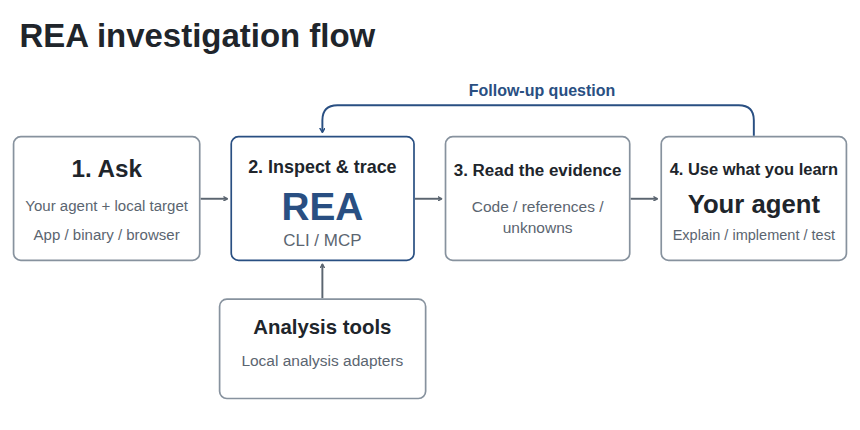
What REA can analyse
The README table is long: desktop application installs, native binaries (pseudo-code, assembly, strings, symbols through Hopper, Ghidra or IDA), JavaScript and Electron applications, .NET assemblies, APKs through JADX, Android devices through adb, firmware, recorded network captures, GGUF and safetensors model files, SQLite databases, websites with a Chrome-family browser, and many more. Static JavaScript and .NET inspections read the supplied files without running the application. Runtime captures, on the other hand, run or drive the target with your user permissions.
For native analysis, REA relies on an external engine that you install: the README names Hopper, Ghidra and IDA, as well as GNU objdump and Rizin for offline inspection. To understand what Ghidra and MCP bring to an agent, see our article on Ghidra MCP and local tools for AI agents.
The project’s warnings
They are part of the tool; ignoring them means misusing it. Summary of the README and DISCLAIMER.md:
- Lawful use: security research, malware and incident analysis, CTFs and education, interoperability, software preservation, debugging or auditing of software that you own or are authorised to examine.
- What the project does not support: circumventing DRM, licence checks or anti-cheat, creating game cheats, bypassing authentication on systems you are not authorised to test, copying proprietary software or reproducing its protected assets.
- Running targets: some flows execute or observe programs, attach to runtime or browser endpoints, capture traffic or operate on connected devices. Authorisation to inspect a file does not necessarily authorise executing it, intercepting traffic or interacting with another party’s system. Use an appropriate environment for untrusted targets.
- Responsibility: you answer for the commands and scripts you ask an agent to run, including those it generates. Having a file or seeing software published is not permission for every operation.
- Results: decompilation, reconstruction and AI-assisted analysis may be incomplete or wrong; check the evidence before relying on it.
The README adds a rule about commercial tools:
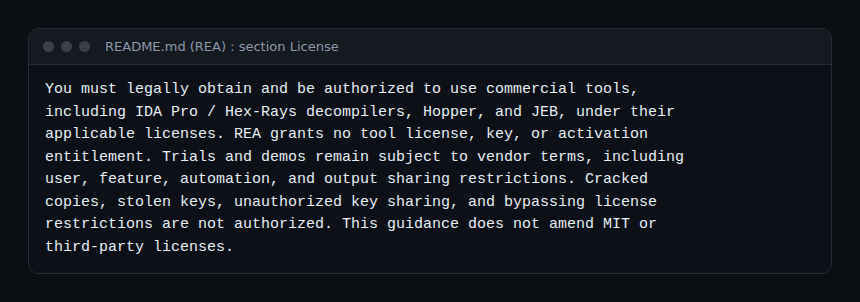
In other words: Hopper, IDA, JEB and their decompilers are paid products with their own terms, and REA provides neither licence nor key. Trial periods remain subject to the vendor’s rules. span.observer is not affiliated with any of these vendors.
Step-by-step installation
- Install Node.js and npm at the versions above. On Linux, the README asks for a procps-compatible
pson REA’sPATHfor some process-ownership checks. - Run the setup wizard:
npx rea-agents setupChoose your agents, review the proposed changes, approve them, then restart the agent. The README says the wizard adds REA’s MCP server and workflow instructions, with a backup of the existing configuration.
- For the command line alone, two README commands:
npx -y rea-agents@latest analyze-javascript-application /absolute/path/to/app --json
npm install --global rea-agents
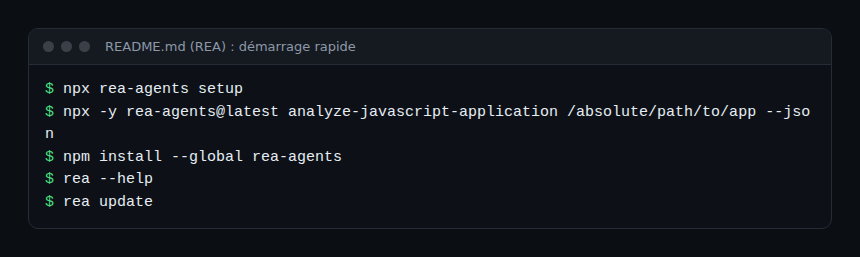
For a client that requires manual configuration, the installation documentation gives an mcpServers.rea entry that runs npx with -y [email protected] mcp: it recommends pinning an exact version for a persistent registration. To update, rea update; the README notes that REA changes quickly and that recent versions often fix bugs.
Limits and open points
- Figures to take with caution: a star count this high does not replace a review of the code and of the third-party tools’ licences. Install only from the official sources cited by the README.
- Paid third-party tools for advanced native analysis (Hopper, IDA, JEB): check cost and terms.
- Execution on your machine: the agent may request runtime captures; work in a virtual machine or a disposable container for untrusted targets.
- Reliability: an agent’s results remain hypotheses; the project says so.
- Data: REA analyses locally, but your agent receives the tool results, and its model provider applies its own data policy (README).
Observing and monitoring usage
The README does not describe an OpenTelemetry trace export. What the repository does document: the rea doctor command, which reads host prerequisites and agent configuration without changing them and returns a JSON report with a healthy value; variables such as REA_LOG_LEVEL for the logging level and REA_MCP_MAX_RESPONSE_BYTES to bound MCP response size; adjustable startup timeouts (REA_GHIDRA_STARTUP_TIMEOUT_MS, REA_HOPPER_STARTUP_TIMEOUT_MS).
To trace what the agent does, Dynatrace SaaS and Dynatrace Managed can receive MCP tool-call events from the client side through OpenTelemetry, as explained in observing MCP agents with OpenTelemetry: tool name, duration, success. Keep tool parameters out of logs if the paths or files analysed are sensitive. Before connecting REA to an agent, frame what it may do with the guardrails for AI agents in production and securing an MCP server.
How to check that it works
rea doctor --jsonreturns a report;rea doctor --client codex --json(or your agent’s identifier) checks one specific registration.- After restarting the agent, the REA tool appears in its list of MCP servers.
- On a JavaScript application you have the rights to, the
analyze-javascript-applicationcommand returns modules and their imports.
Best practices
- Document the authorisation before each analysis: target, scope, owner.
- Isolate untrusted targets in a disposable machine, without real credentials.
- Pin the
rea-agentsversion in the MCP configuration. - Limit REA to the project or agent profile that needs it (the installation documentation describes how).
- Do not publish reconstructed code without checking the rights on the original software.
Frequently asked questions
Is REA legal?
The software is under MIT. Its use depends on what you analyse: the project limits it to software you own or are authorised to examine, and applicable law depends on your country and the licences involved. If in doubt, seek legal advice.
Do I need to buy Hopper or IDA?
Not for static JavaScript or .NET analysis; for native code, the README also names Ghidra, GNU objdump and Rizin. If you use a paid product, obtain it legally.
Are my files sent to a third party?
According to the README, REA analyses locally. Your agent does receive the results, which go to its model provider.
Conclusion
REA is a powerful tool for understanding software you have the right to examine, and the project was upfront about setting the framework of use. Install from the official sources, isolate, trace the calls, and keep the authorisation in writing. For another tool in the series, see GitHub’s official MCP server. Sources: the morluto/rea repository.
span.observer is an independent community blog, not affiliated with Dynatrace LLC or the projects mentioned. Trademarks belong to their owners. This article is not legal advice. Tools change quickly: check commands and options in their official documentation.