
Module 1 of the SLO and SLA training path: SLI vs SLO vs SLA, with clear definitions, what sets them apart and the two mistakes that skew most first reliability targets.
Path: SLO and SLA training · Module 1/6 · Duration: ~30 min · Level: Beginner
Objectives:
- Define an SLI, an SLO and an SLA without mixing them up
- Express an SLI as a ratio of good events to valid events
- Link an SLO to its error budget
- Spot common mistakes: SLO equal to the SLA, a 100% target
Prerequisites: none. A production service you know well helps with the exercise.
A team announces “99.9% availability” in a meeting. Sales hear a promise to customers, product hears an internal goal, operations hear an average ping result. Three people, three different numbers behind the same percentage. That vagueness becomes expensive the day a customer asks for a service credit.
This module sets the vocabulary used throughout the path. The definitions follow Google’s Site Reliability Engineering book, now the industry reference. They are tool-agnostic: they apply to Dynatrace SaaS as much as to Dynatrace Managed, whose implementation is covered in modules 3 and 4.
SLI vs SLO vs SLA: three levels, three roles
| Term | What it is | Who owns it | Example |
|---|---|---|---|
| SLI (Service Level Indicator) | A measurement of service quality as the user experiences it | The engineering team | Share of HTTP requests served without a 5xx error |
| SLO (Service Level Objective) | A target for that SLI, over a time window | Product and engineering | 99.9% successful requests over a rolling 30 days |
| SLA (Service Level Agreement) | A contractual commitment with consequences if it is missed | Legal and sales | 99.5% per calendar month, otherwise a 10% invoice credit |
Remember the order: you measure (SLI), you set a goal (SLO), you commit to a third party (SLA). An SLA without a reliable SLI behind it is a promise nobody can check.
The SLI: a ratio, not a raw metric
A good SLI is written as a ratio of “good” events to “valid” events, multiplied by 100:
SLI = (good events / valid events) × 100This form has three benefits: it stays between 0 and 100%, it compares across services and it converts straight into an error budget. The most common SLI families:
- Availability: requests without a server error / requests received;
- Latency: requests served in under 300 ms / requests received;
- Freshness: reads returning data less than 10 minutes old / reads;
- Correctness: jobs with a correct result / jobs.
The word “valid” matters: health-check probes and client-caused 4xx errors are often excluded. Choosing SLIs for a given service is covered in how to choose SLIs with DQL.
In Dynatrace SaaS, an SLI is computed in DQL. The documentation of the Service-Level Objectives app gives this example of a service success rate:
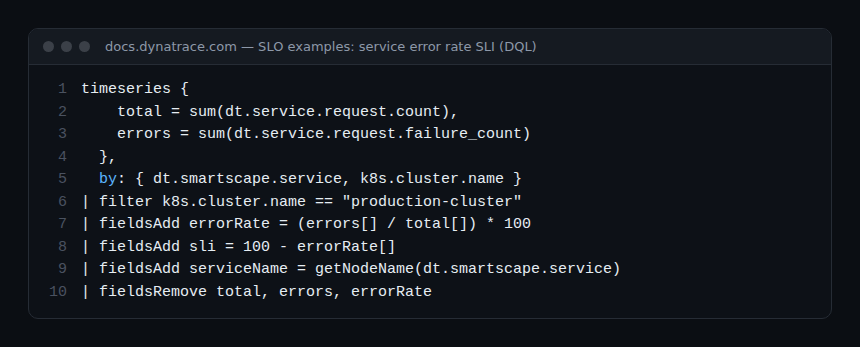
The ratio form is right there: errorRate = errors / total × 100, then sli = 100 - errorRate. In Dynatrace Managed, the same calculation goes through a metric expression in classic SLOs (module 4).
The SLO: a target over a window
An SLO combines three things: an SLI, a percentage target and a time window. “99.9%” on its own is not an SLO. “99.9% of payment API requests succeed, measured over a rolling 30 days” is one.
Pick the target from what users notice and what history shows, not from what sounds good. Starting from the real performance of the last 4 weeks, then adjusting, is the safest method.
The SLA: a contract
The SLA takes an indicator, often coarser (monthly availability), and attaches consequences: service credits, penalties, a right to terminate. It is negotiated with a customer and drafted with legal. Module 6 describes its usual clauses.
The error budget in one sentence
The error budget is the share of failure the SLO allows: budget = 100% − target. With a 99.9% SLO, you may fail on 0.1% of the events in the window. While budget remains, the team can ship and take risks; once it is spent, reliability comes first. Module 2 turns this percentage into minutes and requests; module 5 turns it into a policy.
Common mistakes
Treating the SLO as the SLA
If the internal SLO equals the SLA, the team discovers the breach when it already costs money. The SLO must be stricter than the SLA: for example a 99.9% SLO for a 99.5% SLA. The gap leaves time to react before the penalty.
Aiming for 100%
A 100% target means a zero budget: the slightest error breaches the SLO, every release becomes an unacceptable risk and the team stops shipping. It is also invisible to users, whose mobile network or Wi-Fi fails far more often than your service. Each extra “nine” divides the budget by ten and costs much more to hold.
Measuring what is easy instead of what matters
Host CPU or a ping result do not tell you whether the user could pay. Prefer a measurement as close to the user as possible: requests at the entry point, synthetic transactions or real journeys, as in the article on user journey SLOs.
Too many SLOs
Twenty SLOs per service and nobody looks at them. Start with one or two SLOs per critical journey: availability and latency.
Best practices
- Write every SLI as a good / valid ratio, with its list of exclusions.
- Always state the window with the target.
- Keep a gap between the internal SLO and the external SLA.
- Have product validate the target, not just operations.
Hands-on exercise
Step 1 — Pick a journey
Take a critical journey of your service (login, payment, search). Expected result: one sentence describing what the user wants to achieve.
Step 2 — Write two SLIs
Write an availability SLI and a latency SLI as ratios, with the excluded events. Expected result: two formulas such as “POST /payment requests without 5xx / POST /payment requests excluding probes”.
Step 3 — Set an SLO
Choose a target and a window for each SLI. Expected result: two complete SLOs, target and window included, none at 100%.
Step 4 — Check the gap with the SLA
If your service has an SLA, compare its target with your SLO. Expected result: an SLO stricter than the SLA, or an issue to raise.
Quiz
- Which one is a contractual commitment? a) SLI b) SLO c) SLA
- What error budget does a 99.5% SLO give? a) 0.05% b) 0.5% c) 5%
- What shape should an SLI take? a) A raw CPU value b) A good / valid events ratio c) A number of incidents
- Why avoid a 100% SLO? a) The tool rejects it b) The budget is zero and blocks every release c) It is too easy to reach
Answers
- c) The SLA binds you to a customer.
- b) 100 − 99.5 = 0.5%.
- b) A ratio compares well and converts into a budget.
- b) No error is allowed.
Going further
- How to choose SLIs with DQL
- An SLO dashboard for leadership
- SLOs: Dynatrace, Grafana and Prometheus compared
- Dynatrace documentation — SLO examples
- Google SRE Book — Service Level Objectives
Path overview · Module 2: error budget calculation →
Frequently asked questions
Can an SLO exist without an SLA?
Yes, and it is the most common case. Most internal services have SLOs but no contract. The SLO steers the team; the SLA only exists towards a customer.
Should availability be measured in time or in requests?
Both exist. A request ratio better reflects what users experience; a ratio of “good” minutes is easier to explain in a contract. Module 2 compares the two.
How many SLOs per service?
One or two per critical journey are enough to start. Add more only when a decision depends on them.
You now have the vocabulary: an SLI measures, an SLO targets, an SLA commits, and the error budget is the gap between the target and 100%. The next module does the maths: minutes, windows and burn rate.
span.observer is an independent community blog, not affiliated with Dynatrace LLC. This path does not replace the official Dynatrace University training. Check features against the official documentation for your version.