
Module 2 of the Terraform Dynatrace SaaS course: a Terraform import Dynatrace SaaS workflow brings configuration created by hand in the interface under code control.
Course: Terraform Dynatrace SaaS · Module 2/3 · Duration: ~45 min · Level: Intermediate
Objectives:
- Export an existing configuration as HCL with the provider’s export utility
- Import the exported resources into the Terraform state
- Detect drift between the state, the code and the environment
- Know what the export leaves out by default
Prerequisites: module 1 (provider installed, SaaS authentication), a SaaS test environment and a platform token or an OAuth client. This module applies to Dynatrace SaaS only.
In most teams the configuration exists before the code: alerts, service-level objectives (SLOs) and workflows created during incidents. To manage them with Terraform without rewriting everything, you need a Terraform import Dynatrace SaaS procedure: read what exists, turn it into .tf files, then attach each object to the state. This module covers that approach, then the drift monitoring that follows.
For reliability the stakes are practical: configuration that lives only in the interface cannot be reviewed, versioned or restored after a mistake. Versioned code shortens recovery time.
Terraform import Dynatrace SaaS: the state and what it holds
Terraform keeps a state: the mapping between the resource blocks in your code and the real objects in the environment. Without it, terraform plan would propose creating duplicates of what already exists. An import therefore writes into the state the link between a block and an existing object.
For teamwork, HashiCorp’s documentation recommends remote state. With local state, each person must make sure they hold the latest state before running Terraform, whereas remote state can come with locking that prevents concurrent runs against the same state. The choice of backend is up to your organisation; this module does not impose one.
Export what exists with the provider
The dynatrace-oss/dynatrace provider can also run as a standalone executable to export a configuration. The Dynatrace documentation describes the sequence.
- Install the Terraform CLI and the provider, and create a platform token or an OAuth client whose permissions cover the objects to read.
- Set the environment variables that identify the environment:
DYNATRACE_ENV_URLand, depending on authentication,DYNATRACE_PLATFORM_TOKENorDT_CLIENT_ID,DT_CLIENT_SECRETandDT_ACCOUNT_ID. - Optional:
DYNATRACE_TARGET_FOLDERsets the output folder. Without it, the.configurationfolder is used. - Run the provider executable directly, not
terraform. It is usually found under.terraform/providers/registry.terraform.io/dynatrace-oss/dynatrace/. The documentation says the warning shown on direct invocation can be ignored.
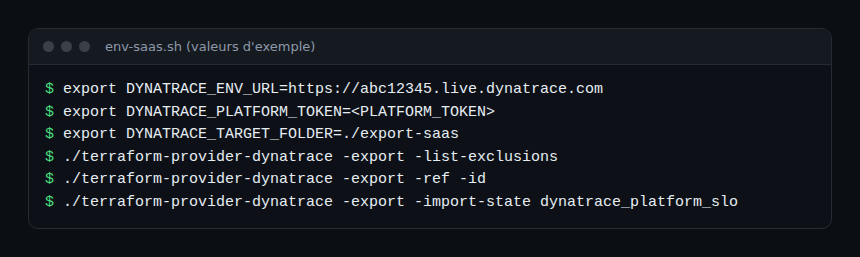
The general form of the command is:
./terraform-provider-dynatrace -export [-ref] [-migrate] [-import-state] [-id] [-flat] [-exclude] [-admin-access] [<resourcename>[=<id>]]The options that matter
| Option | Effect (official documentation) |
|---|---|
-ref |
Includes resources with their data sources and dependencies |
-migrate |
Includes dependencies, without data sources |
-import-state |
Initialises the Terraform modules and imports the resources into the state |
-id |
Adds the identifier as a comment in the resource files |
-flat |
Stores all resources directly in the target folder, without a module structure |
-exclude |
Excludes the named resources |
-admin-access |
Exports OpenPipeline resources of all owners; requires the settings:objects:admin permission |
The -list-exclusions option lists the resources that are not exported by default, without running an export. dynatrace_json_dashboard dashboards are among them: you must name them explicitly to export them. Run it first, so you know what will be missing.
Import into the state and read the result
There are two paths. The first exports and imports in one command with -import-state. The second only exports, and lets each team review the code before any import. For a first attempt, the second is safer: you read the generated files before linking anything.
The documentation gives these examples, using service-level objective resources:
./terraform-provider-dynatrace -export -import-state
./terraform-provider-dynatrace -export -import-state dynatrace_platform_slo
./terraform-provider-dynatrace -export -ref dynatrace_platform_slo dynatrace_automation_workflow
The same page names other types: dynatrace_document, dynatrace_automation_workflow, and the -admin-access option for OpenPipeline. Exporting these resources depends on the permissions of the token or OAuth client. The provider page lists the matching OAuth scopes, such as openpipeline:configurations:read or document:documents:read.
Files to review by hand
Some files cannot be used as they are. The export moves them to two hidden folders, with the reason added as a comment at the top of each file:
.flawed: files that are deprecated or need changes;.required_attention: files that lack essential information to be applied, for example because of sensitive data. The documentation cites the confidential strings ofdynatrace_credentials, which the API does not provide.
Treat these folders as a task list: while they contain files, the import is incomplete.
Detect drift
Drift is the gap between the code, the state and the real environment, for example when someone edits an object in the interface. Two standard Terraform commands help.
terraform plan -refresh-onlycreates a plan whose goal is only to update the state and the root module outputs, so they reflect changes made outside Terraform.terraform plan -detailed-exitcodereturns 0 for no changes, 1 for an error and 2 when the plan contains changes.
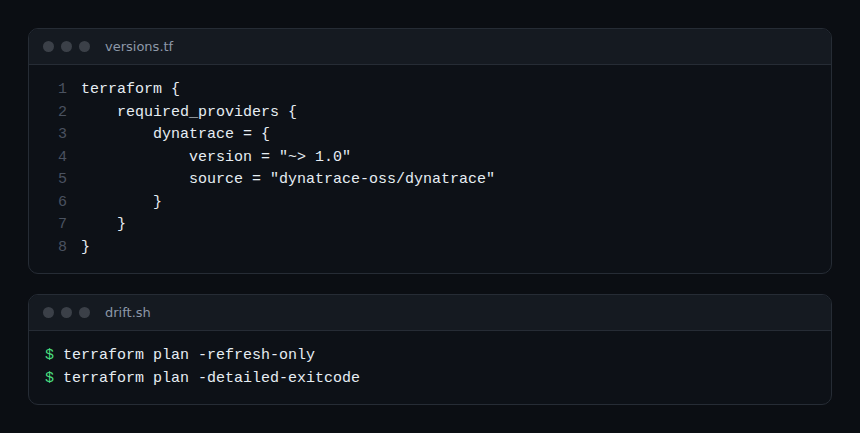
Exit code 2 suits a scheduled check: a non-empty plan means the code and the environment have diverged. Setting this up in a pipeline is the subject of the next module.
Reuse the configuration across environments
The -flat option avoids the module structure; without it, the export organises resources into modules. To copy a configuration from one environment to another, the migration documentation distinguishes the bulk method (-migrate, towards a target environment with no existing configuration) from the iterative method (-migrate -datasources, by resource group). The variables DYNATRACE_DUPLICATE_REJECT=ALL and DYNATRACE_DUPLICATE_HIJACK=ALL control how duplicates are handled: refuse any overwrite, or allow it.
For an example of hand-written resources, see SLOs with Terraform.
Hands-on exercise
Run it on a SaaS test environment. The commands below were not executed while writing this module: their output depends on your environment.
Step 1 — Prepare
Set DYNATRACE_ENV_URL and DYNATRACE_PLATFORM_TOKEN (or the OAuth trio), then point DYNATRACE_TARGET_FOLDER to an empty folder. Expected result: no secret value in shared shell history or in Git.
Step 2 — List the exclusions
Run ./terraform-provider-dynatrace -export -list-exclusions. Expected result: the list of resources missing from a default export; note one that matters to you.
Step 3 — Export one resource type
Export a single type, for example dynatrace_platform_slo, with -id. Expected result: .tf files in the target folder with the identifier as a comment, and possibly files in .flawed or .required_attention.
Step 4 — Import, then check
Run again with -import-state, then run terraform plan in the export folder. Expected result: ideally no changes. If any remain, compare the generated code with the real object before applying anything.
Step 5 — Cause some drift
Edit an object in the interface, then run terraform plan -detailed-exitcode. Expected result: a non-empty plan and exit code 2.
Quiz
- Which executable runs the export? a)
terraformb)terraform-provider-dynatracec)terraform-docsd)oneagentctl - What does
-import-statedo? a) Deletes the state b) Imports the exported resources into the Terraform state c) Encrypts secrets d) Publishes the code to Git - Where does the export put files that lack essential information? a)
.flawedb).required_attentionc).stated).flat - Which exit code does
terraform plan -detailed-exitcodereturn when the plan contains changes? a) 0 b) 1 c) 2 d) 3
Answers
- b) The export is a function of the provider executable, called directly.
- b) The option initialises the modules and imports the resources into the state.
- b)
.required_attentiongathers files that lack essential information to be applied;.flawedholds files that are deprecated or need changes. - c) 0 means no changes, 1 an error, 2 a plan with changes.
Going further
- Terraform and Dynatrace: alerting and dashboards
- Dynatrace SaaS API schemas, to understand the exported objects
- Official documentation: Terraform CLI commands and export
- Dynatrace Terraform provider repository
← Module 1: Terraform provider · Course overview · Module 3: GitOps →
Frequently asked questions
Does the export retrieve the whole configuration?
No. Some resources, including dynatrace_json_dashboard dashboards, are excluded by default and must be requested explicitly. Secrets, such as the confidential strings of credentials, are not available through the API.
Should I call terraform or the provider to export?
The provider. The export is a function of the provider executable, which you call directly; the warning that appears can be ignored, according to the documentation.
How can I tell whether someone edited an object by hand?
Run terraform plan, with -refresh-only to update the state or -detailed-exitcode to get exit code 2 when there are changes.
The code now describes what already existed, and drift is measured with one command. Module 3 puts these checks into a review and promotion pipeline.
span.observer is an independent community blog, not affiliated with Dynatrace LLC. This course does not replace the official Dynatrace University training and certifications. Check features in the official documentation for your version.