gh-aw agentic workflows: the github/gh-aw repository (GitHub Agentic Workflows) lets you write an automation in plain language, in a Markdown file, and have an AI agent run it inside GitHub Actions. It has about 5,500 stars and 604 forks at the end of October 2026, under the MIT licence (“Copyright GitHub, Inc.” in the LICENSE file).
For an SRE, the interest comes down to three questions. What can the agent do in CI? How much does each run cost? How do you observe what happened? This article answers from the README and the official documentation, read on 27 October 2026. It is not a test: span.observer did not install the tool, and the images come from the project’s documentation or reproduce its configuration examples.
One more warning: the documentation says GitHub Agentic Workflows is in “Public Preview”. The details below may change quickly, and several features are marked experimental.
gh-aw agentic workflows: what the repository says
- Principle: an agentic workflow has two parts. The YAML frontmatter sets triggers, permissions, tools and the AI engine; the Markdown body describes the task. The
gh aw compilecommand validates this file and generates a.lock.ymlfile, a standard GitHub Actions workflow. - Built-in AI engines: GitHub Copilot (the default), Claude Code, OpenAI Codex, Google Gemini and Pi.
- Place in CI: the README says the tool complements CI/CD and does not replace it. Builds, tests and deployments stay deterministic workflows. The agent handles tasks that need interpretation: issue triage, pull-request review, CI failure analysis, reports.
- Publisher and licence: a repository of the GitHub organisation, MIT licence. span.observer is an independent blog with no link to GitHub or Microsoft.
- Numbers: about 5,500 stars and 604 forks, read on the repository page on 27 October 2026. The README mentions Go tooling (
go test,go build).
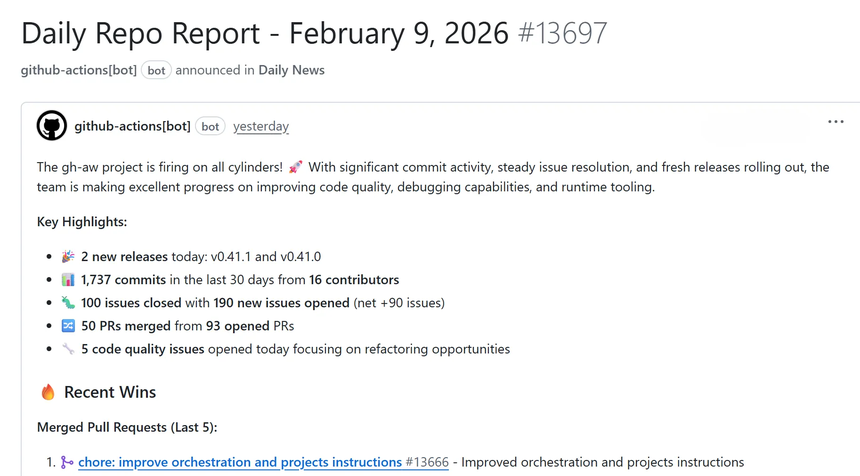
This image, taken from the quick start guide, shows the typical result: the agent does not write to the repository, it produces an issue or a comment.
Step-by-step installation
The quick start guide announces about ten minutes. The prerequisites it lists: an account with an AI provider (Copilot, Anthropic, OpenAI or Google), a repository where you have write access, GitHub Actions enabled, the gh CLI version 2.0.0 or later, and Linux, macOS or Windows with WSL.
Step 1 — Install the extension
gh auth login --scopes repo,workflow
gh extension install github/gh-aw
The documentation also offers an install-gh-aw.sh script if authentication fails. As with any curl | bash, read it before running it.
Step 2 — Add a sample workflow
gh aw add-wizard githubnext/agentics/repo-statusThe wizard checks repository permissions, offers an engine, sets up authentication, then adds the .md file and its .lock.yml to .github/workflows/. Before enabling it, the documentation asks you to review the chosen engine’s data handling, the repository’s sensitivity, and access to logs and artifacts.
Step 3 — Authenticate the engine
Each engine has its own secret: COPILOT_GITHUB_TOKEN (or copilot-requests: write with organisation billing), ANTHROPIC_API_KEY, CODEX_API_KEY or OPENAI_API_KEY, GEMINI_API_KEY. Example from the docs: gh secret set ANTHROPIC_API_KEY < /path/key.txt. A Claude subscription token (CLAUDE_CODE_OAUTH_TOKEN) is not supported.
Step 4 — Compile, run, follow
gh aw compile
gh aw run repo-status
gh aw status
gh run watch
Commit both files: the documentation says the generated .lock.yml is required and must be committed with the Markdown source. A run takes two to three minutes according to the guide.
Running agents in CI: permissions and guardrails
This is the core of the design. According to the README, the supported path starts read-only and sandboxed. Writes go through “safe outputs”: the agent requests an action in structured form, then a separate job with limited permissions applies it after validation.
- Read-only: the agent job has no write rights and, according to the FAQ, does not receive repository secrets by default. A workflow author can still pass them explicitly to tools, steps or custom jobs: review that.
- Safe outputs: create an issue, a comment, a pull request or add a label, with a maximum count per run (for example one issue). Content is sanitised before it is applied (secrets masked, URL domain filtering, size limits).
- Threat detection: when safe outputs are configured, an analysis job runs between the agent and the writes. It looks for prompt injection, secret leaks and malicious patches.
- Network: by default,
network: defaultsallows only basic infrastructure. You add domains or ecosystems (node,python) innetwork.allowed;network: {}blocks everything. - Triggers: the quick start guide warns to prefer
pull_requestoverpull_request_target, which runs in the base repository’s privileged context.
The README is blunt about it: these controls are configurable, and using agentic workflows needs careful security review and human supervision, at your own risk. For the enterprise method, see guardrails for AI agents in production and supervising a coding agent in the enterprise.
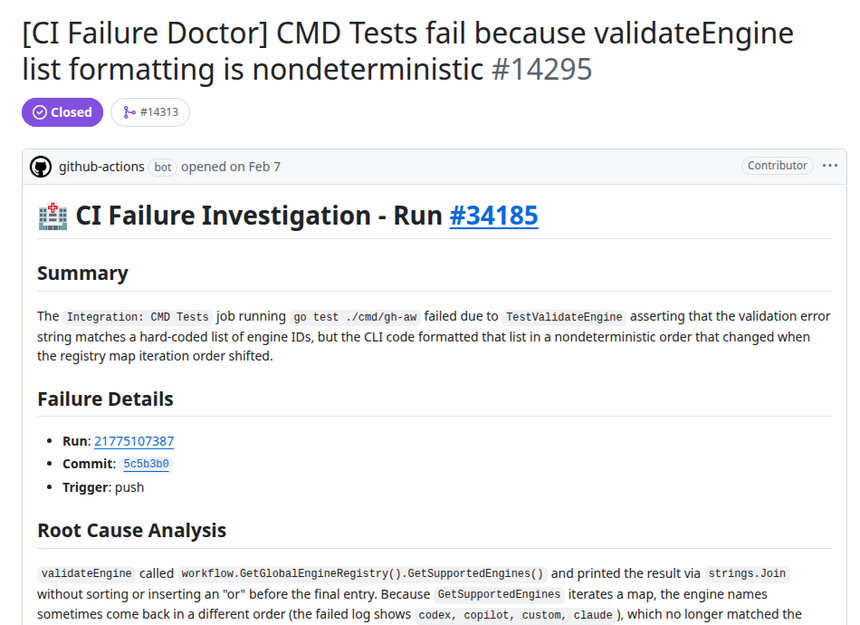
The example above comes from the “CI Failure Investigation” gallery: an agentic workflow that reads a failed run and opens an issue with a lead on the cause. It is the use case closest to an SRE’s daily work.
Costs: credits, durations and triggers
The “Cost Management” documentation splits cost in two: the GitHub Actions minutes of the jobs, and the inference billed by the AI provider. It gives an order of magnitude: a pre-activation job of 10 to 30 seconds, then an agent job of 1 to 15 minutes, each with about 1.5 minutes of runner set-up.
The tracking unit is the AI Credit (AIC): one AIC is worth USD 0.01. Values are computed on a best-effort basis from the models.dev price catalogue and may differ from the real bill: the docs ask you to check with the provider.
The defaults quoted by the documentation:
- 20 minutes timeout for the agent step, 60 minutes for the agent job, 10 minutes for the detection job;
- 1,000 AIC per workflow run and 5,000 AIC per workflow per day (24-hour window);
- adjustable with
timeout-minutes,max-ai-creditsandmax-daily-ai-creditsin the frontmatter.
The main lever is still frequency. The docs rank push, check_run and check_suite as high risk: on an active repository they can trigger hundreds of runs a day. They advise starting with schedule or workflow_dispatch, and avoiding agent runs that are not needed, with skip-if-match or a noop written to $GH_AW_SAFE_OUTPUTS. For token tracking on the telemetry side, see the cost of an AI agent in tokens with OpenTelemetry.
Observing runs: logs, durations, failures
Every run is first a GitHub Actions run: the Actions tab shows per-step logs, and per-job duration is a spend indicator for minutes. gh-aw adds dedicated commands, described in the documentation:
gh aw logs: a table of runs (10 by default) with duration, tokens, AIC and turn count; options--engine,--start-date -30d,--count,--firewall,--json. Failures, timeouts and cancellations are grouped into symptom “clusters”; the doc states these are neither proven causes nor failure rates.gh aw audit <run-id-or-url>: a report on one run (metrics, tool calls, MCP server health, firewall analysis, safe outputs). With two identifiers, it compares the second to the first. A job URL without an anchor extracts the first failing step.gh aw health: workflow health for a repository over 7, 30 or 90 days, based on a sample of the current revision.gh aw status: workflow state.
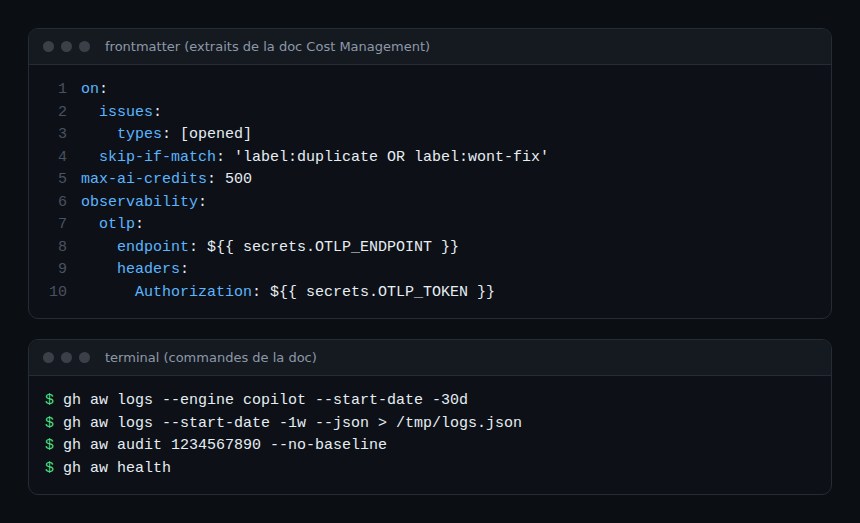
For a multi-repository view, the docs offer observability.otlp: runs send OTLP spans to a collector, with attributes such as gen_ai.usage.input_tokens and gen_ai.usage.output_tokens. Traces are also mirrored to an otel.jsonl file in the agent artifact, and an export failure does not fail the workflow. Header secrets are masked before export, but the documentation warns that Actions console masking does not sanitise the contents of downloadable artifacts. For agent traces in general, see observing MCP agents with OpenTelemetry.
A network block shows up in the logs as DENIED CONNECT registry.npmjs.org:443: the docs recommend checking the destination is intended, then adding only the needed domain or ecosystem.
Limits and open points
- Anchor to flag: “Public Preview” according to the official FAQ. Several documented features are labelled experimental (for example
merge-pull-request, the Azure DevOps or Linear integrations). - Announced vulnerability: the README reports a flaw affecting versions
>= 0.83.3, < 0.85.4(advisory GHSA-8h78-hpm7-29gg), and those releases were retired as a precaution. Check the version you install. - Versions: the documentation describes a weekly or bi-weekly minor release cadence, and a runtime check: a workflow compiled with a version that is too old or revoked can fail or warn, and you then recompile. The number of the latest release could not be read, so it is not quoted.
- Non-determinism: the agent interprets. Results can vary between runs; deterministic CI keeps tests and deployments.
- Approximate costs: AIC is an estimate, not the provider’s bill.
- Data: repository content goes to the provider of the chosen engine; read its terms.
To compare with other agent projects, see OpenBot, a desktop workspace for agents, and the GitHub MCP server.
Best practices
- Start with a
scheduleorworkflow_dispatchtrigger and a light model to measure real cost. - Keep the read-only defaults, add safe outputs one at a time, and cap them.
- Review the generated
.lock.ymlin code review, like any Actions workflow. - Keep
network.allowedto the strict minimum and watch forDENIEDlines. - Pull
gh aw logs --jsonevery week: duration, tokens and AIC per workflow, then compare two runs withgh aw audit. - Send telemetry to a central collector once several repositories are involved.
Frequently asked questions
Does gh-aw replace the existing CI?
No. The README says it complements CI/CD. Builds, tests, static analysis and deployments stay deterministic Actions workflows; the agent handles what needs interpretation.
Can the agent change my repository or read my secrets?
Not by default: the agent job starts read-only and without the repository secrets. Writes go through safe outputs applied in separate jobs. An author can still grant direct rights or pass secrets, so check the .lock.yml.
How do I limit and track cost?
Cap with max-ai-credits and max-daily-ai-credits, avoid frequent triggers, then track duration, tokens and AIC with gh aw logs. The docs remind you these figures are estimates to compare with the provider’s bill.
Conclusion
gh-aw turns a Markdown file into a GitHub Actions workflow where an agent works with reduced rights. The project is recent and in public preview, and its documentation provides caps, audit commands and an OpenTelemetry export that make operations easier. Try it first on a repository without secrets, with a scheduled trigger. Sources: github/gh-aw repository and official documentation.
span.observer is an independent community blog, not affiliated with Dynatrace LLC, GitHub or Microsoft. Trademarks belong to their owners. Tools change fast: check commands and options in their official documentation.