
If your SaaS environment still runs first-generation JMX or IBM WebSphere PMI extensions, you need to migrate JMX extensions to Extensions 2.0 before 1 July 2027. That end-of-support date comes from the official page “EF1 JMX and PMI Extensions End of Support”, published on 5 August 2026 and read on 29 October 2026. It concerns any SRE team monitoring Java servers, message brokers or connection pools.
The warning came with release 1.347: the sprint 347 release notes, rolled out from 16 September 2026 (page updated 6 October 2026), state that JMX/PMI Extensions Framework 1 (EF1) is deprecated for SaaS deployments. A banner appears in Settings. The same notes say the notice no longer applies to Dynatrace Managed, so this article covers Dynatrace SaaS only.
The goal: find what is affected, choose between an official replacement and a conversion, then switch off the old mechanism without losing visibility. The steps below follow the official documentation. I have not replayed them on an environment, so I claim no hands-on experience.
What the documentation confirms
- SaaS deprecation: confirmed by the sprint 347 notes (banner in Settings, dedicated documentation section).
- End of support for EF1 JMX and PMI: 1 July 2027 for SaaS environments, according to the end-of-support page.
- Affected environments: those with at least one EF1 JMX or PMI extension enabled or bound to process groups.
- Managed: the end-of-support page covers SaaS only. For Managed, no date is published in the sources read on 29 October 2026.
The sprint notes give no cut-off date. Only the end-of-support page does. Check it again before you plan: a date can change.
Why Extensions 2.0 replaces EF1
The end-of-support page recalls that in 2023 Dynatrace announced Extensions 2.0 support for JMX data sources, which made migration from EF1 possible for JMX and PMI use cases. EF2 also brings built-in security, configuration flexibility, versioning and packaged assets. For an SRE the gain is practical: a versioned extension is deployed, rolled back and reviewed like code, which cuts the toil of manual settings.
Step 1: find your EF1 extensions
The documentation points to two places in Settings Classic > Monitored technologies:
- Supported technologies tab: look for JMX monitoring in the Type column.
- Custom extensions (deprecated) tab: look for JMX in the Extension type column.
Write down each entry and the process groups it is bound to. This inventory is your migration scope.
Step 2: migrate JMX extensions that Dynatrace ships
The end-of-support page holds a mapping table between each EF1 extension and its EF2 replacement. Here is an excerpt, as it appears there.
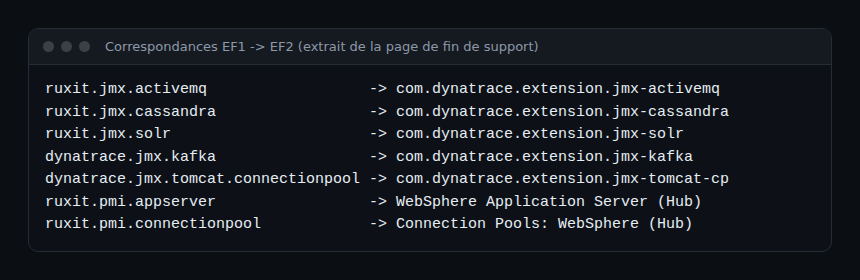
The two PMI entries (ruxit.pmi.appserver and ruxit.pmi.connectionpool) link to Dynatrace Hub pages, with no extension ID in the table. The official procedure:
- Find the EF2 equivalent in the table.
- Deploy the EF2 extension (see “Manage Extensions” in the documentation).
- In Settings Classic > Monitored technologies > Supported technologies, turn off the Monitor the environment toggle on the JMX monitoring entry.
Turn the old mechanism off only after you confirm the new one reports data. Otherwise you open a monitoring gap.
Step 3: migrate JMX extensions you wrote with VS Code
For your own extension, the end-of-support page points to the guide “Migrating JMX 1.0 extensions to the new format”, which relies on the Dynatrace Extensions add-on for VS Code. The guide’s prerequisites: the add-on set up with your developer credentials, and the OneAgent feature Java Metric Extensions (JMX) enabled in Settings > Preferences > OneAgent features, followed by a restart of the monitored Java processes.
Option A: new project
- Create an empty folder and open it in VS Code.
- F1, then Dynatrace extensions: Initialize workspace; schema version 1.275.0; certificates Use existing; project type JMX 1.0 Conversion.
- Load the extension Remotely (or from a
.ziporplugin.jsonfile), pick it from the tenant list, then a technology matching your Java process (or All other).
The manifest is generated in extension/extension.yaml.
Option B: standalone conversion
F1, then Dynatrace Extensions: Convert JMX, same questions, same output file.
Deploy and activate
- F1, Dynatrace extensions: Build, then answer Yes to upload and Yes to activate.
- In Dynatrace, open the extension, add a monitoring configuration, select a host running the Java process, then activate.
A limit to know, per the guide: process-page cards are created only if you chose a technology; All other does not configure them. Finally, delete the old EF1 plugin: under Custom extensions (deprecated), or through the API with DELETE /api/config/v1/plugins/{id}/binary.
What a JMX 2.0 extension looks like
The documentation’s minimal example shows the structure: metadata, optional metric metadata, then a jmx section organised in groups and subgroups that query MBeans.
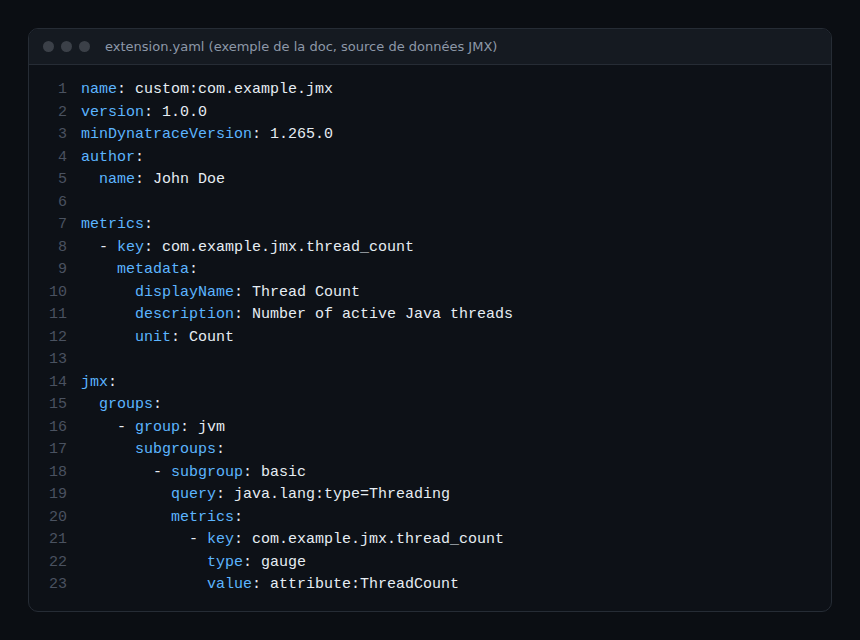
According to the same page, the extension requires the OneAgent feature Java Metric Extensions (JMX), plus Dynatrace and OneAgent version 1.265 or later. Only numeric MBean attributes produce metrics directly; a numeric value inside a complex attribute must be extracted.
How to check that it works
- Open the host page for the Java process: the guide mentions a JMX Metrics card near the bottom.
- Select a process, then
...and Metrics and logs analysis. - Compare the metrics with those of the old extension before the cut-off. Community reports say some PMI metrics may be missing from the replacement: look for yours in the table and the Hub page.
Best practices
Here is a checklist of my own, not an official procedure.
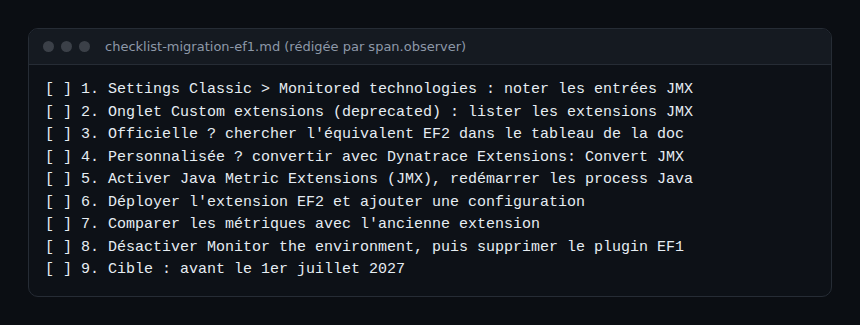
- Plan the migration well before 1 July 2027, starting with the official extensions, which are simpler.
- Keep
extension.yamlfiles in Git; see also Dynatrace extensions for a database for the lifecycle of a 2.0 extension. - Check the version of OneAgent deployed on SaaS before enabling the JMX feature.
- For Java telemetry outside extensions, compare with the OpenTelemetry Java agent.
- Place the migration in the Dynatrace SaaS learning path and, if you come from Managed, reread the Managed to SaaS migration.
Frequently asked questions
When does support for EF1 JMX extensions end?
The official end-of-support page sets 1 July 2027 for SaaS environments. No date is published for Managed in the sources read on 29 October 2026.
How do I know whether my environment is affected?
In Settings Classic > Monitored technologies, look for JMX monitoring (Supported technologies) and JMX (Custom extensions). One extension enabled or bound to process groups is enough.
Must I rewrite my custom JMX extensions by hand?
The documentation offers a conversion from VS Code (Dynatrace Extensions: Convert JMX) that generates extension/extension.yaml. Review the result and compare metrics before deleting the old plugin.
Conclusion
The deprecation is confirmed and the end-of-support date is published: 1 July 2027 for SaaS. Take inventory, replace or convert, verify, then delete the EF1 plugin. Sources: release notes, sprint 347, EF1 JMX and PMI end of support and JMX data source, read on 29 October 2026.
span.observer is an independent community blog, not affiliated with Dynatrace LLC. Dynatrace is a trademark of Dynatrace LLC. Dates, versions and procedures change: check them in the official documentation for your environment.