HarnessRouter unified interface for AI agents: the HarnessRouter/harnessrouter repository offers a self-hosted layer that drives several agent harnesses (Codex, Claude Code, Hermes and about thirty others) behind one API. It has about 3,700 stars and 395 forks at the end of October 2026, under the Apache 2.0 licence. It is a young repository: the releases page lists around ten 0.36 and 0.37 versions published between 23 and 27 October 2026, including v0.37.6 on 27 October.
For an SRE the appeal is simple: one entry point to start, follow and cancel agent tasks, instead of one integration per tool. The next question follows at once: what can you observe from that entry point? This article follows the README, the self-hosting guide and the LICENSE file, read on 27 October 2026.
A note on honesty: span.observer has not installed HarnessRouter. The commands come from the README, and the three screenshots below are images published in the repository’s docs/images folder, under its Apache 2.0 licence.
HarnessRouter unified interface for AI agents: what the repository says
- Role: the README calls it “the unified interface for agent harnesses”. A harness here is a command-line agent such as Codex or Claude Code. HarnessRouter exposes them through an API compatible with the OpenAI Responses API, with persistent sessions, progress streaming, files, cancellation and structured failures.
- Protocol: it implements the Unified Harness Protocol (UHP). The repository holds the reference implementation, the schemas and a conformance suite.
- Licence: Apache 2.0 (LICENSE file read, with a NOTICE file for dependencies). The agent CLIs installed on first launch keep their own licences: the guide cites Anthropic’s terms for Claude Code, for example, and asks you to check Hermes’s licence.
- Figures: about 3,700 stars, 395 forks and 789 commits on the main branch, read on the repository page. The page shows no language breakdown, so we quote none.
- Scope: about 30 agent bases are listed (Codex, Claude Code, Hermes, Pi, OpenCode, Gemini CLI, Cline, goose, Aider, OpenHands and more). A support matrix shows which run with which provider.
A tour of the interface
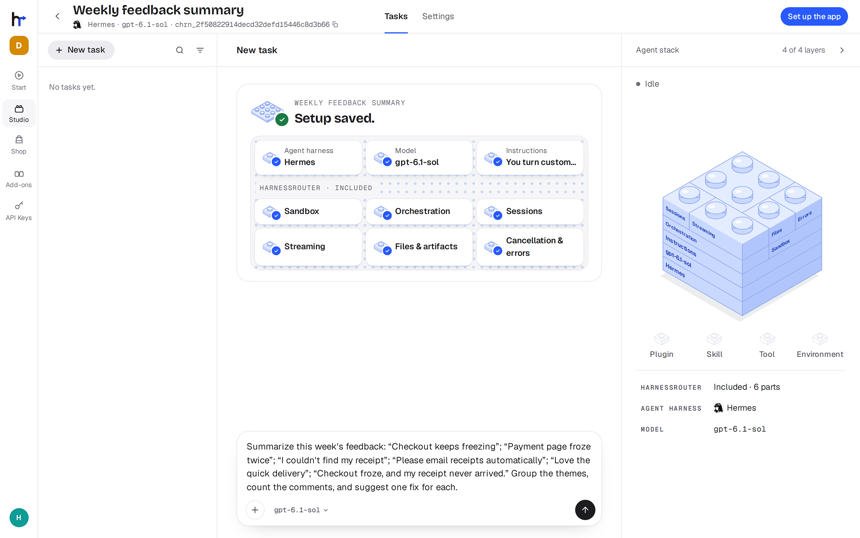
The web console listens on port 3000. The README describes three steps: connect a model provider key (“Bring your own key”), describe in one sentence what the agent should do, then send a first task.
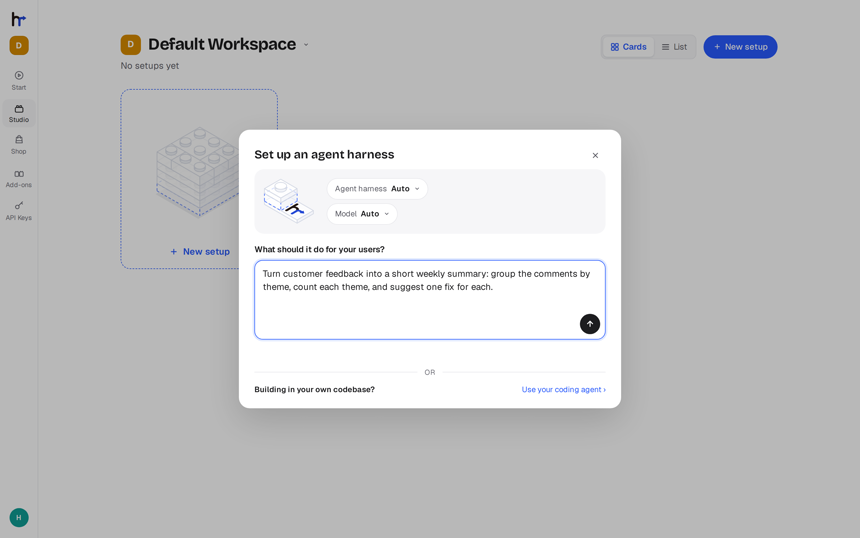
According to the README, HarnessRouter then writes the agent’s instructions, picks the harness, model, skills and tools, and leaves an example request. The harness is fixed once the setup is saved: to change it, you create another setup.
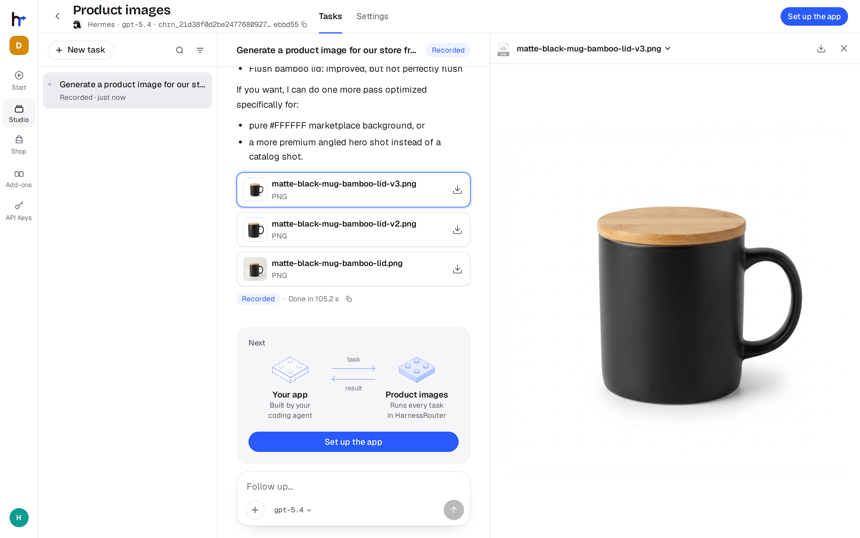
The README also offers three examples whose request replays a recorded run, so you see a finished task without spending tokens. The next screenshot shows one: a produced file, the “Recorded” badge and a duration of 105.2 seconds.
Step-by-step installation
Prerequisites according to the README: Docker, about 4 GB of disk and an API key from a model provider. No HarnessRouter account is needed, and no model or trial key is bundled. The README gives no per-system procedure: everything goes through Docker.
Step 1 — Start the container
docker run -d --name harnessrouter \
  -p 127.0.0.1:3000:3000 \
  -v harnessrouter:/data \
  harnessrouter/harnessrouter
The named volume keeps the database, files, installed agent CLIs and workspaces. Do not add --user: the entrypoint needs root to manage one user per session. Keep the binding on 127.0.0.1 until the initial password is changed.
Step 2 — Wait for the first launch to finish
docker logs -f harnessrouterThe first launch installs the agent CLIs. Continue when the log shows [harnessrouter] ready on :3000. The backends available: line lists what actually installed.
Step 3 — Open the console and change the password
Open http://localhost:3000. The README’s initial credentials are harnessrouter for both user name and password. Change them in Profile before exposing anything; the log repeats a warning while the default password is in place.
Step 4 — Call the API from your product
Create a key under API Keys and keep it server-side in HARNESSROUTER_API_KEY. The harness is chosen with metadata.harness_id:
export HARNESSROUTER_BASE_URL=http://localhost:3000/api/harness

curl --fail-with-body -sS "$HARNESSROUTER_BASE_URL/v1/responses" \
  -H "Authorization: Bearer ${HARNESSROUTER_API_KEY:?}" \
  -H 'content-type: application/json' \
  -d '{
    "input":"Reply with exactly: it works.",
    "metadata":{"harness_id":"codex"},
    "model":"gpt-5.4-mini",
    "stream":false
  }'
Switching agent means changing harness_id (and the model). That is the routing: the same call, another harness. The task and its transcript appear in the console. To retry a request without running it twice, send the same Idempotency-Key header; a key reused with a different body returns a 409 error.
Observing HarnessRouter: logs, tokens and traces
Here is what the repository documentation describes, and nothing more.
- Container logs:
docker logs -f harnessroutershows harness installation, theready on :3000line, the available harnesses and failed installs. The guide says the log names the install that failed. - Tokens per task: the API response contains a
usageobject withinput_tokens,output_tokensandtotal_tokens; the guide also showsreasoning_tokens, the provider’s own count, absent when the provider gives none. These are the fields to collect on the caller side to track cost. - W3C trace context: if the request carries
traceparentandtracestateheaders, the task’s model calls get a child of that trace: same trace id, new span id, sampled flag kept. An invalid value is dropped without failing the task. Thebaggageheader is never read. - Execution history:
GET /v1/sessions/{session_id}/turnsreturns the turns;GET /v1/traces/{session_id}/allreturns the harness’s stored event stream as newline-delimited JSON, one event per line. - Product data: the Community Edition disables the console analytics.
Two limits to know. First, the guide says provider-call spans (the model requests behind a turn) belong to the hosted service’s observability, not to this edition. Second, in the README and guide we read, we found no OTLP export and no Prometheus metrics: you correlate traces on the caller side by injecting traceparent, and you collect usage yourself. For that collection, see the cost of an AI agent in tokens with OpenTelemetry and observing MCP agents with OpenTelemetry.
Limits and open points
- Anchor to flag: a very recent repository, with versions published almost daily. The README’s claims (“the world’s first unified interface”, 99.8% lower cost and 3.2 times faster across eight configurations) are the project’s own statements. The methodology is on harnessrouter.ai/benchmarks, which we did not verify; the README states that the cheapest and fastest vary by task.
- No cost cap: the guide says nothing caps a turn by its cost; a harness carrying
max_cost_usdis refused. A turn is bounded bymax_stepandtimeout_seconds; set spend limits with your provider. - Security: default password, a container that needs root, sessions separated by system user rather than by container. The README warns that a secret an agent can read can be sent elsewhere if a prompt tells it to: hand it short-lived, least-privilege tokens.
- Community Edition: billing, multiple users and several replicas belong to the paid hosted service. The starter kits (Slides, Sheets, Dashboards, Videos, My Workplace) have different terms from the Community Edition.
- Upstream licences: each agent CLI keeps its licence; Apache 2.0 does not replace them.
To place the project, see OpenClaw (one agent and its channels), Paperclip (fleet orchestration), Orca (steering code agents), Ruflo (swarms), ECC (harness optimisation) and wshobson/agents (a plugin marketplace). In the series, OpenBot covers the same need on the desktop. HarnessRouter sits on the server side, as an API gateway.
Good practice
- Keep
127.0.0.1and change the password before publishing the port; put the rest behind TLS, as the guide describes. - Limit installed harnesses with
HR_BACKENDS: a harness that did not install fails on its first task. - Send
traceparenton every call to find the task in your traces. - Record
usagefor every response and set spend caps with the provider. - Use an
Idempotency-Keyfor any retry. - Give agents short-lived, least-privilege tokens.
Frequently asked questions
Is HarnessRouter open source?
The Community Edition is under the Apache 2.0 licence, according to the LICENSE file. The starter kits have different terms and the agent CLIs keep their original licences.
Does HarnessRouter export OpenTelemetry traces?
The README describes W3C context propagation (traceparent, tracestate) to the model calls. The guide says provider-call spans are reserved for the hosted service. No OTLP export is documented in the pages we read.
How do I track token cost?
Read the usage object in each response. This edition has no cost cap: set it with your model provider.
Conclusion
HarnessRouter gives one entry point for several code agents, with routing by harness_id and an API that already feels familiar. Observability remains to be built around it: container logs, usage and trace context injected by the caller. Try it locally first, without exposing the port. Sources: HarnessRouter/harnessrouter repository and its self-hosting guide.
span.observer is an independent community blog, not affiliated with Dynatrace LLC or the projects mentioned. Trademarks belong to their owners. Tools change quickly: check commands and options in their official documentation.